
Advanced Custom Fields PRO 6.8.9 is now available.
This release changes the default block version for ACF Blocks. Starting in 6.8.9, any ACF Block that does not explicitly declare its version will now be registered as a V3 block on WordPress 7.1 and later. This post explains why, what it means for your sites, and what to do if you need more time to migrate.
What WordPress 7.1 Changed
WordPress 7.1 introduced a significant change to the block editor: the editing canvas is now rendered inside an iframe by default, for both block themes and classic themes. The goal is to make the editor preview match what your visitors see on the front end as closely as possible.
The iframe works by isolating the editing canvas from the WordPress admin. Only your theme’s scripts and styles are loaded inside it. Nothing from wp-admin crosses that boundary.
That is where ACF Blocks V2, especially using ‘edit’ mode, runs into trouble.
Why V2 Breaks in the Iframed Editor
V2 blocks rely on JavaScript and CSS loaded in wp-admin to power the block editing interface, including core WordPress libraries like the WYSIWYG editor and jQuery UI date pickers that WordPress itself has stopped loading inside the iframe. Previously, inserting a V2 block into the editor would automatically remove the iframe. In WordPress 7.1, that is no longer the case. The iframe stays, and the libraries needed to run V2 editing are no longer available inside the canvas. The result: fields are forced into preview mode, and editing can only happen through the narrow right-hand sidebar. For blocks with Repeaters, Flexible Content, or more than a handful of fields, that is a frustrating experience.
To be transparent, edit mode as V2 implemented it was always something of an antipattern in the block editor. The canvas is designed to preview your block as it looks on the front end. Injecting wp-admin scripts into that preview area to power a full editing interface was always at odds with the direction WordPress core was heading. WordPress 7.1 is the point where that tension became unavoidable.
This is not a decision ACF made. It is a WordPress core change, and one that aligns with a long-standing direction in how the block editor is designed to work.
Who This Affects
Your blocks have no explicit version set. Starting in 6.8.9, these blocks will automatically run as V3 on WordPress 7.1 and later. No code changes required, but you will notice the editing experience change.
Your blocks explicitly set acf.blockVersion or acf_block_version to 1 or 2. This release does not change those blocks. They will continue to run on V2, but will be affected by the WordPress 7.1 iframe issue. We recommend migrating to V3.
You need more time to migrate. Install the compatibility plugin to restore V2 behavior while you plan your migration, or use the acf/blocks/default_block_version filter to keep the previous default globally. Both are temporary solutions.
Why People Loved V2 Edit Mode
V2’s edit mode gave content editors something the block editor does not naturally provide: a traditional data entry experience. Some blocks used the pencil icon to toggle between a field form and a preview. Many went further and locked blocks into edit mode permanently, disabling the preview entirely so editors always saw their ACF fields and nothing else.
For teams migrating from the classic editor, or for agencies building content-heavy blocks with lots of structured fields, this was a deliberate design choice. Content editors did not need to think about what the block looked like on the front end. They just saw a form, filled it in, and moved on. Familiar, fast, and predictable.
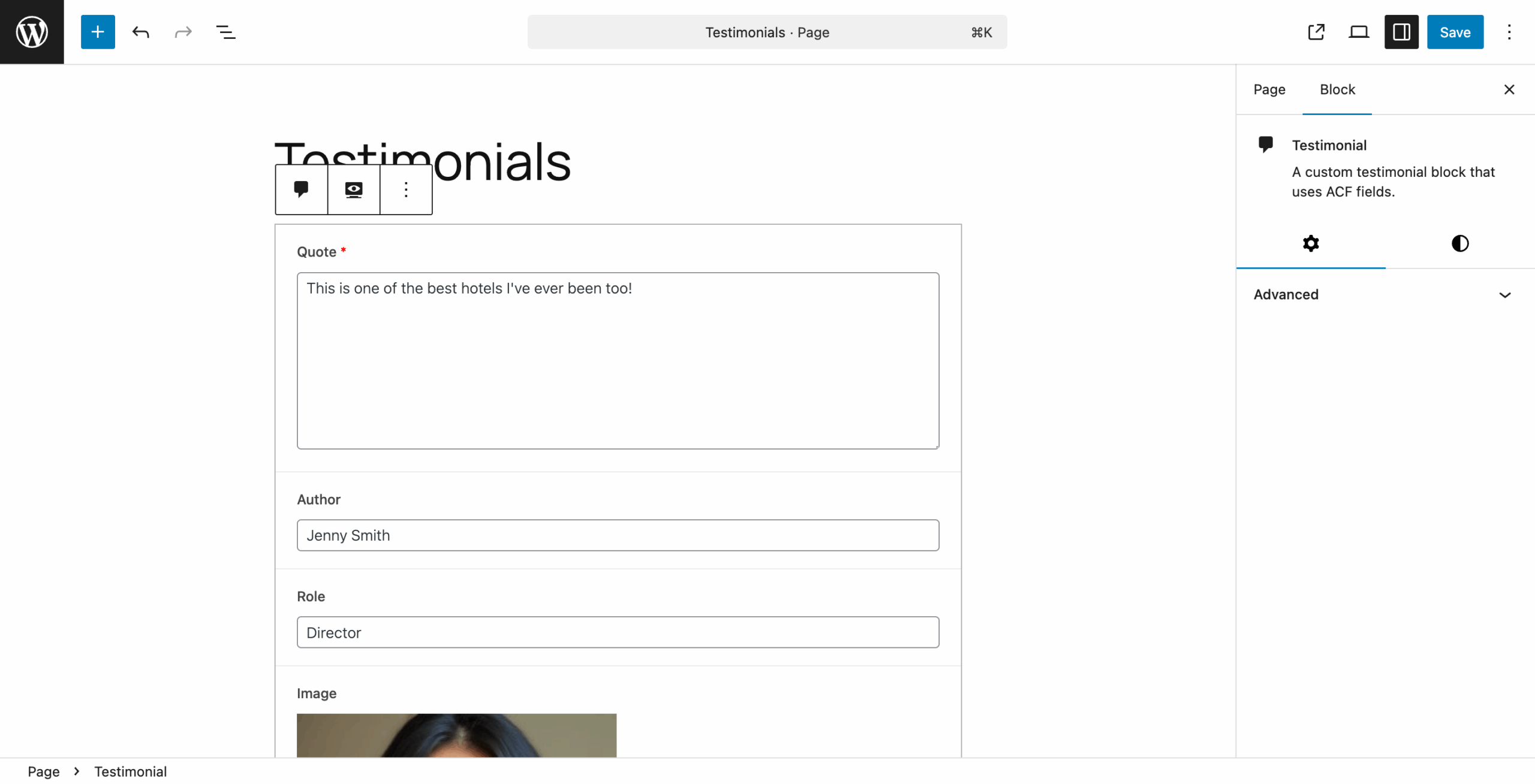
That experience is genuinely good for certain workflows. We understand why people built on it.
The problem is that it was only ever possible by injecting wp-admin scripts directly into the block canvas, which put it in direct conflict with where WordPress core was heading. WordPress 7.1 is where that finally caught up.
How V3 Approaches Editing
By default, V3 blocks show a preview in the canvas. Clicking the pencil icon opens the expanded editor: a larger panel alongside the block preview, giving you a proper editing surface for complex field groups, Repeaters, and Flexible Content. It is significantly more space than the narrow sidebar that V2 blocks are reduced to in WordPress 7.1.
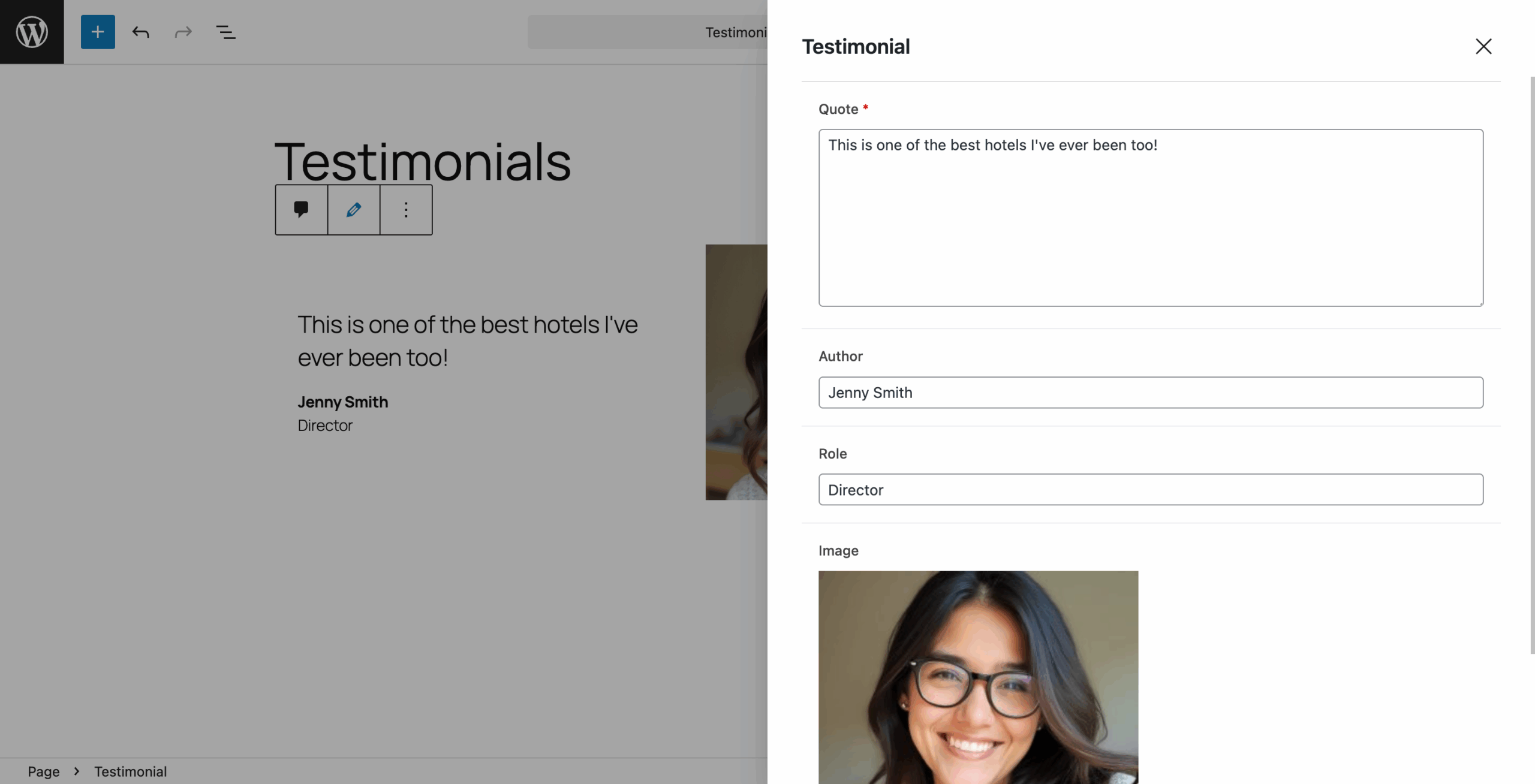
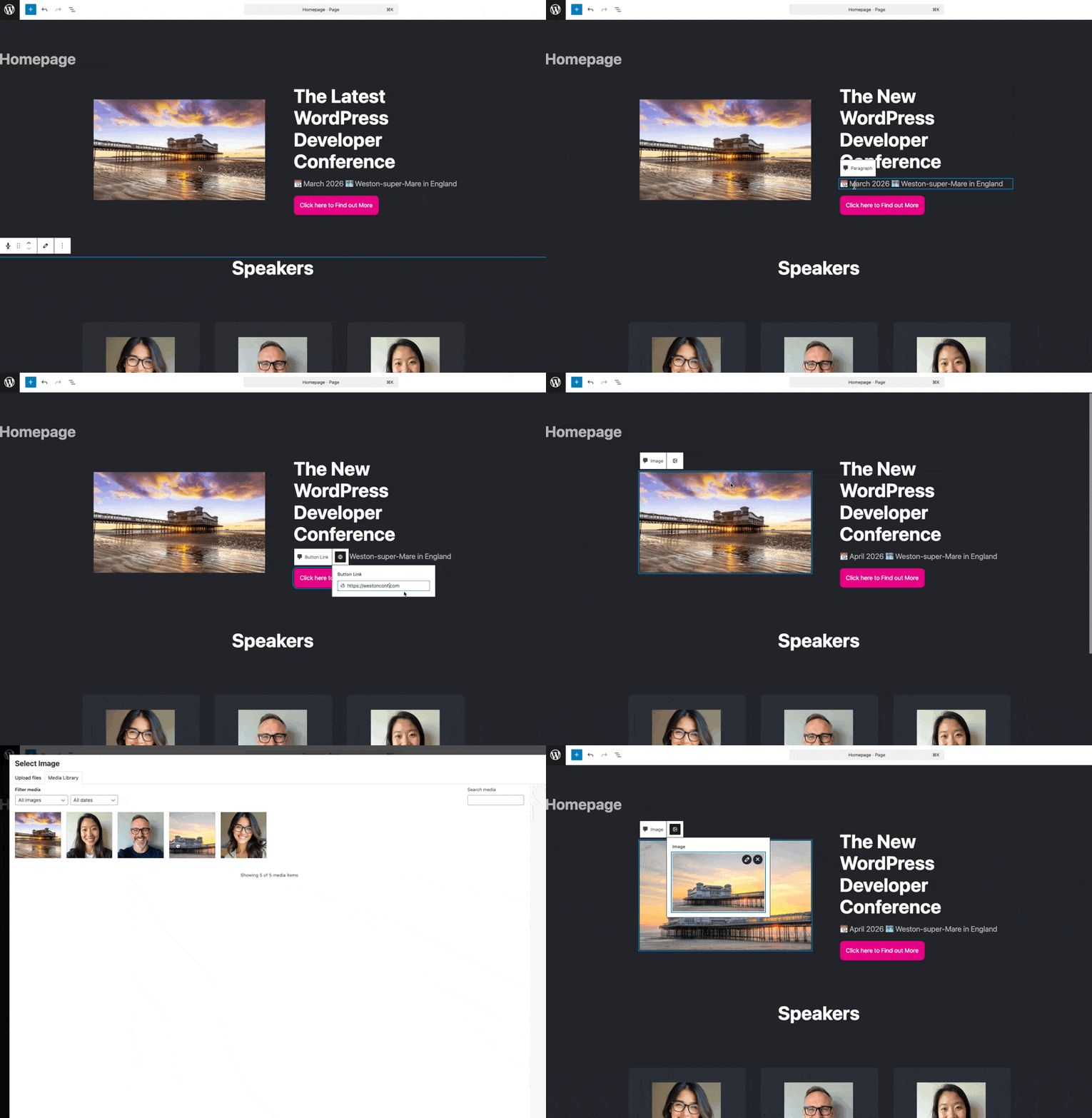
Optionally, you can also enable inline editing, which lets editors click directly on text fields inside the block preview and type in place, without opening the expanded editor. This is an intuitive and arguably better experience of editing field data inside the block editor.
No-Preview Mode for V3 Blocks
One of the most common V2 patterns was locking blocks into edit mode permanently by setting mode: 'edit' and supports: { mode: false }. In V3, those settings were previously ignored, meaning blocks would always show a preview — which could be broken or overwhelming for complex blocks.
6.8.9 fixes this in two ways.
First, V3 blocks that have the legacy V2 settings will now automatically skip the render template and show a clean placeholder instead: the block icon, title, and an edit button to open the expanded editor.
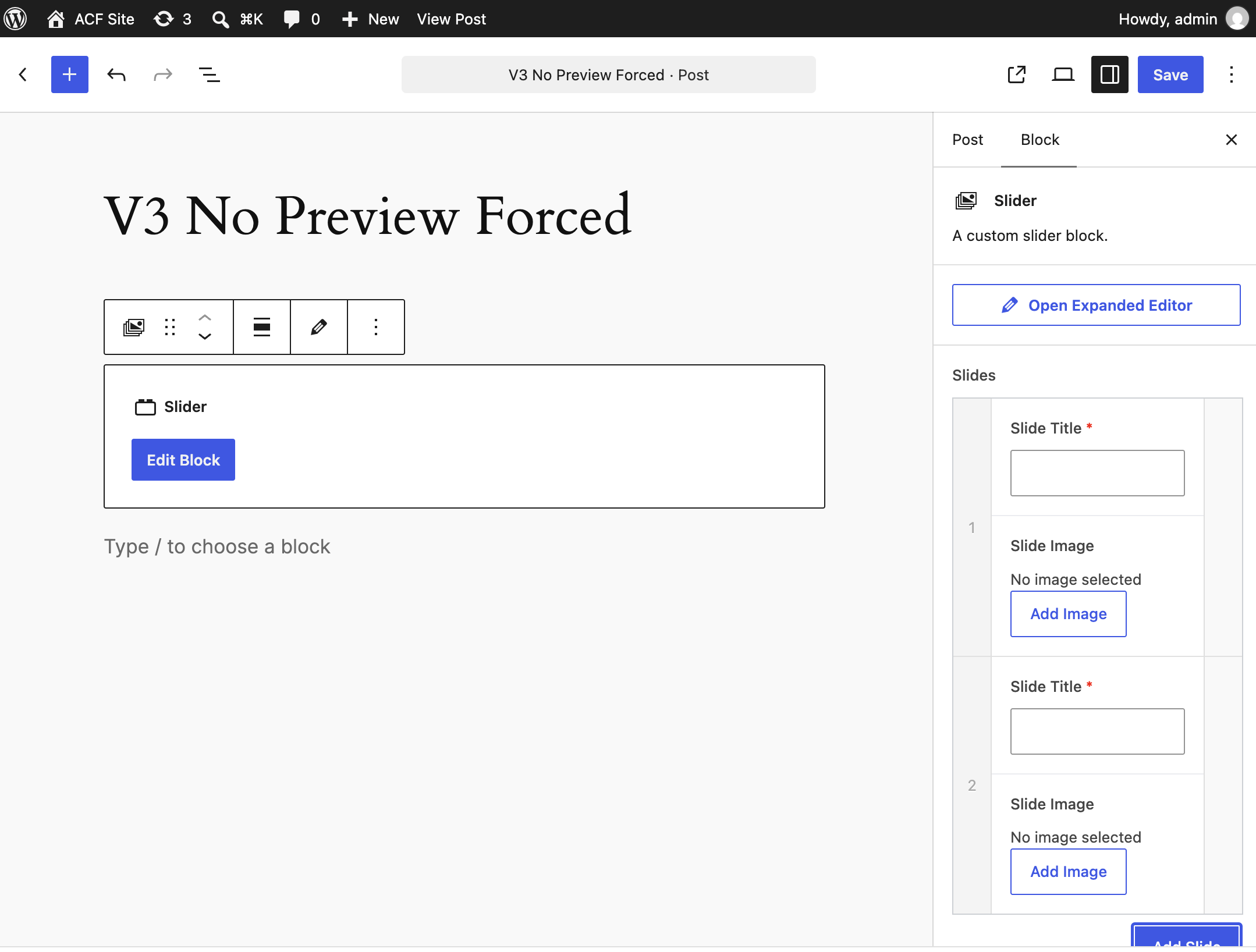
Second, for new V3-native blocks, you can now explicitly disable preview rendering with a single property in block.json:
{
  "acf": {
    "renderPreview": false
  }
}
This gives developers a supported, forward-compatible way to build blocks that go straight to the expanded editor rather than showing a preview. No workarounds required.
For many editors, once they get used to it, the expanded editor is actually more comfortable than V2’s inline fields, especially for complex blocks. But the transition is not just a code change. For agencies and freelancers who have built hundreds of sites and trained hundreds of clients on the V2 editing experience, this is a real and significant disruption. Existing clients need to be re-trained. Documentation needs updating. Support requests will come in.
We are not treating that as a small ask.
Why We Recommend V3
V3 is the only editing experience that works correctly in WordPress 7.1 and will continue to work as WordPress core evolves. V2 edit mode is not recoverable in the iframed editor without workarounds that will eventually stop working.
That said, we know V3 is a meaningful shift for content editors. Workflows change. Training is required. That is not nothing, and we are not dismissing it.
We Hear You: Here is a Workaround
We have published an official compatibility plugin to give teams more time to migrate:
acf-blocks-v2-iframe-compatibility
This plugin restores V2 editing behavior on WordPress 7.1. A few important caveats:
- It is a temporary bridge, not a long-term solution
- Some things may not work perfectly. This is not a fully supported path
- As WordPress core continues to evolve the iframed editor, this approach may stop working in a future release
We are publishing it because we want to give you a way to keep running while we listen to your feedback. Not because we think staying on V2 is a sustainable answer.
Download the plugin zip here.
Tell Us What You Need
If V2 edit mode is critical to how you or your clients work, we want to understand why. What does your content editing workflow look like? What would need to change in V3 to make migration realistic for your team?
Book a call with me. I am setting aside time specifically to talk through these workflows. Your feedback will directly shape how we prioritize V3 improvements.
You can also reach out through our support channels or open a discussion on GitHub.
How to Migrate to V3
If you are ready to migrate, see the full V3 migration guide.
For sites with many blocks, the fastest path is a single filter added to your theme or plugin:
add_filter( 'acf/blocks/default_block_version', function() {
    return 3;
});
Blocks that have acf.blockVersion explicitly set in block.json are not affected by this filter and will need to be updated individually.
ACF PRO 6.6 or later is required for V3 blocks. Inline editing for V3 requires ACF PRO 6.7 or later.
👨💻 Please find the release notes below. And for the latest ACF news, follow us on X @wp_acf.
Changelog
- Enhancement – ACF Blocks registered via
acf_register_block_type()orblock.jsonwithout an explicit version now default to v3 on WordPress 7.1 or later. Blocks that specify a version continue to use the version they declare, and the default can be customized via theacf/blocks/default_block_versionfilter - Enhancement – ACF Blocks v3 now supports a
renderPreviewoption inblock.json. Setting"renderPreview": falseshows a placeholder with the block’s icon, title, and an “Edit Block” button in the editor instead of rendering the block’s template as a live preview. The block continues to render normally on the front-end, and legacy v2 blocks combining"mode": "edit"with"supports": { "mode": false }are automatically migrated when upgraded to v3 - Fix – Inline editable fields in ACF Blocks V3 no longer require a second click before they can be edited
- Fix – Radio buttons now appear correctly in ACF admin screens
- Fix – Image and Gallery fields no longer reject SVG uploads when the Safe SVG plugin is active


For plugin support, please contact our support team directly, as comments aren't actively monitored.