
We’re excited to announce the release of ACF PRO 6.8 Beta 2.
🚀 ACF PRO v6.8.0-beta2 is now available with both Automatic Structured Data with Schema.org and Abilities API support.
ACF PRO 6.8 Beta 2 introduces a powerful new feature that brings automatic structured data (JSON-LD) generation to your WordPress site. This release adds the ability to automatically output Schema.org-compliant structured data which helps your content get discovered by search engines, AI Overviews, and the growing ecosystem of AI-powered tools.
🚨 This is an early build of a feature marked ‘Experimental’ where features and implementation may change.
What is Structured Data?
Structured data helps machines understand your content. Whether it’s Google displaying rich results, Bing powering Copilot responses, or AI systems like ChatGPT and Perplexity retrieving information from your site—structured data provides the machine-readable context they need.
Using Schema.org vocabulary (the standard supported by Google, Microsoft, and others), you can explicitly tell these systems: “This is a Recipe with a 30-minute cook time” or “This is a Product priced at $49.” Without structured data, AI systems have to guess what your content means. With it, they know.
Until now, adding structured data to WordPress sites required custom code, third-party plugins, or manual JSON-LD snippets. With ACF PRO 6.8 Beta 2, your custom fields can automatically generate Schema.org-compliant structured data with zero code required.
Why This Matters
Discoverability in the AI Era
The way people find content is changing. Google AI Overviews, Claude, Copilot, ChatGPT, Perplexity—these AI systems are becoming the front door to the web. Structured data helps your content get retrieved, understood, and cited by these systems. It’s not just about ranking anymore; it’s about being the source AI pulls from.
This feature is your direct tool for building more successful client sites. By automatically priming your clients’ content for AI, you are future-proofing their business’s discoverability and securing their presence in critical, high-visibility search features like AI Overviews and Rich Results. This directly translates to more authoritative traffic and a higher return on their content investment.
Rich Results in Search
Search engines use structured data to display enhanced results—recipe cards with cook times and ratings, product listings with prices and availability, event calendars with dates and venues. These rich results drive higher click-through rates and visibility.
No Code Required
Map fields to Schema.org properties directly in the ACF UI. No need to write custom JSON-LD templates or install additional SEO plugins.
Automatic Formatting
ACF handles value formatting automatically. Dates are converted to ISO 8601, images are transformed into Schema.org ImageObjects, and nested structures are built for you.
Future-Proof
The system uses the complete Schema.org vocabulary (867 types, 1,509 properties). As AI systems evolve, having clean, standardized structured data ensures your content remains machine-readable and discoverable.
How It Works
1. Enabling the Schema Feature
Once you’ve installed the beta, you will need to opt-in to the new Schema feature by adding the following filter to your theme’s functions.php or a custom plugin:
add_filter( 'acf/settings/enable_schema', '__return_true' );
2. Enable JSON-LD on Your Post Type
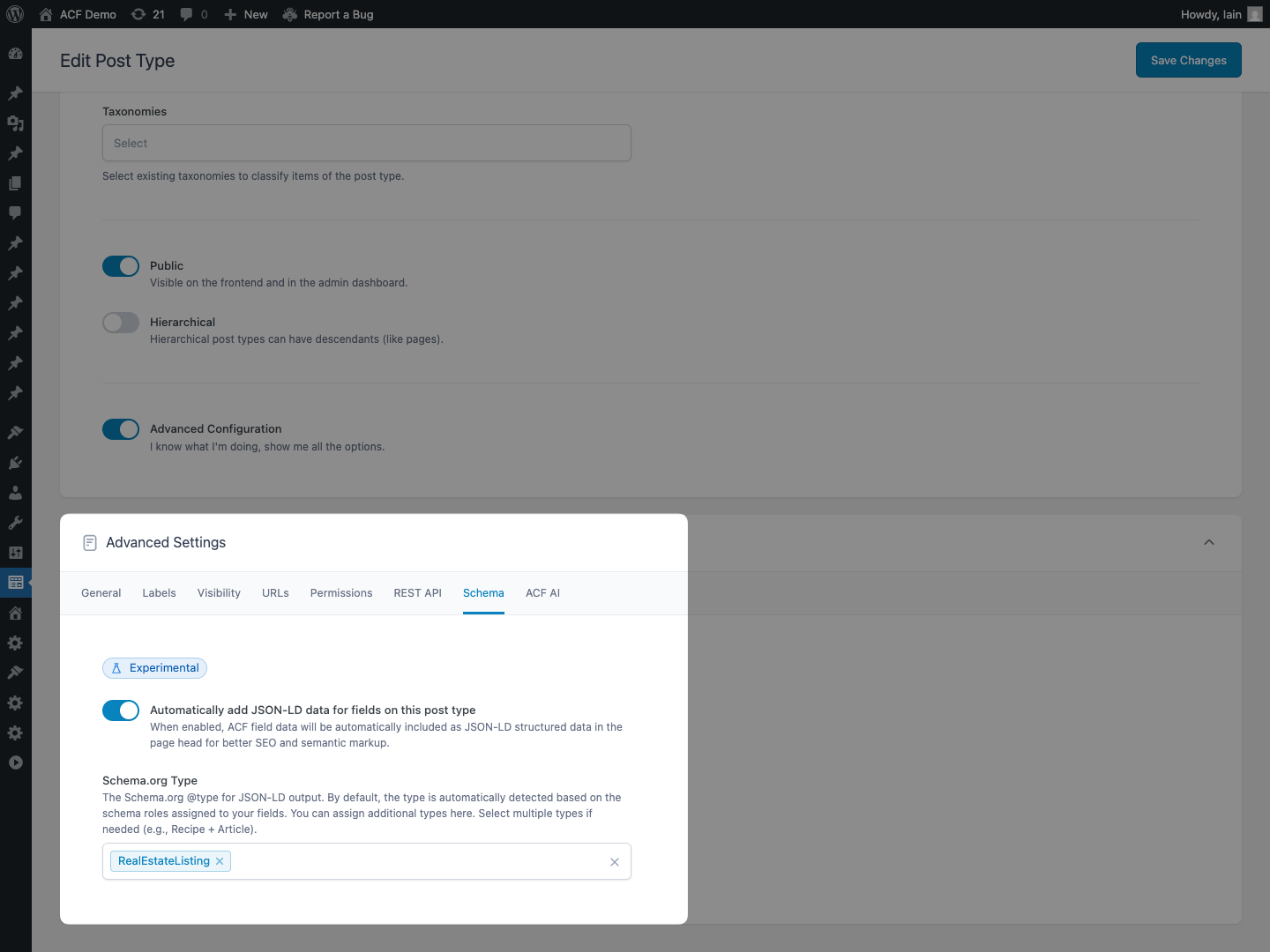
In the Post Type editor, you’ll find a new Schema tab with two new options:
- Enable Auto JSON-LD: Turn on automatic structured data generation for this post type
- Schema Type: Choose the Schema.org type (e.g., Recipe, Product, Event, Article) or let ACF automatically detect it from your field mappings
3. Map Fields to Schema.org Properties
Each ACF field now has a new Schema Property setting in the General tab. This lets you specify which Schema.org property the field represents.
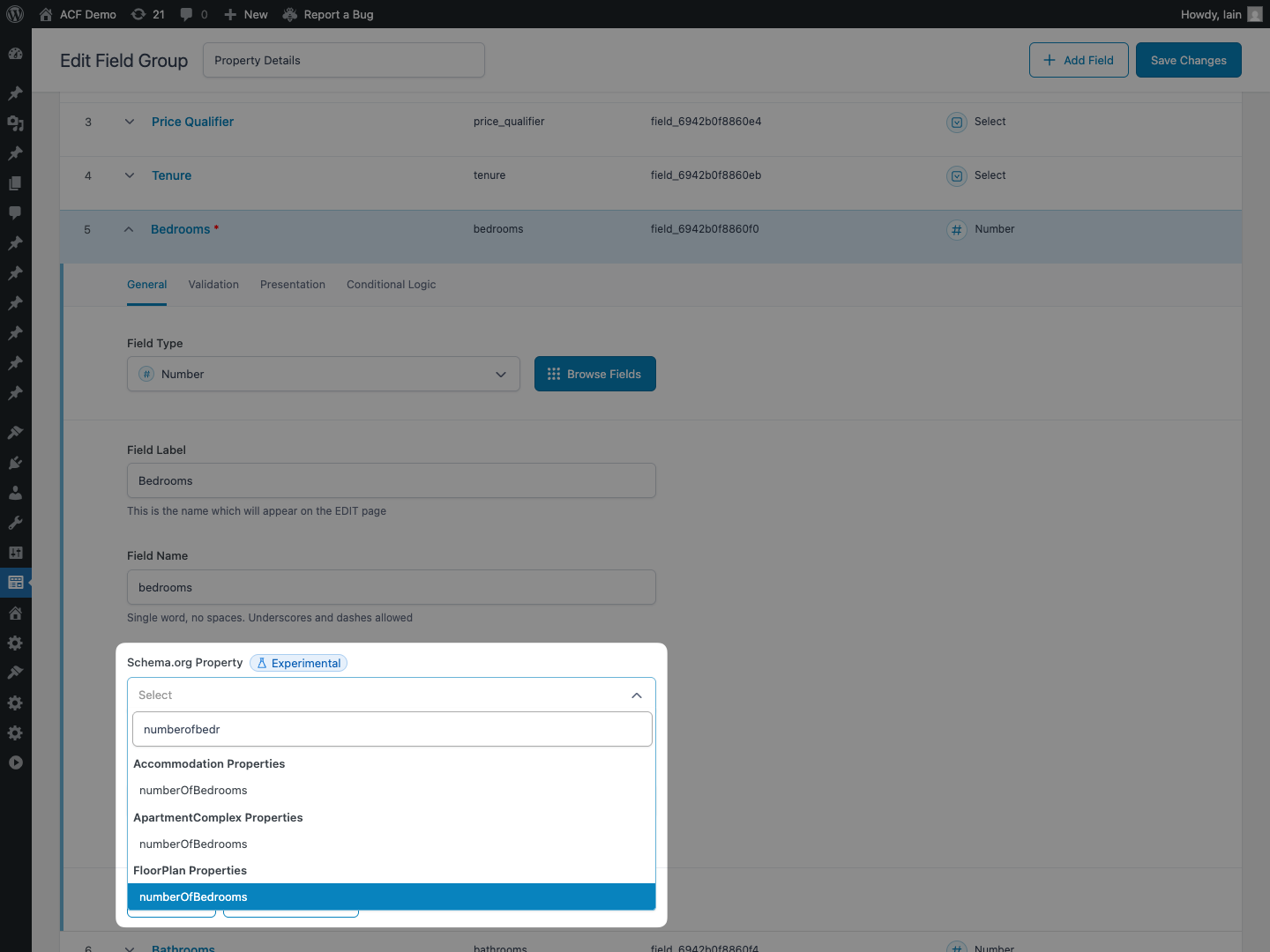
The Schema Property dropdown includes 1,500+ Schema.org properties organized by type, making it easy to find the right mapping for your data.
4. Automatic Type Inference
Don’t know which Schema.org type to use? No problem. When you map fields to properties like prepTime, cookTime, and recipeIngredient, ACF automatically infers that your post type should use the Recipe schema. This intelligent type detection eliminates guesswork and ensures your structured data is always valid.
Automatic Enhancements
ACF Pro 6.8 Beta 2 automatically includes additional structured data to make your JSON-LD more complete:
Author Information
Every post automatically includes the author as a Person schema with their name and author archive URL.
Featured Image
If your post has a featured image, it’s automatically included as an ImageObject with full dimensions.
Core Post Data
Essential metadata like datePublished, dateModified, url, and name are automatically populated from your post data.
Repeater Field Support
Repeater fields work seamlessly with structured data. Each sub-field can have its own Schema Property, allowing you to build complex structures like recipe ingredients or step-by-step instructions.
Example: Recipe Ingredients
Repeater: schema_property = "recipeIngredient"
    └─ Text Sub-field: schema_property = "recipeIngredient"
Output:
{
  "recipeIngredient": [
    "2 cups flour",
    "1 cup sugar",
    "3 eggs"
  ]
}
Example: Recipe Instructions with Images
Repeater: schema_property = "recipeInstructions"
  └─ Text Sub-field "Step": schema_property = "text"
  └─ Image Sub-field: schema_property = "image"
Output:
{
  "recipeInstructions": [
    {
      "text": "Preheat oven to 350°F",
      "image": "https://example.com/step1.jpg"
    },
    {
      "text": "Mix dry ingredients",
      "image": "https://example.com/step2.jpg"
    }
  ]
}
Block Support
ACF Blocks can also output JSON-LD structured data. Enable it via block.json:
{
  "name": "acf/recipe-block",
  "title": "Recipe",
  "acf": {
    "autoJsonLd": true,
    "schemaType": "Recipe"
  }
}
Or programmatically when registering your block:
acf_register_block_type( array(
    'name'        => 'recipe',
    'title'       => 'Recipe',
    'auto_jsonld' => true,
    'schema_type' => 'Recipe',
) );
Fallback for Unmapped Fields
Fields without a Schema Property aren’t ignored, they’re automatically included in the additionalProperty array as PropertyValue objects. This ensures all your custom field data is represented in the structured data output while maintaining Schema.org compliance.
{
  "@type": "Recipe",
  "name": "Chocolate Chip Cookies",
  "prepTime": "PT15M",
  "additionalProperty": [
    {
      "@type": "PropertyValue",
      "name": "Difficulty Level",
      "value": "Easy"
    }
  ]
}
Testing the Beta
As it is a beta release, we do not recommend using this on production sites, but have released it for the broader ACF community who wish to test on development and staging environments so we can gather feedback for the general release.
This is a PRO only release. To access this release, please log in to your account and navigate to the “Licenses” page. You can then select “6.8.0-beta2″ from the available downloads or click on the ‘Install pre-release version’ tab for full instructions.
Learn more about testing pre-release versions of ACF PRO.
Changelog
- New: ACF PRO can now automatically generate JSON-LD structured data from custom fields on Post Types and ACF Blocks
- Enhancement: Debug information about the ACF Abilities API and JSON-LD are now available in the WordPress Site Health


For plugin support, please contact our support team directly, as comments aren't actively monitored.