
Key points
- WordPress search does not index Advanced Custom Fields (ACF) values by default.
- An ACF search filter allows users to search or filter content based on ACF metadata.
- Developers typically solve this using plugins or custom
WP_queryqueries. - The most common plugin solutions are FacetWP, Search & Filter Pro, and ACF: Better Search.
- Each plugin approaches the problem differently: FacetWP focuses on faceted filtering, Search & Filter Pro combines faceted filtering with indexed search, and ACF: Better Search extends the default WordPress search index.
- For simple projects, developers can build lightweight filters using
meta_query. - The right approach depends on dataset size, UI requirements, and development control.
WordPress® makes it easy to store structured data using Advanced Custom Fields (ACF®), but working with that data on the front end often introduces a new challenge.
By default, WordPress search and archive queries don’t account for most custom field values. That means users can’t easily search or filter content based on ACF data.
Adding filters to a WordPress search experience usually means modifying the search query, so it also considers custom field values or selected filter inputs.
When working with Advanced Custom Fields, this typically involves connecting a search interface—such as dropdowns, checkboxes, or form inputs—to a query that filters posts using ACF metadata.
Developers typically solve this by extending the query layer — either by using filtering plugins that integrate with ACF or by building custom queries that target field metadata directly.
Why ACF data isn’t searchable or filterable by default
WordPress search queries only look at a small set of core fields in the wp_posts table, including:
post_titlepost_contentpost_excerpt
Values stored in custom fields are not included in those queries.
Advanced Custom Fields stores field values in the wp_postmeta table, which is separate from the main post content. Because default search and archive queries don’t look at this metadata table, WordPress has no way to match results based on ACF field values.
That means content stored in ACF fields—such as product attributes, event dates, property prices, or location data—cannot be searched or filtered unless you explicitly extend the query.
For example, imagine a custom post type called: courses with ACF fields like difficulty level, duration, instructor, and price.
A visitor searching the site for “beginner course” would not find posts where “beginner” exists only inside the difficulty level field.
Similarly, archive pages cannot automatically filter results using ACF metadata.
Developers solve this by extending the query layer to include custom field data.
This is typically done by creating an ACF search filter, which connects user inputs—such as dropdowns, checkboxes, or search fields—to queries that target the postmeta table, where ACF stores its values.
There are two common approaches:
- Using plugins that automatically generate filtering queries
- Writing custom queries with
WP_Queryandmeta_query
What is an ACF filter?
An ACF filter is a search or filtering interface that lets users narrow results by custom field values created with Advanced Custom Fields.
Instead of filtering only by WordPress taxonomies like categories or tags, visitors can filter content by structured metadata.
Common examples include filtering by price range, event date, location, rating, and availability.
Under the hood, these filters work by modifying the WordPress query to include a meta_query condition.
A simplified workflow looks like this:
- A visitor selects one or more filters.
- Those filter values are passed to the query.
- WordPress queries the
postmetatable for matching field values. - The filtered results are returned.
Developers can implement this with filter plugins or custom queries, depending on how complex the interface needs to be.
Supercharge Your Website With Premium Features Using ACF PRO
Speed up your workflow and unlock features to better develop websites using ACF Blocks and Options Pages, with the Flexible Content, Repeater, Clone, Gallery Fields & More.
Popular plugins for ACF search filters
To build a full filtering system from scratch is always an option, but it involves several moving parts:
- creating filter interfaces
- connecting filters to queries
- querying custom field metadata
- updating results dynamically
- maintaining performance on larger datasets
To save time, developers would go for filtering plugins that handle most of this automatically. They connect user interface controls (checkboxes, dropdowns, search inputs) to queries that filter posts based on ACF field values stored in the postmeta table.
Most ACF filtering workflows rely on one of three plugins: FacetWP, Search & Filter Pro, and ACF: Better Search.
These tools approach the ACF search filter problem differently. Some focus on interactive filtering interfaces, while others improve how WordPress search indexes custom fields.
| Plugin | Best for | Filtering approach | Ajax support | ACF compatibility | Primary strength |
|---|---|---|---|---|---|
| FacetWP | Complex filtering interfaces and large datasets | Faceted navigation | Yes | Strong native support | Extremely fast dynamic filtering |
| Search & Filter Pro | Combining faceted filtering with enhanced keyword search | Faceted filtering, with an optional indexer for search and advanced field types | Yes | Strong native support (Pro only) | Built-in styling options and flexible setup |
| ACF: Better Search | Making ACF data searchable in WordPress search | Search indexing | No filtering UI | Expands search indexing to ACF | Lightweight search improvement |
The key difference is how each plugin interacts with ACF data.
- FacetWP builds faceted filtering systems, where users combine multiple filters and results update instantly via Ajax.
- Search & Filter Pro combines faceted filtering with an indexed search engine, supporting both searching and filtering of ACF data.
- ACF: Better Search improves the WordPress search engine itself, allowing ACF field values to appear in search results.
In practice, developers often combine these approaches. For example, a site might use ACF: Better Search to index custom fields, while using FacetWP to build the front-end filtering interface.
Using FacetWP for advanced ACF filtering
FacetWP is one of the most widely used plugins for building dynamic filtering interfaces in WordPress, especially when filtering needs to be driven by Advanced Custom Fields data.

The plugin implements a filtering pattern known as faceted navigation.
Instead of relying on a single search form, faceted navigation allows users to refine results by combining multiple filters simultaneously. For example, a visitor might filter content by location, price range, rating, and category simultaneously, narrowing the dataset step by step.
This type of interface is particularly effective for content-heavy sites where users need to explore large collections of structured data. Common use cases include items with multiple attributes stored as custom fields, like:
- property listings
- job boards
- product catalogs
- and documentation libraries
FacetWP works well in these scenarios because it can query and filter ACF field values stored in WordPress post metadata, then update the results instantly without reloading the page.
How FacetWP works with ACF
FacetWP organizes filters into components called facets. Each facet represents a filtering control—such as a dropdown, checkbox list, slider, or search field—that pulls its values from a specific data source.
Facet data sources can include WordPress taxonomies, standard post fields, or ACF field values stored in the postmeta table. Once a facet is connected to an ACF field, the plugin automatically adjusts the underlying query whenever a user interacts with the filter.
For example, if a facet is connected to a custom field called difficulty_level, selecting “Beginner” would filter the query to show only posts where that ACF field contains the corresponding value.
From a developer’s perspective, integrating FacetWP into an ACF-driven template usually follows a simple workflow:
- create the necessary ACF fields
- configure a facet in the FacetWP interface
- map the facet to the ACF field
- add the facet to the template
- wrap the query output inside a FacetWP container
Once these pieces are in place, the plugin takes care of building and updating the filtering queries automatically.
Example facet configuration
Facet type: Checkbox
Data source: ACF field → difficulty_level
You can output the facet in a template using the FacetWP shortcode:
echo do_shortcode('[facetwp facet="difficulty_level"]');
The query displaying results must then be wrapped inside a FacetWP template container so the plugin knows which results to update when filters change.
<div class="facetwp-template">

<?php

$query = new WP_Query([

'post_type' => 'course'

]);

while ($query->have_posts()) : $query->the_post();

the_title('<h2>', '</h2>');

endwhile;

?>

</div>
When a user selects a filter option, FacetWP automatically modifies the query, retrieves matching posts, and refreshes the results using Ajax.
Because the page itself doesn’t reload, filtering feels fast and responsive even when working with large datasets.
When FacetWP is the right choice
FacetWP is often the best choice when a project requires highly interactive filtering interfaces built on top of structured ACF data. It performs particularly well when users need to combine multiple filters or explore large collections of content.
The plugin’s strengths include fast Ajax filtering, strong support for ACF fields, and the ability to build complex filtering systems without writing custom query logic.
The main trade-offs are that it is a paid plugin and that configuration can take additional time when working with complex data structures or many filters.
Using Search & Filter Pro for ACF search filters
Search & Filter Pro approaches filtering a little differently. As well as faceted filtering, recent versions include a search indexing system, which means you can combine keyword search – with fuzzy matching and relevance scoring – with faceted filters in a single plugin. (The Enhanced Search engine is currently a beta feature, enabled from the plugin’s settings.)

Search fields and filters are created in a visual admin editor and can be placed using shortcodes, blocks, or PHP templates, then styled to fit your theme using the plugin’s built-in styles system.
The plugin works well for archive filtering, custom search pages, and faceted interfaces. One thing to note: the ACF integration is only available in the Pro version.
How to put filters on search with Search & Filter Pro
Search & Filter Pro creates fields using a visual admin editor and displays them using shortcodes or blocks, with additional display options for page builders.
An example filter setup could be:
- Field type: Choice → Select
- Data type: ACF Field
- ACF group: Courses
- ACF field: Difficulty
Because the integration is native, you’re only shown ACF fields compatible with the field type you’re building – a Range field, for example, will only offer ACF fields that support range queries, like numbers.
Template integration example
Search & Filter Pro separates the filter interface from the results display. This makes it easy to place filters in one part of a template while rendering results elsewhere on the page.
To display a search field or filter, output the shortcode for a field created in the admin editor:
[searchandfilter field=”difficulty”]
Or build the field directly in the block editor using one of the Search & Filter native blocks.
To display the filtered results, use the results shortcode for your query:
[searchandfilter query=”123″ action=”show-results”]
Or connect the query to the native Query Loop block in the block editor.
When Search & Filter Pro is the right choice
Search & Filter Pro is a strong choice when you want faceted filtering and indexed keyword search from a single plugin, without pairing a filtering plugin with a separate search-indexing plugin. Developers can integrate it quickly without restructuring existing templates or building custom filtering logic.
The plugin’s main strengths are quick setup, Ajax filtering, and styling options out of the box – its styles system includes controls for colors, borders, radius, shadows, and spacing, so filters can match your theme without custom CSS.
The main trade-offs are that ACF support requires the Pro version, and with several ways to build and place fields (admin editor, shortcodes, blocks, page builders), there’s some learning curve in choosing the right approach for your setup.
How to use ACF: Better Search to index custom field values
While plugins like FacetWP and Search & Filter Pro focus on building filtering interfaces, ACF: Better Search addresses a different limitation in WordPress: the way the default search system handles custom fields.
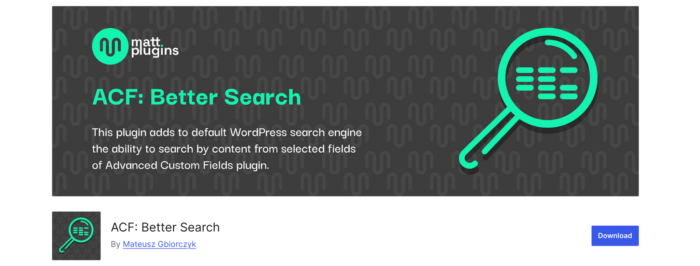
By default, WordPress search queries only look at core content fields such as the post title and post content. Values stored in custom fields—including those created with Advanced Custom Fields—are typically ignored. As a result, users searching the site cannot find posts based on information stored in ACF metadata.
ACF: Better Search solves this problem by expanding the WordPress search index to include custom field values.
Once the plugin is enabled and configured, search queries automatically include ACF field data stored in the postmeta table. This allows visitors to find content based on metadata that would otherwise remain invisible to WordPress search.
Unlike filtering plugins, ACF: Better Search does not create filter interfaces or modify archive queries. Instead, it improves the search engine itself, ensuring that ACF data becomes part of the searchable dataset.
Setting up ACF: Better Search
Configuring the plugin is straightforward and typically requires only a few steps.
First, install and activate ACF: Better Search from the WordPress plugin repository. Once activated, the plugin adds its configuration panel to the WordPress settings area.
You can access the plugin settings by navigating to:
Settings → ACF: Better Search
From this panel, developers can enable indexing for ACF field values and control how those values are included in search queries. The settings also allow you to define which post types should be indexed, helping limit the search scope to relevant content.
After adjusting the configuration, the plugin needs to rebuild its search index. This process scans the selected post types and adds ACF field values to the searchable dataset. Once indexing is complete, WordPress search queries automatically begin including those values.
Example search query
After indexing is enabled, standard WordPress search queries can return posts based on ACF field values without requiring custom query logic.
For example, a typical search query might look like this:
$args = [

'post_type' => 'listing',

's' => get_search_query()

];

$query = new WP_Query($args);
Because ACF: Better Search expands the fields included in the search index, posts containing matching ACF metadata will now appear in the results alongside matches from post titles or content.
When ACF: Better Search is the right choice
ACF: Better Search is a good fit when the primary goal is improving WordPress search behavior rather than building filtering interfaces. The plugin is lightweight, easy to configure, and works with existing search templates without requiring major template changes.
Its main limitation is that it focuses strictly on search indexing. It does not provide filtering controls, Ajax-powered interfaces, or dynamic archive filtering. For that reason, many developers pair it with a filtering plugin such as FacetWP or Search & Filter Pro.
What’s the difference between FacetWP and Search & Filter Pro?
When deciding between FacetWP and Search & Filter Pro, the key consideration is how users will interact with your filters and the complexity of your dataset.
FacetWP excels when you need dynamic, multi-dimensional filtering. If users should be able to combine several criteria at once and see instant results without page reloads, or if you’re working with large datasets, FacetWP is built to handle it. Its interactive interface makes it ideal for discovery-oriented experiences, though setup can take more time.
Search & Filter Pro also offers faceted, Ajax-powered filtering, and pairs it with an indexed keyword search engine. It’s easier and faster to implement, making it a strong choice for archive filtering, custom search pages, or projects that need filtering and keyword search from a single plugin.
Ultimately, the choice comes down to user experience expectations and project priorities:
- Choose FacetWP for highly interactive, multi-filter exploration across large, complex datasets.
- Choose Search & Filter Pro for speed of setup, simplicity, and combining filtering with indexed search.
Building a custom ACF search filter with WP_Query
For simpler projects, you may not need a plugin. A simple project is one where:
- You have only a few fields to filter (e.g., difficulty level or category).
- You don’t need dynamic multi-faceted filtering.
- The dataset is relatively small, so performance isn’t a concern with standard queries.
- You don’t require Ajax-powered updates—page reloads are acceptable.
In these cases, WordPress queries can filter posts using custom field values via meta_query. This approach provides full control over query logic and avoids adding extra plugin dependencies.
Step 1: Create the filter form
<form method="GET">

<select name="difficulty">

<option value="">All Levels</option>

<option value="beginner">Beginner</option>

<option value="intermediate">Intermediate</option>

<option value="advanced">Advanced</option>

</select>

<button type="submit">Filter</button>

</form>
Step 2: Modify the query
$difficulty = $_GET['difficulty'] ?? '';

$args = [

'post_type' => 'course',

'posts_per_page' => 10,

];

if ($difficulty) {

$args['meta_query'] = [

[

'key' => 'difficulty_level',

'value' => $difficulty,

'compare' => '='

]

];

}

$query = new WP_Query($args);
Step 3: Display filtered results
while ($query->have_posts()) : $query->the_post();

the_title('<h2>', '</h2>');

endwhile;
When the form submits, the query filters results based on the selected ACF value.
FAQs about ACF Search Filters
Can I combine search and filtering plugins?
Yes — for example, use ACF: Better Search to index fields and FacetWP for front-end filtering. This gives both keyword search and structured filtering.
Do I always need Ajax for filtering?
No — Ajax is useful for instant updates and large datasets. Simple filters often work fine with standard form submissions.
Will these approaches affect performance?
Performance depends on the approach: FacetWP is optimized for large datasets and dynamic filtering. Search & Filter Pro’s indexer was rebuilt in version 3.2.0 with specialized index tables and caching support, improving performance on large datasets. ACF: Better Search improves search indexing without affecting front-end queries, and custom WP_Query filters are lightweight for small datasets but may require optimization on larger content collections.
Why use ACF search filters at all?
Primarily, to improve user experience on your WordPress site. They make structured content searchable and filterable, improving content discovery and usability on your web pages.



For plugin support, please contact our support team directly, as comments aren't actively monitored.