
Advanced Custom Fields version 6.8.1 is now available.
This release introduces a powerful new opt-in datastore for the block editor that brings full revision and autosave support to ACF fields. This release also includes a security hardening fix for multisite installations, enhanced block bindings with live preview, and the ability to define field groups directly in your block.json files.
New Block Editor Datastore
The headline feature of 6.8.1 is a new wp.data store (acf/fields) that integrates ACF fields directly into Gutenberg’s native save flow. When enabled, your ACF field values are saved through WordPress’s REST API rather than the legacy metabox AJAX request, unlocking several long-requested capabilities:
- Full revision support – ACF field values are now included in post revisions, with complete diff and restore functionality
- Autosave integration – Field values are captured in autosaves alongside your post content
- JavaScript API – Read and write ACF field values programmatically via
wp.data.select('acf/fields')andwp.data.dispatch('acf/fields')
This feature is disabled by default and requires WordPress 6.7 or later. To enable it, add this filter to your theme or plugin:
add_filter( 'acf/settings/enable_datastore', '__return_true' );
The datastore is currently available in ACF PRO while we collect feedback from early adopters. We recommend testing thoroughly in a staging environment before enabling on production sites, as custom JavaScript hooked into ACF’s legacy save events may need to be updated to work with Gutenberg’s REST save flow.
Documentation: Using the ACF Datastore
Block Bindings UI and Live Preview
WordPress 6.7 introduced a new Attributes panel in the block editor that lets you visually connect block attributes to custom fields. ACF fields now appear in this panel, so you can bind a Heading, Paragraph, Image, or Button block to an ACF field directly from the editor interface, no code required.
To use block bindings, you need to:
- Enable the datastore (see above)
- Enable “Allow Access to Value in Editor UI” for each field you want to use in bindings (found in the Presentation tab of the field settings)
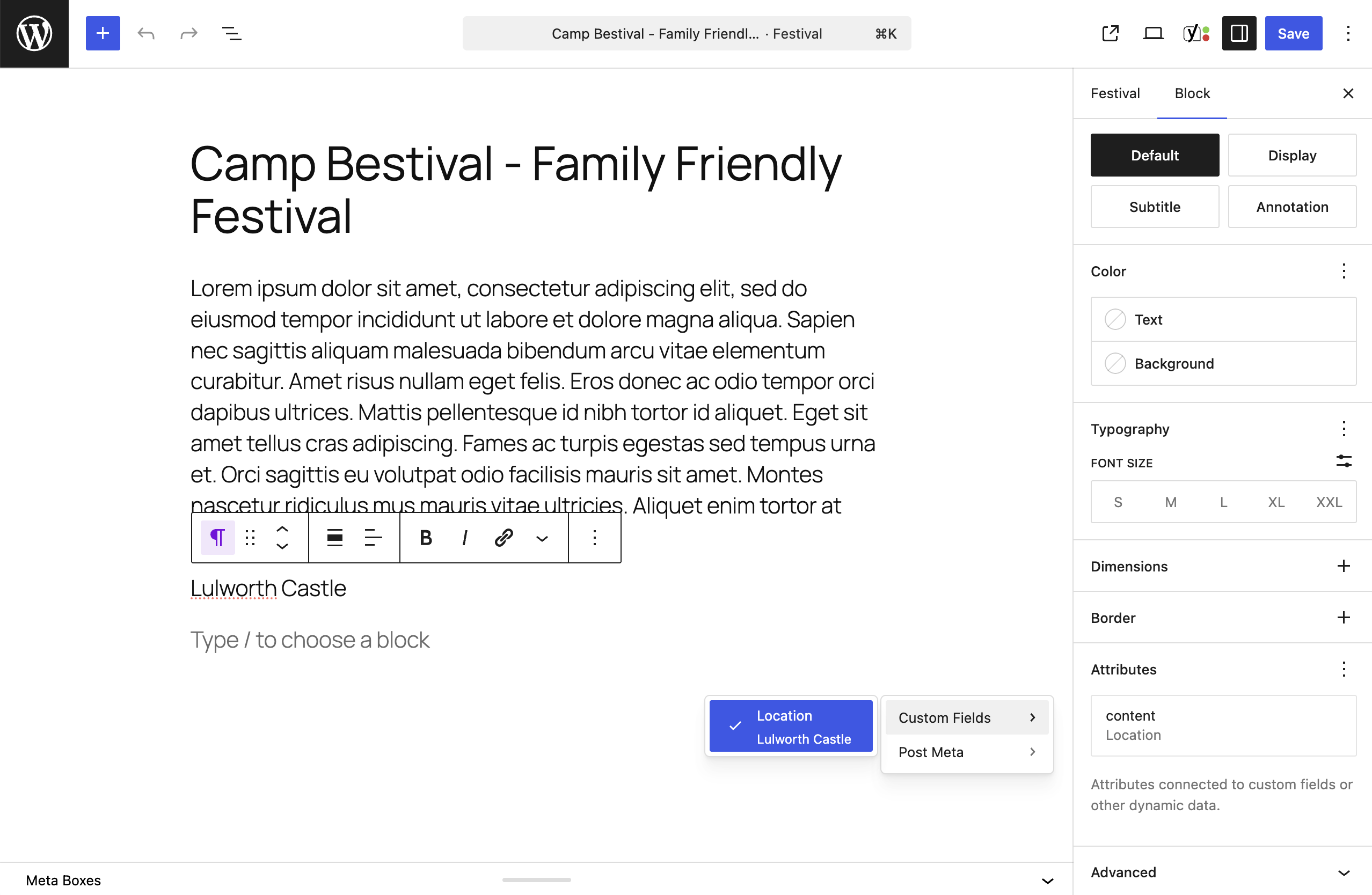
Once enabled, block attributes bound to ACF fields will:
- Update in real-time as you edit the connected ACF field
- Allow direct editing of the bound content within the block itself
- Sync changes back to the underlying ACF field automatically
This creates a seamless editing experience where bound blocks behave like native Gutenberg content while remaining powered by your ACF field values.
Define Field Groups in block.json
You can now declare ACF field groups directly within your block’s block.json file, keeping your block’s fields co-located with its configuration:
{
  "name": "acme/testimonial",
  "title": "Testimonial",
  "acf": {
    "fields": [
      {
        "name": "quote",
        "label": "Quote",
        "type": "textarea"
      },
      {
        "name": "author",
        "label": "Author Name",
        "type": "text"
      }
    ]
  }
}
Field keys are auto-generated and scoped to the block, so you don’t need to manage them manually. The same syntax works with acf_register_block_type() via the fields argument.
These inline field groups are intentionally PHP-local – they won’t appear in the Field Groups admin screen since block.json is your source of truth.
Security Fix: Multisite Upgrade Permissions
ACF now correctly validates user permissions before running database upgrades in multisite environments. Previously, a subsite administrator could potentially trigger upgrades on other sites in the network. This fix ensures only super admins can run cross-site upgrade operations.
We recommend all multisite installations update to 6.8.1.
Bug Fixes
- PHP 8.x compatibility – Repeater and Flexible Content row helpers no longer trigger a
TypeErrorwhenrow_index_offsetor the active loop index is non-numeric - Block sidebar fields – v3 Blocks with
hideFieldsInSidebarenabled no longer show fields in the sidebar after the inline toolbar popover is closed - Tab scrollbars – Scrollbars no longer appear under the tabs in field groups containing many tabs
- Abilities API – The
acf/delete-{taxonomy}ability no longer returns a 501 error when deleting terms, and theprepare_field_for_ability_importfilter is now correctly removed after each import
Wrap Up
👨💻 Please find the release notes below. And for the latest ACF news, follow us on X @wp_acf.
We take the security of ACF extremely seriously and are always working on protecting our users. If you have discovered a vulnerability in the code or have a security issue, please see our Security page for more information.
We’re releasing the datastore as an opt-in feature in ACF PRO to ensure it works well across the wide variety of WordPress configurations in the wild. If you try it out, we’d love to hear how it works for you.
As always, we recommend testing updates on a staging site before deploying to production. Thanks for using ACF!
Changelog
- Security – ACF now correctly checks user permissions before running database upgrades on a specific site in a multisite network
- New – A
wp.datastore (acf/fields) is now available for reading and writing ACF field values from JavaScript, which can be enabled via a newacf/settings/enable_datastorefilter (requires WordPress 6.7 or later) - New – ACF block bindings now support live preview and editing in the block editor, when both the datastore and the
enable_block_bindingssetting are enabled - New – ACF can now save metabox field values via Gutenberg’s native REST flow with full revision and autosave support when using the datastore
- New – ACF Blocks can now define their field group inline via an
acf.fieldsarray inblock.json, or via afieldsargument inacf_register_block_type(), with field keys auto-generated and scoped to the block - Fix – Repeater and Flexible Content row helpers no longer trigger a PHP 8.x
TypeErrorwhenrow_index_offsetor the active loop index is non-numeric - Fix – V3 Blocks with
hideFieldsInSidebarenabled no longer show fields in the sidebar after the inline toolbar popover is closed - Fix – Scrollbars no longer appear under the tabs in field groups containing many tabs
- Fix – The
acf/delete-{taxonomy}ability no longer returns a 501 error when called without an explicitforceargument, as terms cannot be trashed - Fix – The
prepare_field_for_ability_importfilter is now correctly removed after each Abilities field group import, preventing subsequent imports in the same request from having values corrupted



For plugin support, please contact our support team directly, as comments aren't actively monitored.