
Key points:
- WordPress® can run as a headless CMS by separating the backend (content, media, users) from the frontend, which changes how pages are rendered, deployed, and maintained across your stack.
- This architecture consists of three layers: WordPress® backend, an API layer (REST or WPGraphQL for complex queries), and a frontend like Next.js or Astro that handles rendering using SSG, SSR, or a hybrid approach.
- ACF helps you with content modeling in a headless setup, replacing unstructured WYSIWYG content with structured fields that map directly to frontend components and reduce API complexity.
- Managed platforms like WP Engine can streamline operations by hosting both the WordPress® backend and Node.js frontend together.
WordPress®1 can absolutely be used as a headless CMS, but whether it should be depends on what you’re trying to build. That’s because decoupling changes how pages are rendered and reshapes your architecture, workflows, and long-term costs. This guide focuses on those realities and helps you to decide if a headless approach fits your project.
What headless WordPress means for your stack
In a traditional setup, WordPress® (via PHP) handles the entire request cycle: querying MySQL, loading theme templates, assembling HTML, and returning a finished page to the browser.
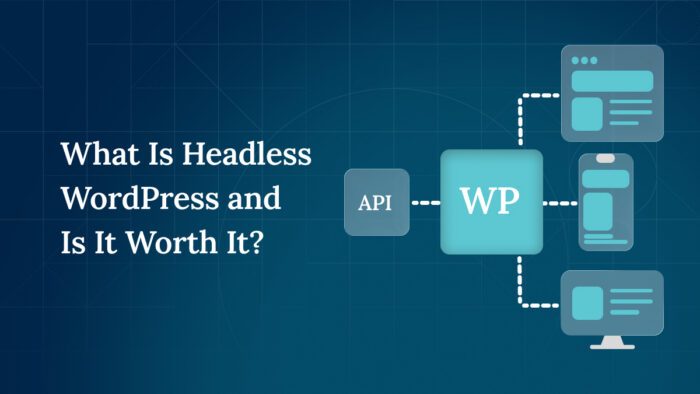
In a headless architecture, that responsibility is split. WordPress® becomes the content and editorial backend, exposing data through an API, while a separate frontend application handles rendering.
This separation creates a three-layer architecture that defines how your stack operates:
- WordPress® manages content, media, and user permissions.
- An API layer exposes that content through the built-in REST API (rooted at /wp-json/ with endpoints under /wp/v2/) or via WPGraphQL when more flexible, relational queries are needed.
- A frontend application – commonly built with Next.js, Astro, or React – fetches content and renders the user interface.
Each layer is developed, deployed, and scaled independently, which is where both the flexibility and complexity of headless setups come from. However, keep in mind that platforms like WP Engine host both the backend and frontend together, which can reduce operational overhead.
Once rendering moves to the frontend, you also decide how pages are generated. Static Site Generation (SSG) produces HTML at build time for fast CDN delivery, while Server-Side Rendering (SSR) generates HTML per request for dynamic content. Most real-world implementations combine both, using static generation for stable pages and incremental or server-side rendering for frequently updated content.
The appeal of a headless WordPress® is control and reuse. You can design the frontend without WordPress® theme constraints, optimize performance at the edge, and deliver the same content across multiple channels.
For example:
- Al Jazeera consolidated multiple CMS platforms into a single headless WordPress® stack with a GraphQL layer and React frontend.
- TechCrunch rebuilt its site using the WordPress® REST API with a decoupled frontend.
- Edutopia chose WordPress® VIP specifically to support headless content delivery at scale.
💡 Most of the tradeoffs of decoupling WordPress® come from losing the tight coupling between content, rendering, and plugins. Read more about the real costs in our guide to headless WordPress and whether it’s worth it.
Five steps to set up headless WordPress
Setting up WordPress® as a headless CMS is less about flipping a switch and more about making a series of architectural decisions in the right order.
Step 1: Set up WordPress and choose your API layer
Start by installing WordPress® on a managed host. Nothing changes in the admin experience – editors still create content, upload media, and manage users as usual. The difference is how that content is accessed.
For simple projects, the built-in REST API is enough. It requires no plugins and exposes standard content types out of the box. If your data model becomes more relational (nested content, reusable components, or complex queries), WPGraphQL becomes a better fit because it lets the frontend request exactly the fields it needs in a single query.
Advanced Custom Fields (ACF®) works with both approaches:
- For REST, fields appear once you enable “Show in REST API.”
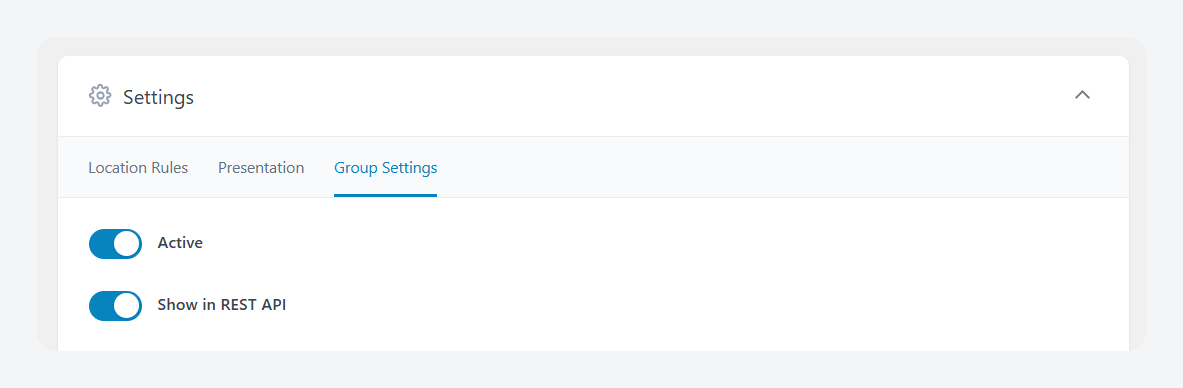
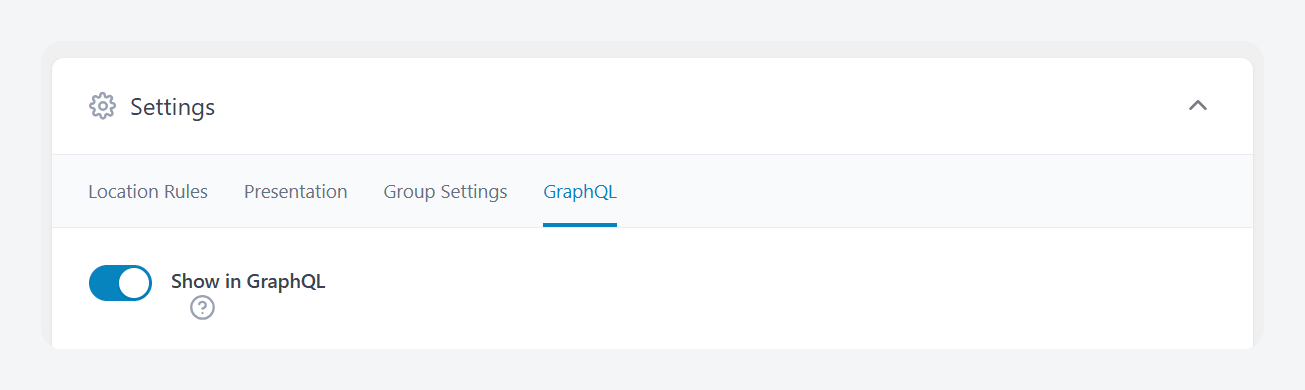
- For GraphQL, you’ll need the WPGraphQL plugin and the WPGraphQL for ACF bridge plugin. Then, opt ACF field groups into the schema with “Show in GraphQL.”
Step 2: Model your content for the API
This is where most headless WordPress® projects succeed or fail. In a traditional setup, you can get away with loosely structured content because PHP templates handle presentation. In headless, your API becomes the contract between WordPress® and the frontend. Poor structure here creates long-term friction everywhere else.
Here’s what you need to do:
- Model your domain: Create custom post types for real entities – events, case studies, team members – and use taxonomies for classification.
- Structure your content at the field level: This is where ACF® solves a real architectural problem. Instead of storing everything in a single WYSIWYG field, define fields that match how the frontend will render components – hero sections, FAQs, stat blocks, CTAs. This gives your frontend predictable API data. With WPGraphQL for ACF, it can also become part of a typed GraphQL schema.
- Select fields appropriately: Use Group for single structured objects, Repeater for lists, and Relationship fields to connect content across post types. Flexible Content should be used carefully – only when editors genuinely need layout control – because it introduces variability the frontend must handle.
- Avoid the common trap of pushing structured content into rich text editors: If a section has a consistent shape, model it. This decision directly affects performance, maintainability, and how easily your frontend can evolve.
- Set a clear plan for Gutenberg: You can render blocks as HTML, selectively replace key sections with ACF fields, or adopt a structured block approach – but this should be decided early, not retrofitted later.
- Treat your API like a product: Expose only the fields your frontend needs, make visibility explicit, and version your ACF field-group definitions using ACF Local JSON so field changes are tracked and deployable. This step defines how scalable your headless architecture will be.
Supercharge Your Website With Premium Features Using ACF PRO
Speed up your workflow and unlock features to better develop websites using ACF Blocks and Options Pages, with the Flexible Content, Repeater, Clone, Gallery Fields & More.
Step 3: Choose and connect your frontend framework
With your API in place, the frontend becomes a separate application. Framework choice depends on rendering needs and team expertise. Next.js is the most common option for hybrid SSR and static generation, while Astro is better suited for content-heavy sites aiming for minimal JavaScript.
At this stage, the frontend simply fetches data from your WordPress® API and renders pages. The complexity comes later when you introduce routing, caching, and preview.
Step 4: Deploy both systems
Headless WordPress® means two deployment pipelines. The WordPress® backend runs on a managed WordPress® host, while the frontend is deployed separately to platforms like Vercel, Netlify, or Cloudflare Pages.
Each side needs its own environment variables, build process, and caching strategy. This separation is powerful but introduces operational overhead. Managed platforms such as WP Engine can reduce that complexity by hosting both the WordPress® backend and the Node.js frontend together, but the architectural separation still exists.
Step 5: Wire up the remaining pieces
The final step is closing the gaps created by decoupling. SEO metadata generated in WordPress, via tools like Yoast SEO, must be fetched through the REST API and injected into the frontend’s <head>. Sitemaps, canonical URLs, and redirects are no longer handled automatically and must be rebuilt or proxied.
Preview is another key consideration. Editors lose the default WordPress® preview experience, so you’ll need either framework-native solutions like Next.js Draft Mode or a toolkit such as Faust.js to restore it.
Once these pieces are in place, you have a fully functional headless setup.
💡 Check out ACF’s post on creating a headless site using React and ACF® for a full example implementation.
Picking a frontend framework
Choosing a frontend framework for headless WordPress® depends on four factors: how your pages are rendered, what your team already knows, how important preview is, and the performance profile you’re targeting.
Here are the most popular options:
- Next.js supports SSG, SSR, and Incremental Static Regeneration (ISR), which lets you update pages without full rebuilds. It also has the largest WordPress-specific ecosystem, making integrations and long-term maintenance easier.
- Faust.js builds on Next.js and handles WordPress-specific concerns like preview, authentication, and data fetching. It is positioned as a toolkit rather than a standalone framework, but it removes the need to build a preview infrastructure from scratch.
- Astro is designed for performance-first builds. It ships zero JavaScript by default and hydrates only interactive components, making it a strong fit for content-heavy sites where most pages are static.
- Gatsby is a static-first React framework with a dedicated WordPress® data source plugin. Its ecosystem is less active following the shutdown of Gatsby Cloud and migration to Netlify, which affects long-term platform support.
Deciding if headless WordPress is right for your project
The question isn’t “is headless better?” – it’s “does my project have a specific problem that headless solves?” The decision comes down to where the added complexity actually pays off:
| Headless makes sense | Stick with traditional WordPress® |
|---|---|
| High-traffic sites where edge-cached delivery improves performance. | Brochure sites with a handful of pages. |
| Teams with strong JavaScript expertise and a need for full frontend control. | Personal blogs and content-only sites. |
| Multi-channel delivery (web, mobile apps, digital signage) from one backend. | Teams without dedicated frontend developers. |
If your project falls on the left, headless WordPress® gives you flexibility, scalability, and control. If it falls on the right, a well-optimized traditional setup delivers the same outcomes with far less complexity.
For teams moving forward, managed platforms like WP Engine provide a production-ready headless environment with Node.js frontend hosting alongside the WordPress® backend, reducing the operational overhead of running both systems separately.
FAQs about WordPress as a headless CMS
What types of websites benefit most from headless WordPress®?
High-traffic publishing sites, applications that need custom frontend experiences, and projects delivering content across multiple channels benefit the most from a headless WordPress® architecture. The common thread is scale, complexity, or multi-platform delivery.
How does headless WordPress compare to purpose-built headless CMS platforms?
Headless WordPress® lets teams keep a familiar editor, plugins, roles, and existing content while delivering pages through APIs. It is cost-effective for content-heavy sites, migrations, and teams already invested in WordPress.
However, platforms like Contentful, Sanity, and Strapi are designed API-first. They usually offer cleaner content modeling, stronger omnichannel delivery, modern developer tooling, and better separation between content and presentation.


For plugin support, please contact our support team directly, as comments aren't actively monitored.