
WordPress developers are increasingly looking for ways to expose their content—including all those custom fields you’ve carefully crafted with Advanced Custom Fields—through modern APIs that frontend frameworks like React, Next.js, and Vue.js can consume.
That’s where GraphQL comes into play, offering a powerful and flexible way to query exactly the data you need, when you need it. And when combined with ACF, you unlock the ability to expose all your custom field data through a single, unified API endpoint.
If you’re aiming to build modern, decoupled applications, you need a solution that seamlessly integrates with ACF and provides comprehensive support for all your custom fields. Let’s see how you can do that with Gato GraphQL.
Why Expose Your WordPress Website via GraphQL?
Exposing your website through GraphQL unlocks several benefits that enhance your site’s capabilities and developer experience. A GraphQL API allows you to:
Build headless architectures: Decouple your frontend from WordPress, allowing you to build with modern JavaScript frameworks like React, Next.js, and Vue.js while keeping WordPress as your content management system.
Fetch precise data: Request exactly the fields you need—no more, no less—reducing payload sizes and improving performance compared to traditional REST APIs.
Simplify API calls: Access all your WordPress data, including ACF fields, through one unified GraphQL endpoint instead of making multiple REST API calls.
Improve developer experience: GraphQL’s schema provides autocomplete and validation, making it easier to work with your ACF data in your frontend applications.
Future-proof your architecture: Build applications that can easily adapt as your content structure evolves, without breaking existing integrations.
Gato GraphQL: A Step Above with Full ACF Support
You might be wondering how the content you create with ACF fits into a GraphQL API. Let’s consider a scenario where you’re using ACF PRO to create a website with custom and complex content. To expose this content through a modern API, you use Gato GraphQL. This empowers you to:
Expose all your ACF fields through a single GraphQL endpoint.
Query and mutate custom fields of any type, from simple text fields to complex relationships.
Build headless applications that consume your ACF content with precision and efficiency.
Provide your frontend developers with a type-safe, self-documenting API.
Gato GraphQL is a WordPress plugin that converts your site into a GraphQL server, providing comprehensive support for Advanced Custom Fields. Whether you’re using ACF Free or ACF PRO, Gato GraphQL enables you to query and mutate all ACF field types through GraphQL.
The plugin supports all ACF field types, including:
Basic fields: Text, Textarea, Number, Email, URL, Password, and more
Content fields: Image, File, WYSIWYG Editor, OEmbed
Choice fields: Select, Checkbox, Radio Button, Button Group, True/False
Relational fields: Post Object, Page Link, Relationship, Taxonomy, User
Date fields: Date Picker, Date Time Picker, Time Picker
Advanced fields: Google Map, Color Picker, and all ACF PRO fields
Once you set up Gato GraphQL, you can immediately start querying your ACF fields from any frontend application, mobile app, or external service.
How to Expose Your ACF Content With Gato GraphQL
There are just a few simple steps to setting up Gato GraphQL to expose all your ACF content, including all field types.
Make sure you have the following plugins installed on your site:
ACF or ACF PRO
Gato GraphQL (available from the WordPress plugin directory or gatographql.com)
To illustrate how Gato GraphQL exposes ACF fields, we’ll set up a field group for posts using ACF. It has the following fields:
Label, of type Text
Description, of type Text
Link, of type Link
Image, of type Image
Related posts, of type Post Object
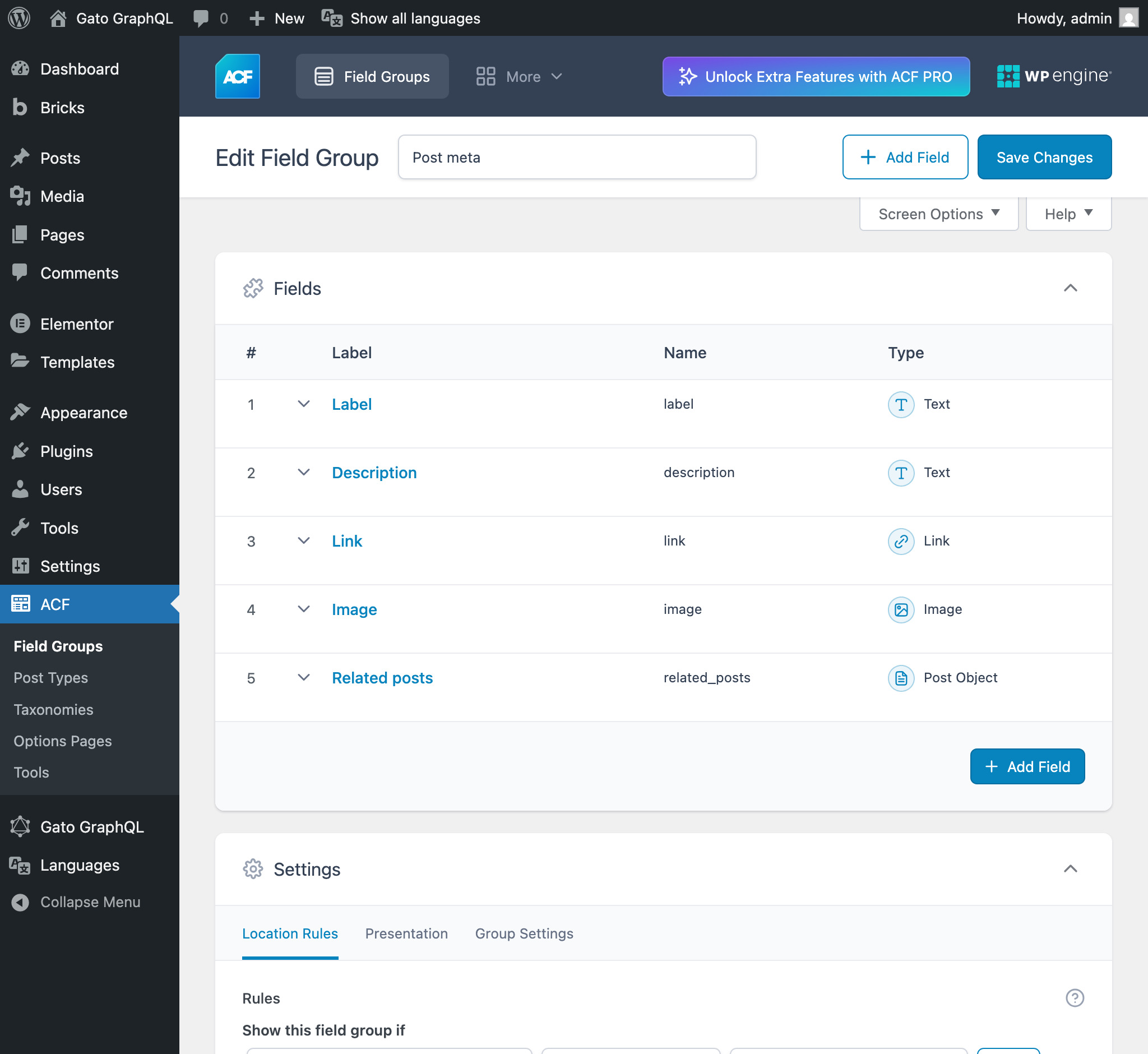
We then complete the field group for some posts.
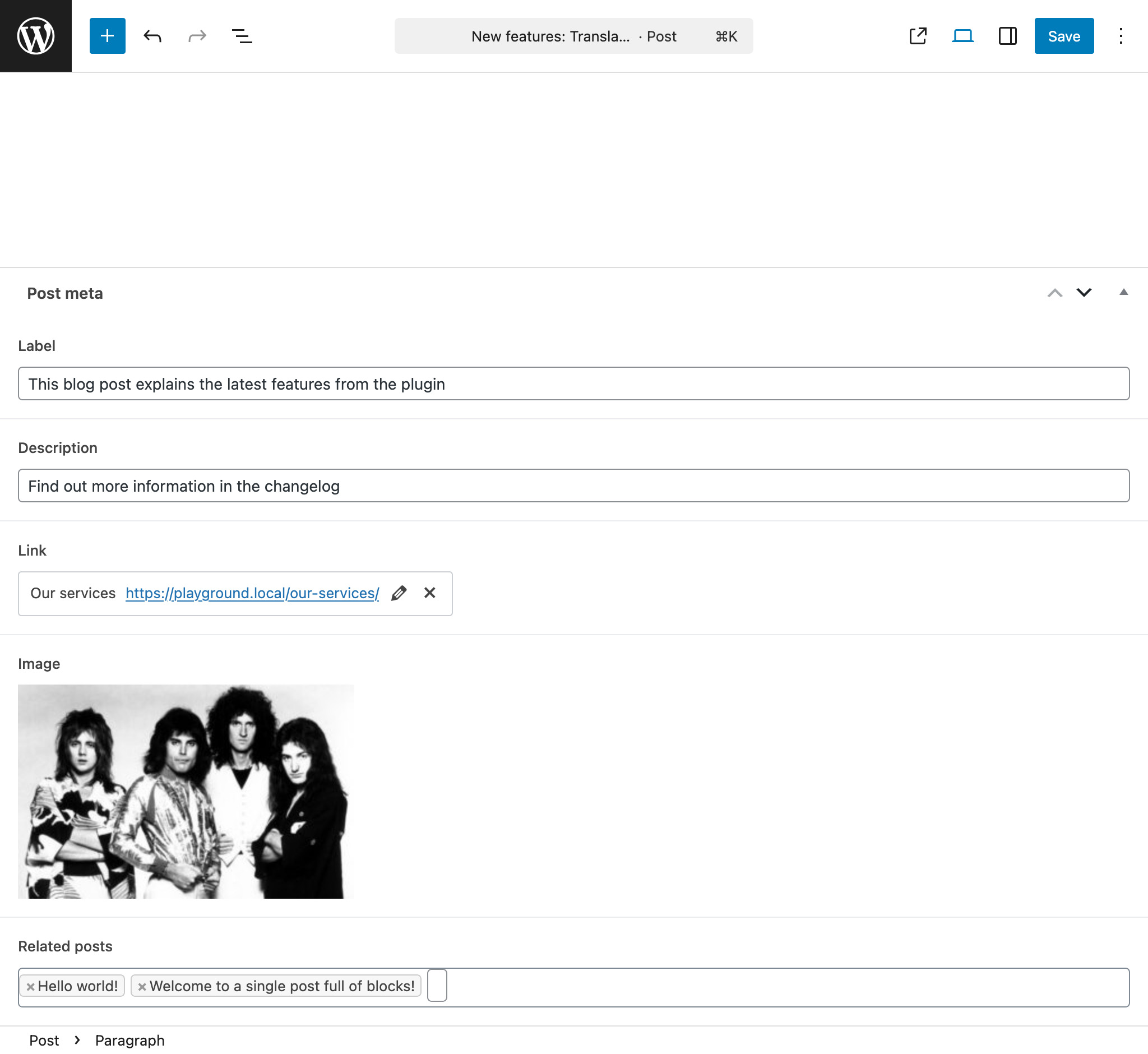
Let’s get started with the step-by-step guide on how to query your ACF content via GraphQL.
Step 1: Query Basic ACF Fields
Basic field types can be queried directly using the metaValue field. Here’s an example query that retrieves common ACF field types from a post:
query GetPostWithACFFields {

post(by: { id: 1 }) {

title

text: metaValue(key: "text_field")

textarea: metaValue(key: "textarea_field")

number: metaValue(key: "number_field")

email: metaValue(key: "email_field")

url: metaValue(key: "url_field")

}

}
Step 2: Query Relational Fields
When working with relational fields like images, files, or post relationships, you can export the IDs and then query the related entities in a subsequent query:
query GetPostDataAndExportRelationships {

post(by: { id: 1 }) {

# Image field type

imageId: metaValue(key: "image_field")

@export(as: "imageId")

# Post Object field type

post_object: metaValue(key: "post_object_field")

@export(as: "post_object_id")

# Relationship field type

relationships: metaValue(key: "relationship_field")

@export(as: "relationship_ids")

}

}

query QueryPostRelationships

@depends(on: "GetPostDataAndExportRelationships")

{

# Query the image

relationshipImage: mediaItem(by: { id: $imageId }) {

id

src

altText

title

}

# Query the related post

postObject: customPost(by: { id: $post_object_id }, status: any) {

id

title

excerpt

}

# Query multiple relationships

relationships: customPosts(

filter: { ids: $relationship_ids, status: any },

pagination: { limit: -1 }

) {

id

title

excerpt

}

}
Step 3: Query Complex Field Types
For more complex field types like dates, you can transform the data using Gato GraphQL’s built-in functions:
query GetPostWithDateFields {

post(by: { id: 1 }) {

# Date Picker field - transform ACF's YMD format

dateAsString: metaValue(key: "date_picker_field")

dateYear: _strSubstr(string: $__dateAsString, offset: 0, length: 4)

dateMonth: _strSubstr(string: $__dateAsString, offset: 4, length: 2)

dateDay: _strSubstr(string: $__dateAsString, offset: 6, length: 2)

dateAsTimestamp: _makeTime(

year: $__dateYear,

month: $__dateMonth,

day: $__dateDay,

hour: 0,

minute: 0,

second: 0

)

formattedDate: _date(format: "Y-m-d", timestamp: $__dateAsTimestamp)

}

}
Step 4: Mutate ACF Fields via GraphQL
Gato GraphQL doesn’t just let you read your ACF data—it also enables you to create, update, and delete custom field values through GraphQL mutations. This means you can manage your ACF content entirely through the GraphQL API.
Here’s how you can update multiple ACF fields in a single mutation:
mutation UpdatePostACFFields($postId: ID!) {

updatePost(

input: {

id: $postId

meta: {

text_field: ["New text value"],

textarea_field: ["New textarea value"],

select_field: ["New select value"],

multi_select_field: ["Choice 1", "Choice 2"],

number_field: [42],

date_picker_field: ["20240320"],

}

}

) {

status

errors {

__typename

...on ErrorPayload {

message

}

}

post {

id

title

text: metaValue(key: "text_field")

textarea: metaValue(key: "textarea_field")

select: metaValue(key: "select_field")

multiSelect: metaValue(key: "multi_select_field")

number: metaValue(key: "number_field")

date: metaValue(key: "date_picker_field")

}

}

}
Fetch your ACF fields
You can test your queries using the built-in GraphQL editor, or integrate the API with your frontend application.
Here’s a complete example query for our post setup:
query GetPostsWithACFFields($postId: ID!) {

post(by: { id: $postId }) {

id

title

label: metaValue(key: "label")

description: metaValue(key: "description")

link: metaValue(key: "link")

imageId: metaValue(key: "image")

@export(as: "imageId")

relatedPostIds: metaValue(key: "related_posts")

@export(as: "relatedPostIds")

}

}

query GetPostRelationships

@depends(on: "GetPostsWithACFFields")

{

image: mediaItem(by: { id: $imageId }) {

id

src

altText

title

}

relatedPosts: customPosts(

filter: { ids: $relatedPostIds, status: any },

pagination: { limit: -1 }

) {

id

title

}

}
When you run this query, you will get the ACF data for the post:
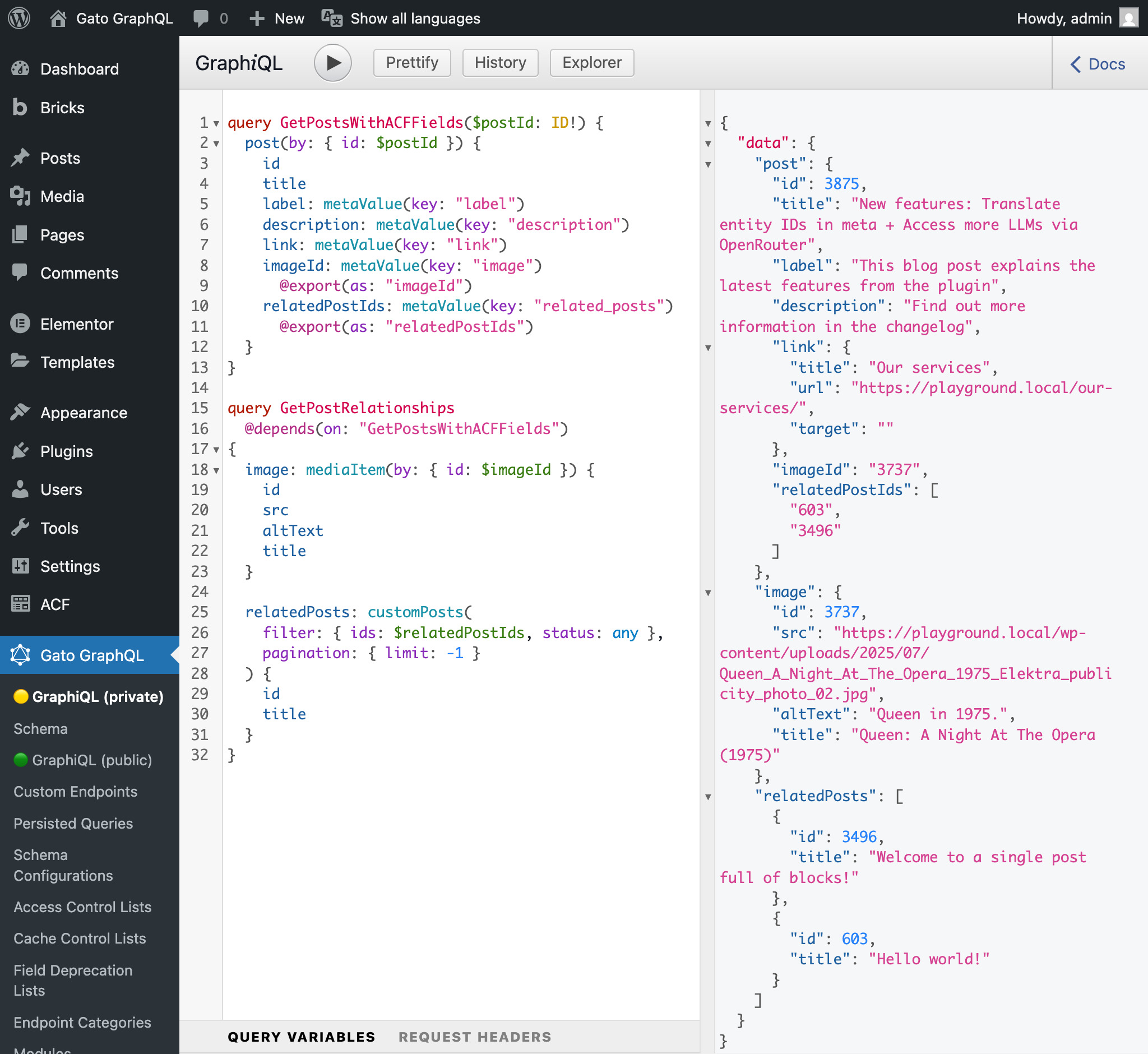
Your frontend can then consume this data directly, without needing to make multiple API calls or process complex data structures.
Final Thoughts
With powerful plugins such as ACF PRO and Gato GraphQL, your website can break free from traditional WordPress architectures and communicate with modern frontend applications through a flexible, type-safe API.
ACF Blocks and custom fields enable you to design custom, compelling content that fits your specific needs, transforming your site into a dynamic platform. Gato GraphQL further empowers this transformation by providing comprehensive support for all your ACF content, allowing you to expose every field type through a single GraphQL endpoint.
Plus, Gato GraphQL’s efficient architecture and built-in optimizations save you from performance concerns that can plague other GraphQL implementations. This leaves you with more freedom to concentrate on what’s truly essential – creating quality content for your audience and building amazing frontend experiences.
By leveraging GraphQL with ACF, you’re not just building a website—you’re creating a flexible content API that can power any frontend, anywhere, anytime.


For plugin support, please contact our support team directly, as comments aren't actively monitored.