
Key points:
- Pods and Advanced Custom Fields (ACF®) are both powerful WordPress® tools for creating custom content, but they differ in focus.
- Pods is completely free and uniquely offers custom database tables, but lacks grouped repeatable fields and demands more editor training.
- ACF is the stronger choice for most professional builds due to nested repeatable fields, polished editorial workflow, and a massive ecosystem of 2M+ installs.
- ACF stores data in
wp_postmetaaligned with WordPress® core, while Pods’ custom table advantage only kicks in at very high content volumes that most sites never reach. - Pick Pods when custom table storage is the genuine deciding factor.
- Pick ACF for structured content modeling on agency projects.
Pods and Advanced Custom Fields (ACF®) are two of the most widely used content modeling solutions for WordPress®1. Both let you create custom content structures, but they take fundamentally different approaches to the job.
Instead of a standard feature checklist, our comparison focuses on the architectural decisions behind each tool and what those decisions mean downstream. How you model content, what your editors experience, where performance holds or breaks, and what licensing costs look like across multiple sites.
Every section is evaluated against real build scenarios. If you’re choosing a stack for your next project, the goal here is to help you pick the tool that fits your specific requirements, not the one with the longer feature list.
Pods vs ACF for typical WordPress projects
ACF fits nested data models and PHP block workflows. It keeps content teams productive with a polished content governance framework.
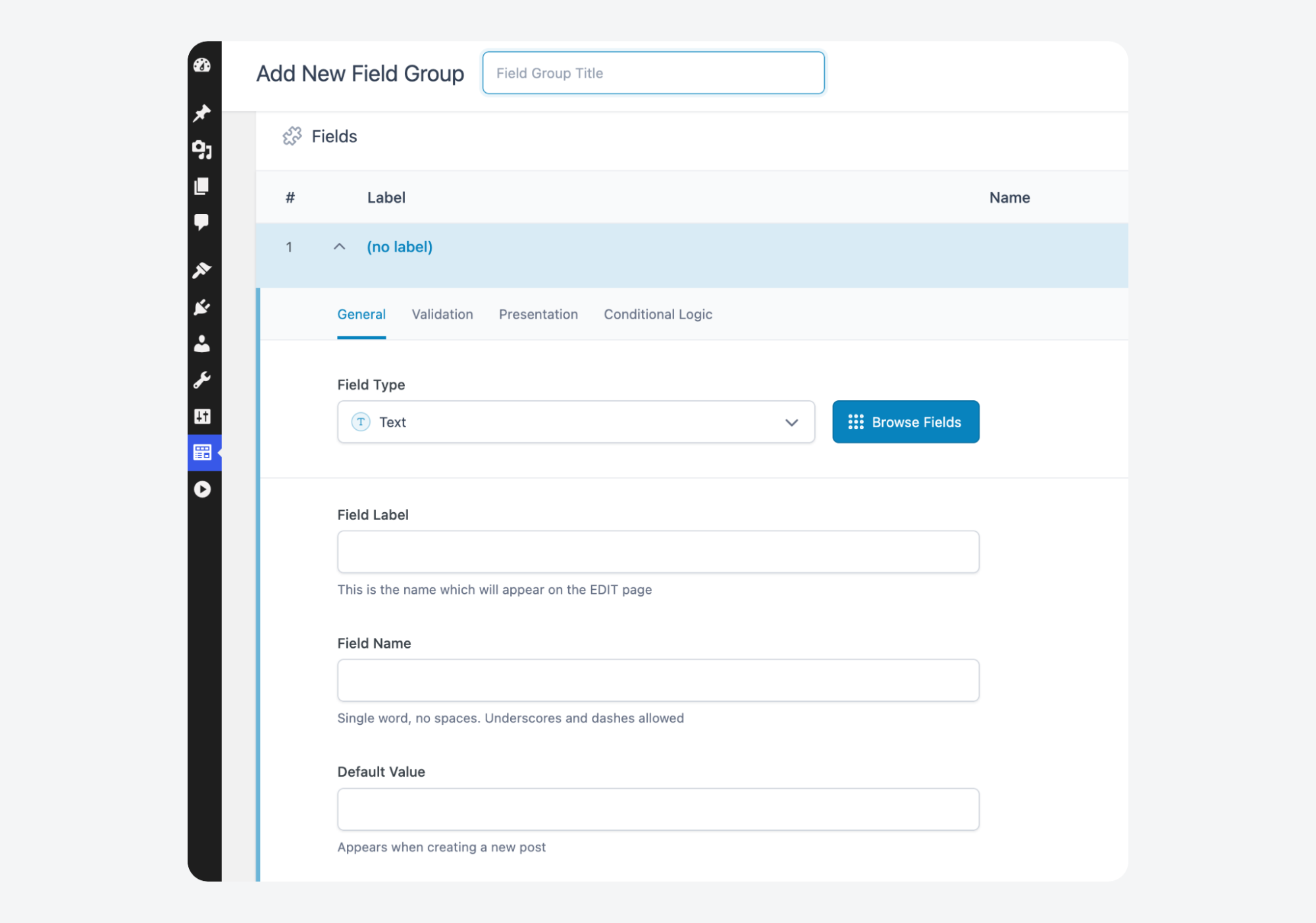
Pods fits high-volume custom table scenarios where default WordPress® storage becomes a bottleneck.
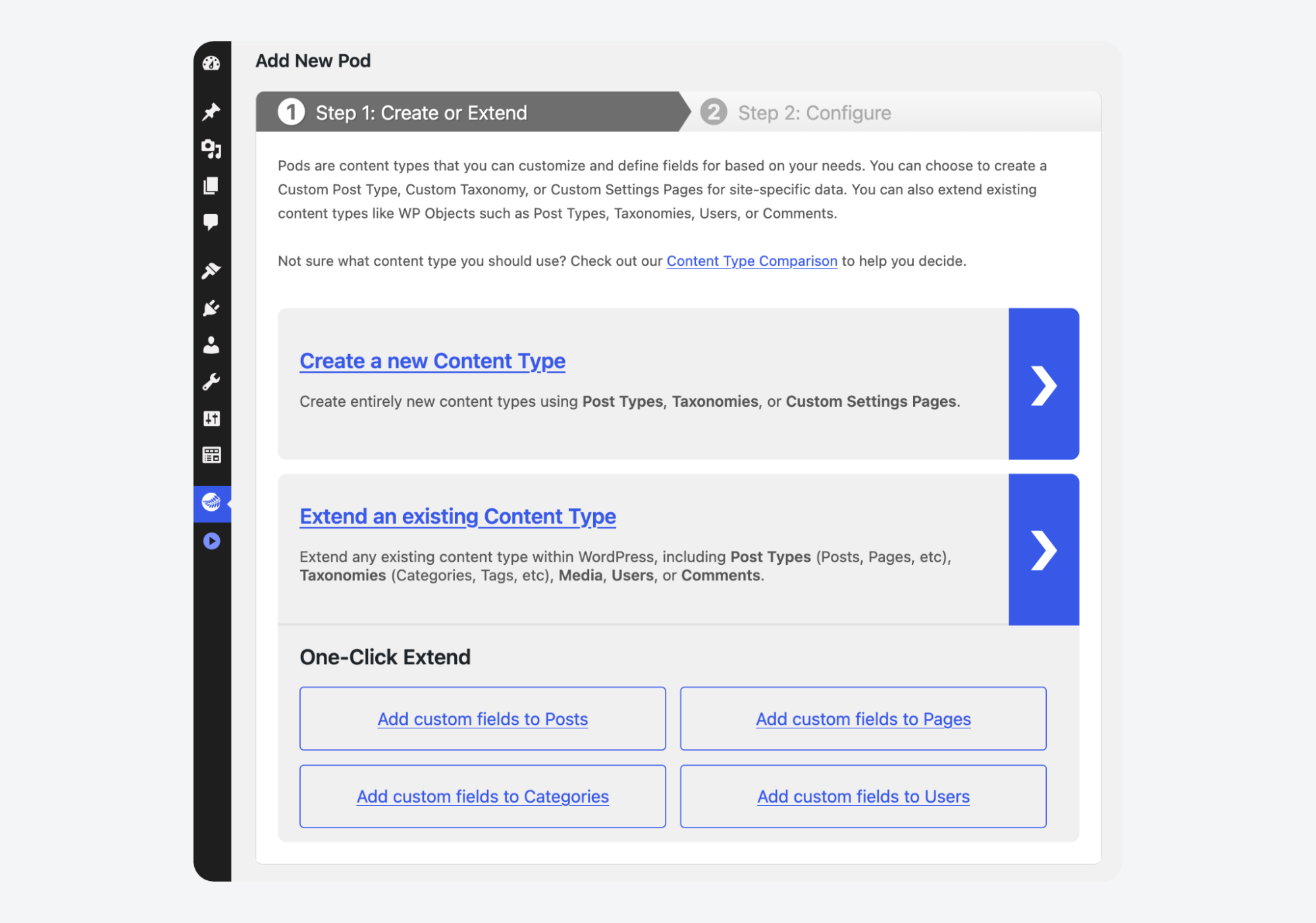
💡 Both options now register custom post types and taxonomies natively. That used to be a differentiator, but it no longer is.
Let’s do a more in-depth look into what you’re getting with each option.
| Feature | Pods | ACF |
|---|---|---|
| Price | Free | Free version available; PRO $49–$249/yr |
| Custom post type (CPT) and taxonomy registration | Built in | Built in |
| Field types | 20+ | 30+ including Google Maps, color picker, oEmbed |
| Grouped repeatable fields | Single-field repeat only | Available in PRO – Repeater with full subfield grouping |
| Modular layouts | Not available | Available in PRO – Flexible Content for controlled page building |
| Bi-directional relationships | Built in | Built in |
| Gutenberg blocks | Pods Blocks API | Available in PRO – PHP-only, InnerBlocks, versioning |
| Custom table storage | Advanced Content Types with dedicated tables | Uses wp_postmeta (core-aligned) |
| Options pages | Built in | Available in PRO |
| Gallery field | Built in | Available in PRO |
| Editor learning curve | Steeper – single-cockpit UI | Gentle – feels native to WordPress® |
| Config version control | JSON export available | Local JSON with automatic sync |
| Active installs | 100K+ | 2M+ |
| Rating | 380+ 5-star reviews | 1,200+ 5-star reviews |
| Support model | Community Slack and forums | WordPress.org forums; PRO includes premium ticket support |
| Page builder compatibility | Elementor, Beaver Builder, Divi | Elementor, Beaver Builder, Divi, Bricks |
| Best suited for | Budget builds, high-volume custom tables | Most agency and professional builds |
The rest of this article breaks down architecture, cost, content modeling, editor UX, performance, and ecosystem support.
Supercharge Your Website With Premium Features Using ACF PRO
Speed up your workflow and unlock features to better develop websites using ACF Blocks and Options Pages, with the Flexible Content, Repeater, Clone, Gallery Fields & More.
Architectural differences that affect long-term builds
Pods is an integrated content framework. It handles custom post types, taxonomies, fields, and templating from a single interface.
ACF is a specialist field manager that also registers CPTs and taxonomies, but keeps its scope deliberately narrow.
Storage-wise, ACF writes field data to wp_postmeta, which is the same table WordPress® core uses. That alignment means broad compatibility, predictable query patterns, and straightforward debugging. When WordPress® updates ship, ACF rarely breaks because it follows core conventions.
Pods offers Advanced Content Types that store data in dedicated custom database tables. This bypasses wp_postmeta entirely. For sites with hundreds of thousands of posts and complex field structures, that architecture can deliver real query speed improvements. However, most projects never cross that threshold.
ACF’s focused architecture means fewer moving parts. When something goes wrong, there are fewer places to look. Pods bundles more functionality into one place, which appeals to solo developers who want a single cockpit for everything. ACF appeals to teams who want a tool that does one job well and stays out of the way.
Cost considerations for single sites and agencies
Pods is 100% free. The Pods Foundation, a non-profit funded through Friends of Pods, maintains the plugin with no paid tier.
ACF’s free version is more capable than most people realize. It includes 30+ field types, custom post type and taxonomy registration, conditional logic, bi-directional relationships, and Local JSON for version control. Many simple projects never need more than this.
The ACF PRO modeling toolkit provides the capabilities that complex builds depend on:
- Repeater fields handle nested data.
- Flexible Content enables modular page building.
- ACF Blocks let PHP developers create Gutenberg blocks without learning React.
- Gallery fields and Options Pages round out the package.
Pricing runs $49/yr for a single site, $149/yr for 10 sites, or $249/yr for unlimited. Dev and staging activations don’t count against your license.
Pods provides galleries, options pages, and repeatable single fields. However, they can’t match ACF PRO’s grouped repeatable fields or modular layout capabilities.
For agencies, the math is simple. The $249/yr unlimited tier covers every client site you manage. One project that needs structured content modeling pays for the entire year.
Supercharge Your Website With Premium Features Using ACF PRO
Speed up your workflow and unlock features to better develop websites using ACF Blocks and Options Pages, with the Flexible Content, Repeater, Clone, Gallery Fields & More.
Content modeling for growing and changing requirements
How you model content today determines whether your structures survive evolving requirements or need rebuilding. Every plugin handles flat fields easily. The real test is what happens when a client asks for nested, repeatable data months into a project.
Simple fields and flat content structures
Text inputs, image uploads, select dropdowns, relationship links: both Pods and ACF cover the basics without issues. Pods offers 20+ field types. ACF offers 30+, pulling ahead with Google Maps, color pickers, oEmbed embeds, and range sliders.
If your content model stays flat, the choice barely matters at this level. Either one handles it well.
Grouped, repeatable, and nested content patterns
ACF PRO’s Repeater groups multiple subfields and repeats the entire set. An event page with days, sessions, speakers, and time slots is one field group. A team page with name, role, photo, and bio repeating per person is another. These structures stay maintainable because the data relationship is preserved inside the group.
Pods’ repeatable setting applies to individual fields only, not grouped subfields. You can repeat a single text field or a single image. You cannot repeat a set of related fields together without an add-on.
ACF Flexible Content goes further. It works as a modular layout manager, letting editors assemble pages from predefined content blocks without touching a page builder. Content teams get controlled flexibility. Developers keep control of the markup.
Pods holds a genuine advantage in bi-directional relationships. When you connect a course to an instructor, Pods reflects that connection automatically on both sides. ACF supports this too, but Pods’ implementation requires less configuration.
That said, most projects that outgrow basic fields need grouped repetition before they need relationship reflection. That makes ACF PRO the more natural next step when requirements start scaling.
Editor experience and content team workflows
The best field plugin is the one your content team uses correctly. That makes the editor experience a practical concern rather than a cosmetic one.
ACF’s interface mirrors native WordPress® patterns. Editors who know how to use the default post editor can work with ACF fields immediately. Inputs behave as expected and the learning curve is minimal.
ACF 6 refined this further with a UI refresh and group-level conditional logic that hides irrelevant fields based on context.
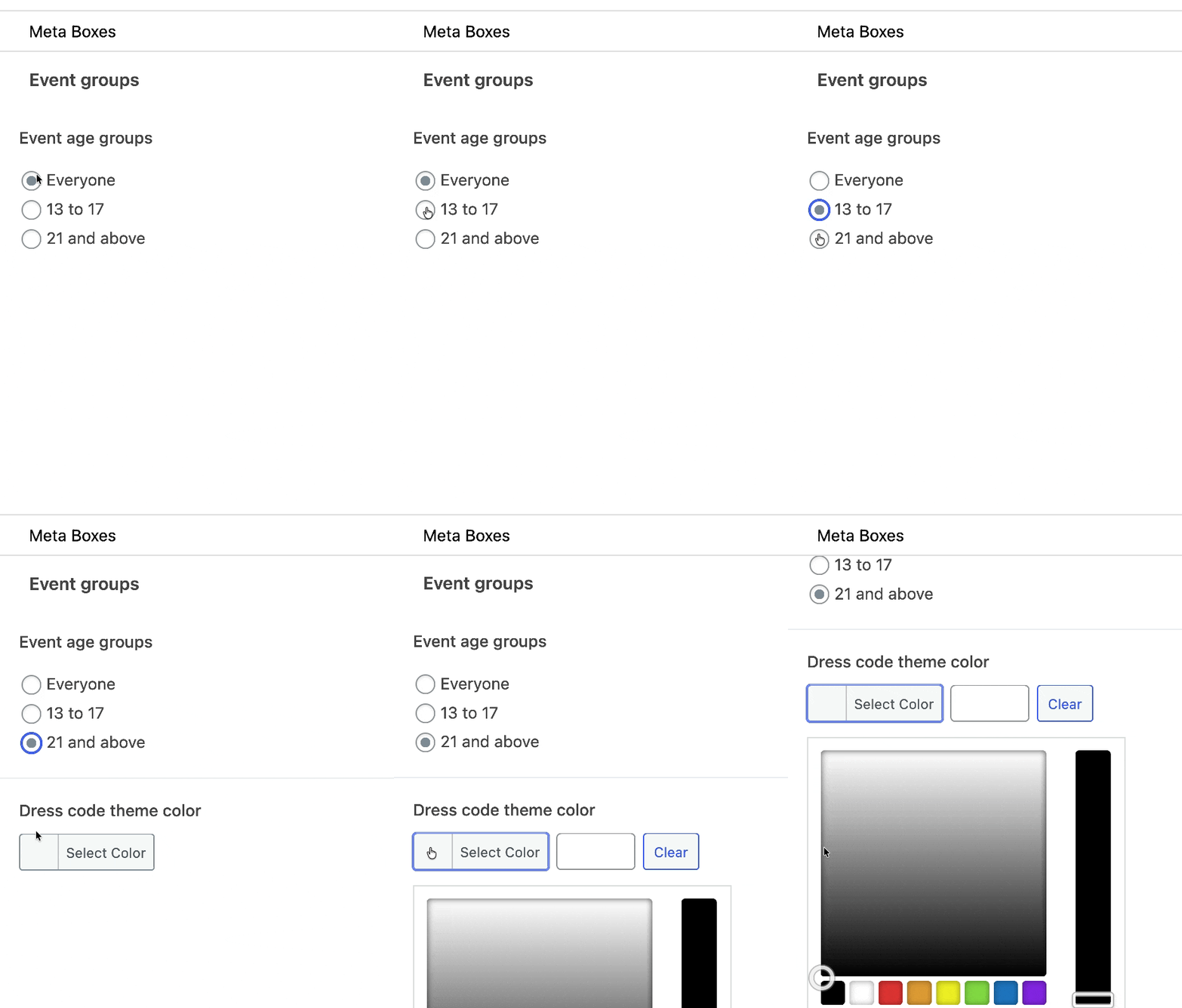
Pods packs more functionality into its admin interface. That density is useful for solo developers who want CPTs, taxonomies, fields, and relationships accessible from one screen.
For content teams, the same density creates friction. Every new editor needs time to learn where things live and how the interface maps to their tasks. That training cost multiplies across every project.
On the workflow side, the Admin Columns plugin integrates directly with ACF to add sortable, filterable custom field columns in post list screens. Content managers can scan, sort, and bulk-manage entries without opening individual posts.
For multi-editor projects, small UX advantages compound fast. Less time spent on training, fewer support questions, fewer data entry mistakes. ACF’s lower friction pays off on every content update across the life of a site.
Performance considerations as content volume increases
Performance debates around custom fields often start too early.
Storage architecture only becomes a factor once content volume crosses specific thresholds. Most WordPress® sites never get there. But knowing where those thresholds sit helps you avoid both premature optimization and expensive surprises.
Scenarios where default WordPress storage performs well
WordPress® stores post metadata in wp_postmeta. It is a simple key-value table, and it handles the vast majority of sites without measurable slowdown. A site with a few thousand posts and moderate field counts will never feel the strain.
ACF writes to this table, which keeps it aligned with core WordPress® conventions. That alignment has practical benefits: broad compatibility with other plugins, predictable WP_Query behavior, and an easier time when migrating hosts or running standard database maintenance.
Scenarios that benefit from alternative storage approaches
The picture changes at scale.
Sites with hundreds of thousands of posts carrying large repeater data or deeply nested relationships will eventually hit wp_postmeta‘s limits. Queries slow down as the table grows, and joins become expensive.
Pods has its clearest technical advantage here. Its Advanced Content Types store data in dedicated custom tables, bypassing wp_postmeta entirely. At high volume, that architecture delivers real query speed improvements.
The catch is, of course, that most projects never reach that volume. Optimizing for custom tables on a site with 5,000 posts solves a problem that doesn’t exist.
📍 If you are running a project at that scale, though, ACF lets you safely move data into custom tables. Native support for dedicated database storage is a prioritized feature on the platform’s current roadmap.
Developer workflow and ecosystem support
ACF’s template API is built around two functions: get_field() and have_rows(). They’re simple and consistent. A developer new to ACF can read the docs and be productive in an afternoon. Retrieving structured content or looping through repeater rows all follow the same pattern.
ACF Blocks extends that simplicity into Gutenberg. PHP developers can build custom blocks without writing any React code. Each block is a PHP template with an ACF field group attached to it.
InnerBlocks support and block versioning let you build sophisticated editor pipelines while staying in a language your team already knows.
💡 ACF’s Local JSON feature speeds up configuration sync and version control by storing field group definitions as JSON files. It doesn’t affect frontend query performance.
Pods has its own Blocks API, and both integrate with major page builders like Elementor, Beaver Builder, Divi, and Bricks. For teams working inside those ecosystems, either one connects without issues.
The ecosystem gap is harder to ignore. ACF has over 2 million active installs. Pods has just over 100,000. That 20:1 ratio shows up everywhere: tutorials, Stack Overflow threads, blog posts, YouTube walkthroughs, and third-party add-ons.
When a developer hits an edge case, ACF’s ecosystem depth means the answer is almost certainly already posted somewhere.
Support models, ownership, and project longevity
When you commit to a tool for client work, you’re also committing to its support model and the organization behind it.
ACF is backed by WP Engine. That means dedicated development resources, a consistent release cadence, professional ticket support for PRO users, and extensive official documentation.
Pods is maintained by the Pods Foundation, a non-profit funded through community donations. Support runs through a community Slack, forums, and official docs. The governance model keeps development community-driven and free from commercial pressure. The tradeoff is that support response times depend on volunteer availability.
Both models work. They just serve different priorities.
For agencies using ACF PRO, each site must have a valid, activated license to access PRO features. If you manage dozens of client sites, stay on top of renewals. Lapsed licenses don’t break existing functionality, but they do block updates and support access.
For agencies billing clients on project timelines, ACF’s professional support infrastructure reduces risk. Having a support ticket system behind your tooling is worth factoring into the decision.
“I’ve always used ACF but decided to give Pods a try on a client site. Pods was feature-rich and easy to use, but a minor release actually broke functionality… ACF has been rock solid 100%, so that one incident scared me off of Pods.”
Supercharge Your Website With Premium Features Using ACF PRO
Speed up your workflow and unlock features to better develop websites using ACF Blocks and Options Pages, with the Flexible Content, Repeater, Clone, Gallery Fields & More.
PRO FeaturesACF BlocksOptions PagesPRO FieldsRepeaterFlexible ContentGalleryClone
Which to choose? How to make the right call
Choose ACF when your project needs nested repeaters, flexible layouts, polished editor UX, PHP block development, and a deep ecosystem with professional support behind it. That description fits most agency and professional builds.
Choose Pods when custom table storage is a genuine requirement for high-volume data, or when budget rules out any paid tooling.
Both plugins can coexist on the same site. You don’t have to pick one exclusively.
One factor worth weighing early is lock-in. Migrating complex ACF Repeater or Flexible Content data to another system is real work.
Something like WP All Import with its ACF add-on can help, but expect effort.
That said, the same structural complexity that makes migration difficult is exactly the complexity that made ACF the right choice in the first place. If your data model is simple enough to migrate easily, you probably didn’t need the advanced tooling to begin with.
For most WordPress® builds, ACF gives you the content modeling depth, editorial experience, and long-term reliability to ship confidently and maintain sanely.
FAQs about Pods vs ACF
Does the free version of ACF allow creating custom post types like Pods does?
- Yes, since version 6.1, the free version of ACF includes a native UI for registering Custom Post Types and Taxonomies. While Pods has always offered this, ACF now matches that specific convenience, meaning you no longer need a third-party plugin like CPT UI to get started with ACF.
Is Pods considered a viable free alternative to ACF PRO for complex sites?
- Technically, yes. Pods offers ‘Advanced Content Types’ and relationship fields for free that ACF reserves for its PRO tier. However, the trade-off is often architectural. As developer Adrian notes, for complex projects, it can sometimes feel like ‘Pods is not working with WordPress, but working around it’, leading to custom functions that may be non-intuitive for teams used to core WordPress® standards.
Why do many developers consider ACF’s user interface to be superior to Pods?
- Developers generally favor ACF’s UI because it mimics the native WordPress® admin style, requiring almost zero training for clients. While Pods provides a powerful ‘single cockpit’ for developers, it can feel cluttered to a non-technical content editor. As one developer puts it, “Pods being completely free is a big draw. I find its UI a bit confusing but nothing that a bit of exploring won’t fix’‘, but in an agency environment, that ‘exploring’ time often translates to higher costs.


For plugin support, please contact our support team directly, as comments aren't actively monitored.