
Key points:
- WooCommerce attributes, backend custom fields, and customer-facing add-ons are three distinct systems that shouldn’t be confused or mixed.
- Advanced Custom Fields (ACF®) is purpose-built for structured, editor-friendly product metadata and excels at that job.
- Customer-facing inputs that affect pricing need dedicated add-on plugins designed for WooCommerce’s transactional flow.
- Pair ACF with an add-ons plugin and each tool operates at full strength in its own domain.
WooCommerce lets you extend product data in several ways, but the terminology makes it easy to pick the wrong one.
You’ve probably already hit a snag where a field saves in the admin, then doesn’t show on the product page. Or it displays fine but vanishes at checkout. Or it appears everywhere except where it actually needs to affect the price.
These failures happen because “custom product data” refers to at least two completely different systems with different jobs:
- Backend fields store product information that staff manage and intentionally display.
- Customer-facing options collect buyer input, adjust pricing, and flow through the cart and checkout automatically.
They share a name but not a pipeline.
Advanced Custom Fields (ACF®) gets pulled into both roles because it’s the go-to tool for custom fields in WordPress. It excels at structured backend data. It was never designed to handle pricing logic or transactional flow, and forcing it into that role creates the exact breakdowns described above.
Let’s separate those data paths so you can choose the right tool before you start building.
Three types of custom product data in WooCommerce
WooCommerce product data falls into three categories that sound similar but work differently:
- Attributes.
- Backend custom fields.
- Customer-facing add-ons.
Mixing them up is the single most common reason custom fields behave unpredictably. Each has its own storage mechanism, display logic, and relationship to WooCommerce’s transactional pipeline.
1. Attributes: Variation selectors and product filtering
Attributes are the system WooCommerce uses to define product variations and power layered navigation. When you create a “Color” or “Size” attribute and assign terms to it, WooCommerce can generate variation dropdowns on the product page and filter widgets in your shop sidebar.
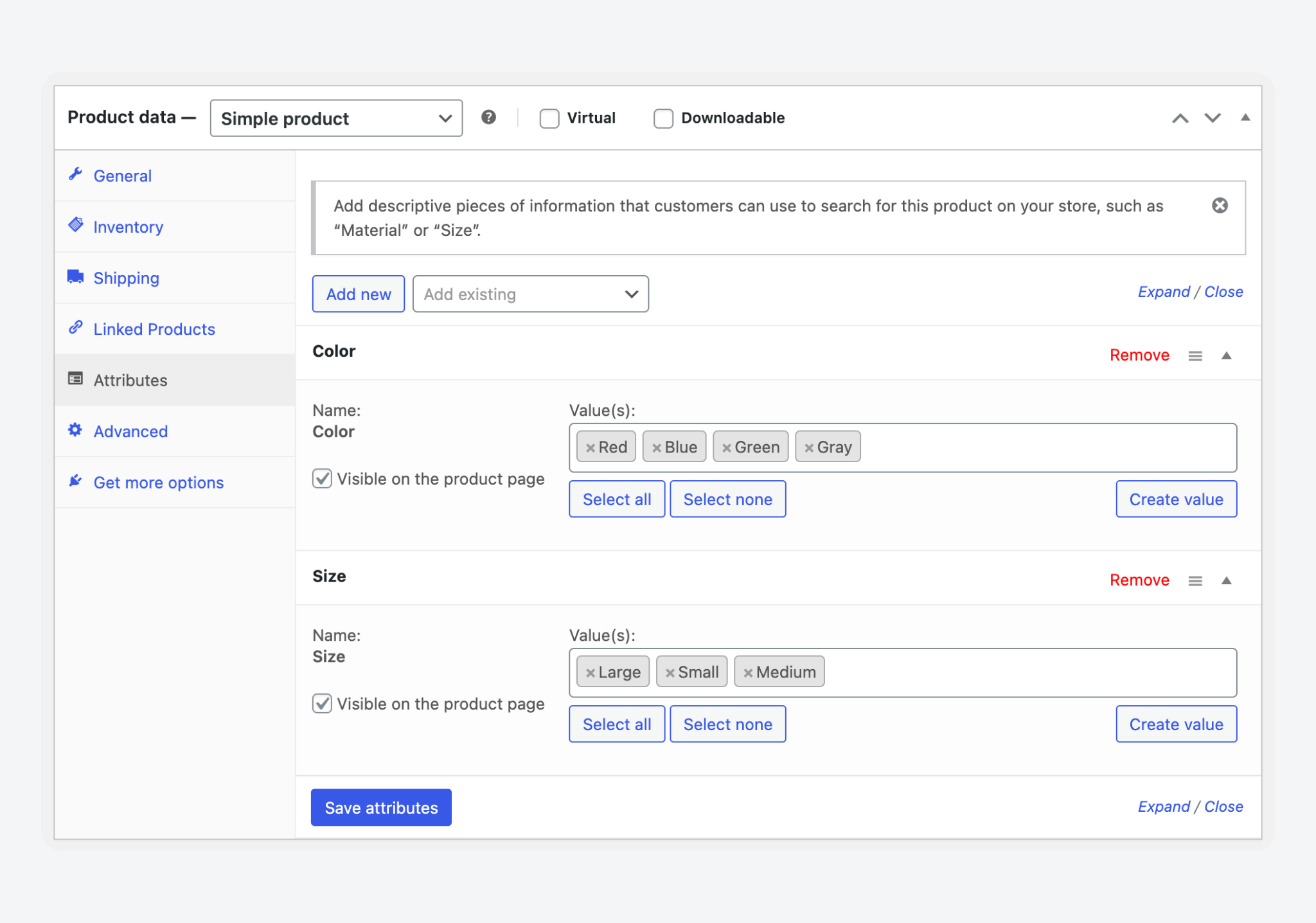
That’s their job, and it stops there.
Attributes are designed for selection and filtering, not for storing detailed specs or structured metadata. If you need to display a specifications table, warranty details, or a materials breakdown, attributes won’t work. They lack the layout control and editorial structure that kind of data requires.
2. Backend custom fields: Specs, certifications, and product metadata
Backend custom fields hold product information that your team enters in the admin and deliberately outputs on the frontend. Think specification tables, compliance certifications, care instructions, material composition, or any structured data that describes the product but isn’t selected by the customer.
ACF is built for exactly this.
Field groups target WooCommerce products through location rules. Additional features like Repeater and Flexible Content let you model complex, layered product data without touching core files. The editor experience stays manageable because fields are scoped and organized into logical groups.
This is how an ACF field – a radio selection for materials – appears when editing a product it’s assigned to:
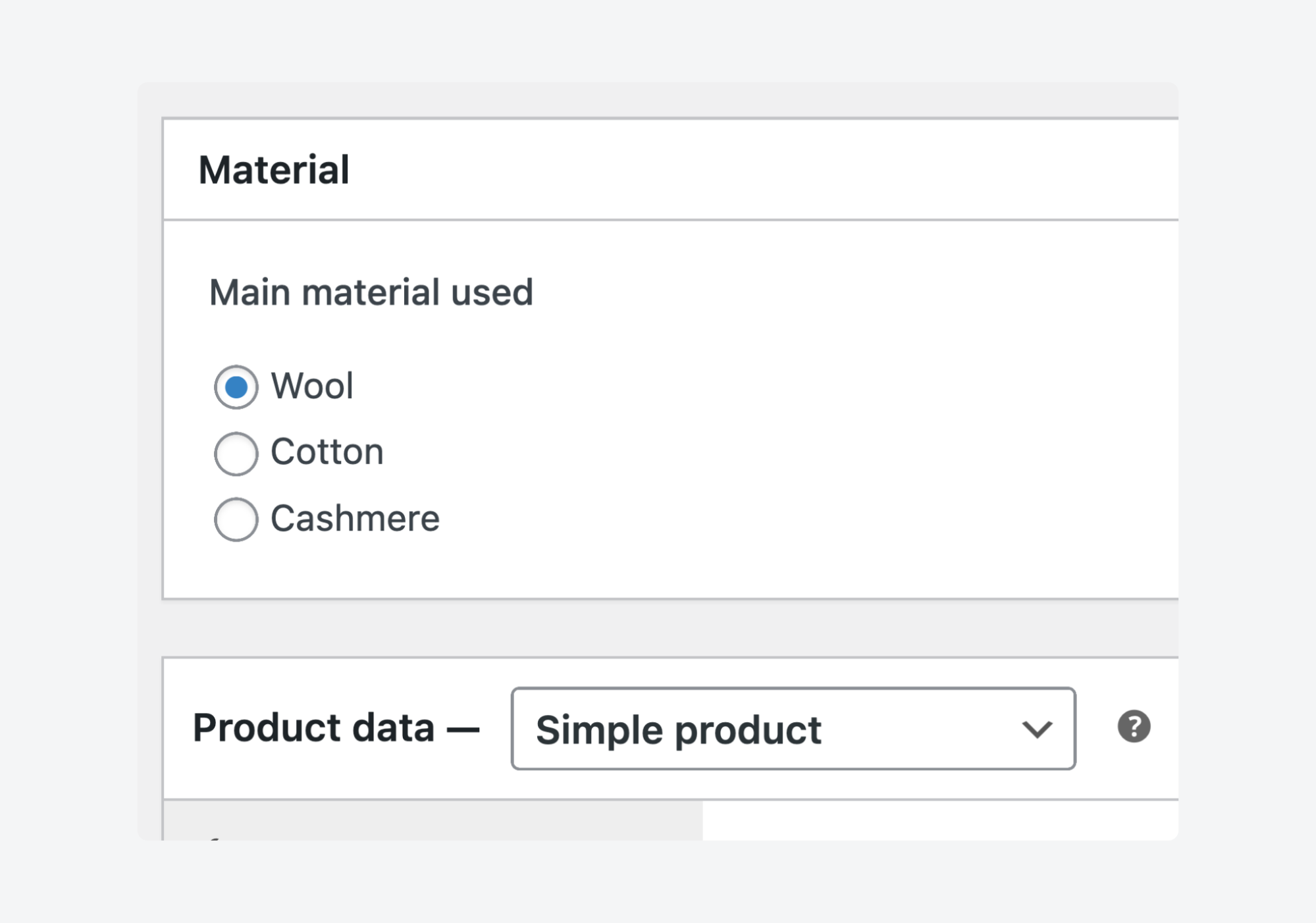
However, none of this data renders automatically on the product page, in the cart, or on orders unless you explicitly output it. That’s not a limitation, though. It’s just how backend metadata is supposed to work.
Supercharge Your Website With Premium Features Using ACF PRO
Speed up your workflow and unlock features to better develop websites using ACF Blocks and Options Pages, with the Flexible Content, Repeater, Clone, Gallery Fields & More.
3. Customer-facing add-ons: The inputs buyers fill out on the product page
Add-ons are fields that the customer fills in before adding a product to the cart. Text inputs for engraving, dropdown selectors for gift wrapping, and file uploads for custom prints.
In contrast, here’s the same materials field but on the frontend for customer input:
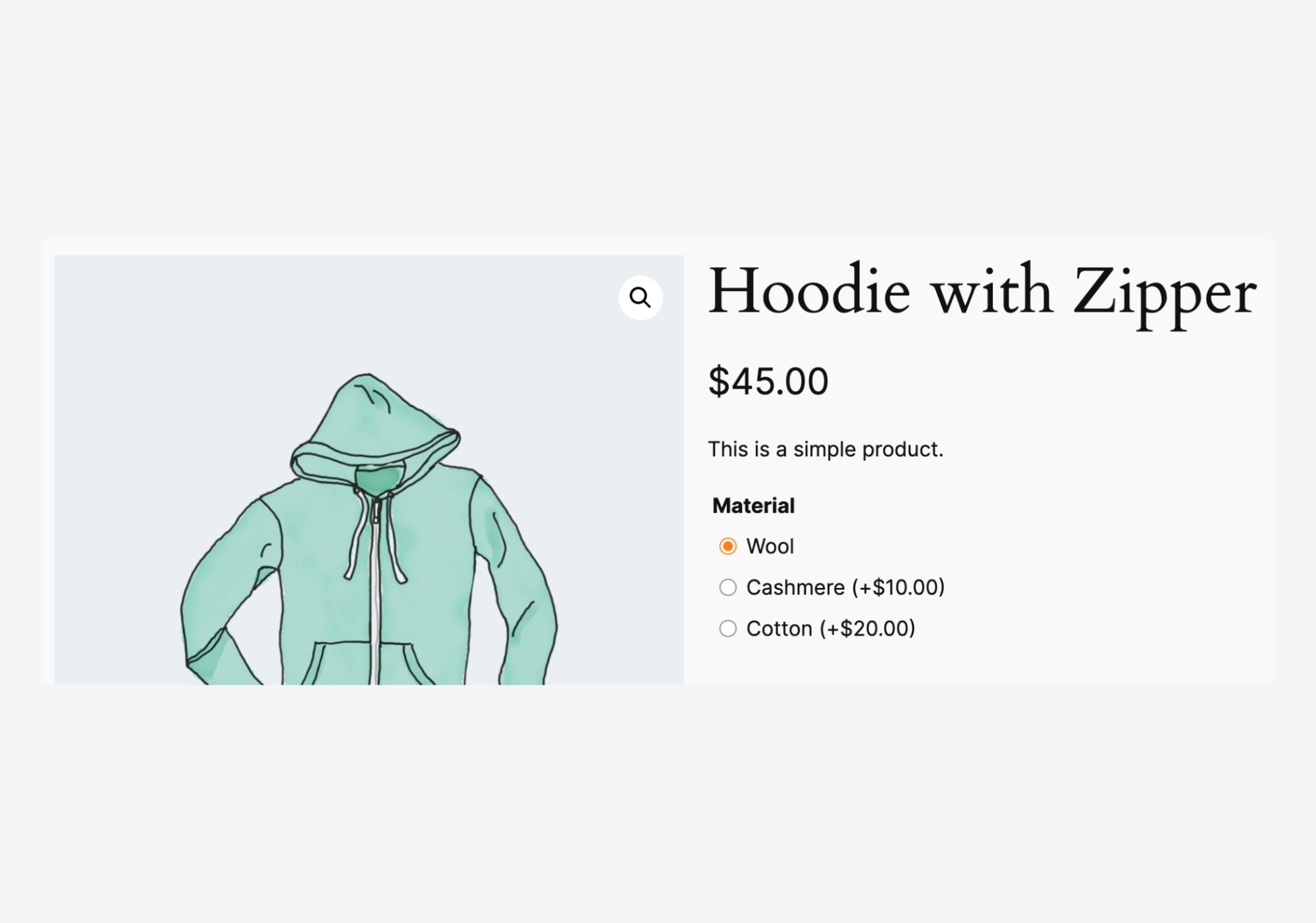
These inputs modify the price, validate on submission, persist through cart and checkout, attach to the order, and appear in admin and email notifications. The entire chain is automatic.
ACF cannot do this. It’s not meant to.
It has no integration with WooCommerce’s pricing calculations, cart item data storage, or order line item meta. You could build that pipeline with custom code, but you’d be rebuilding what add-on plugins already handle a lot better.
Dedicated product add-on plugins exist specifically because this workflow requires tight coupling with WooCommerce’s transactional layer.
Two WooCommerce product data paths
Every piece of custom product data belongs to one of two paths:
- Backend product information.
- Customer inputs.
Problems start when you treat them as one system. Keep them separate and each tool works reliably.
Path A: Backend product information you control and display
Staff enter this data in the admin. It describes the product. Things like specs, compliance info, sourcing details, or care instructions.
Nothing here is automatic. You create the field, enter the value, then write the output logic. If you want it on the product page, you hook into a template or use a page builder. If you want it copied into orders, you write additional code to capture it at checkout. Each step is independent.
ACF is designed specifically for this path. It gives you structured field groups with location rules, straightforward editor layouts, and repeatable data patterns. It improves consistency across products and makes the admin easier for non-technical editors to use.
Supercharge Your Website With Premium Features Using ACF PRO
Speed up your workflow and unlock features to better develop websites using ACF Blocks and Options Pages, with the Flexible Content, Repeater, Clone, Gallery Fields & More.
Path B: Customer inputs that affect price and flow into orders
Customers enter this data on the product page before adding to cart. It modifies the price, passes through checkout, attaches to the order, and appears in admin screens and emails. That entire chain is handled automatically by dedicated plugins like Product Add-Ons for WooCommerce, also built by the WooCommerce team.
Product add-on plugins render inputs on the frontend, apply pricing rules, validate submissions, and persist everything through WooCommerce’s transactional layer without custom code.
ACF doesn’t natively connect to any part of this pipeline. It can’t adjust prices. It can’t attach customer input to cart items. It can’t write data into order line items automatically. Forcing it into this path means building and maintaining every one of those steps yourself.
Path A method: Adding and displaying backend product data
Path A has distinct stages:
- You create fields in the admin.
- Output values on the frontend.
- Optionally copy selected data into orders.
Each stage requires its own implementation. None of them happen automatically.
Adding custom product fields in the admin (code vs plugins)
ACF field groups attach to WooCommerce products through location rules. No core files change. You set the rule to Post Type is equal to Product, and your fields appear in the product editor immediately.
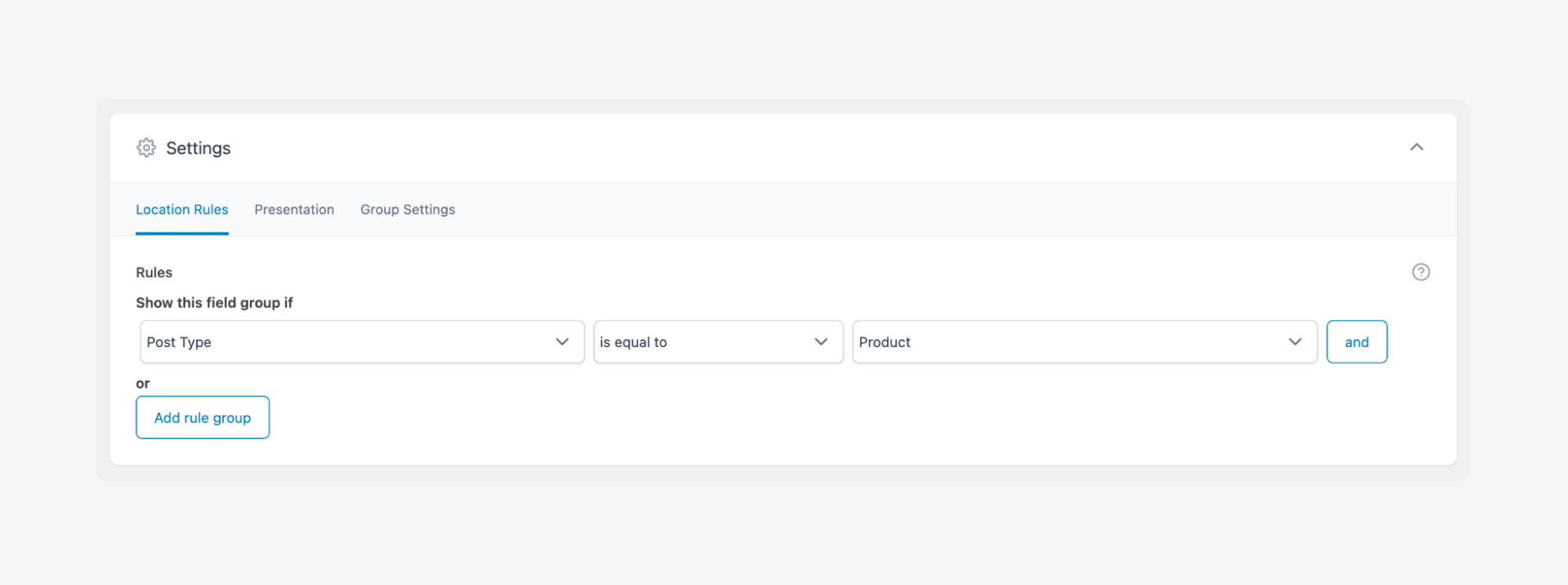
ACF PRO extends this further. Repeater fields let you build structured spec tables where editors add rows without limit. Flexible Content fields let you define modular content blocks, so product descriptions can mix text, feature lists, embedded media, and callouts in any order.
If you prefer code, WooCommerce provides hooks for injecting fields into the product data metabox:
woocommerce_product_options_general_product_dataadds fields to the General tab.- Helper functions like
woocommerce_wp_text_inputandwoocommerce_wp_selectrender native-looking form elements. - Save values on the
woocommerce_process_product_metahook.
One requirement applies to both approaches: use WooCommerce CRUD methods ($product->update_meta_data() and $product->save()) instead of writing directly to postmeta.
This keeps your data compatible with High-Performance Order Storage (HPOS) and future WooCommerce architecture changes.
Displaying backend fields on product pages and product tabs
ACF fields never render on their own. Saving a value in the admin does nothing on the frontend until you write output logic.
You have four options for display:
- Template overrides let you place values anywhere in your theme’s single-product.php hierarchy.
- Hooks like
woocommerce_single_product_summarylet you inject content at specific positions using priority numbers. - Block themes can use ACF’s custom blocks or bound block attributes.
- Page builders like Elementor and Beaver Builder offer dynamic field widgets that pull ACF values without PHP.
For dense specifications, product tabs are the easiest approach. The woocommerce_product_tabs filter lets you register a new tab and populate it with ACF data. This keeps the product page scannable while giving detailed specs a dedicated, organized space.
Whichever method you use, always escape output. esc_html(), esc_attr(), and wp_kses() apply to ACF values the same way they apply to any dynamic content.
When and how backend data should appear in cart and orders
Backend product fields do not flow into cart or orders. This is by design. Product metadata, like specs or certifications, is informational. It belongs on the product page, not repeated on every line item.
Sometimes, though, a backend value is operationally relevant. A lead time, a warehouse location, or a compliance code might need to travel with the order. For those cases, two hooks handle the pipeline:
woocommerce_get_item_datadisplays additional data in the cart and checkout. It’s a display filter only and doesn’t save anything.woocommerce_checkout_create_order_line_itemwrites meta to the order line item, where it persists in the database and appears in admin order views and email notifications.
Be selective about what you copy. Pushing every ACF field into order meta creates clutter and adds unnecessary database writes. Capture only what warehouse staff and fulfillment systems genuinely need on the order.
If you find yourself writing code to capture customer-entered data at this stage, stop. That’s a signal you need Path B, not more hooks for ACF.
Supercharge Your Website With Premium Features Using ACF PRO
Speed up your workflow and unlock features to better develop websites using ACF Blocks and Options Pages, with the Flexible Content, Repeater, Clone, Gallery Fields & More.
Path B method: Where product add-ons make the most sense
Product add-ons exist because customer input that modifies pricing needs direct access to WooCommerce’s transactional pipeline.
Rendering a field on the product page is only the first step. That input has to adjust the price, validate before reaching the cart, persist through checkout, attach to the order, and appear in admin screens and email notifications.
Every step is tightly coupled to WooCommerce internals – a fundamentally different job from storing and displaying structured product metadata.
Should you use ACF for customer input and price logic?
It’s technically possible. ACF can collect frontend input with custom code to render fields outside the admin, but that’s where the easy part ends.
Pricing logic requires separate hooks to intercept WooCommerce’s price calculations. Cart storage requires filtering woocommerce_add_to_cart_item_data to attach input to the cart item array. Order capture requires hooking into woocommerce_checkout_create_order_line_item to write persistent order meta. Display in emails and admin screens requires yet another layer.
Each piece works independently. If one breaks during a WooCommerce update, pricing can also fail or order data can disappear. You’re maintaining a custom transactional pipeline across multiple hooks, none of which fall within ACF’s design scope or update cycle. Neither the ACF nor WooCommerce support teams will help debug it.
How product add-ons handle pricing, validation, and order data automatically
Add-on plugins render customer-facing inputs directly on the product page without template overrides or custom PHP.
Because these plugins are built exclusively for these pipelines, configuration is straightforward even for non-technical users. It’s the same philosophy as ACF, only from the other side.
Here’s what Product Add-Ons for WooCommerce looks like when creating a global add-on:
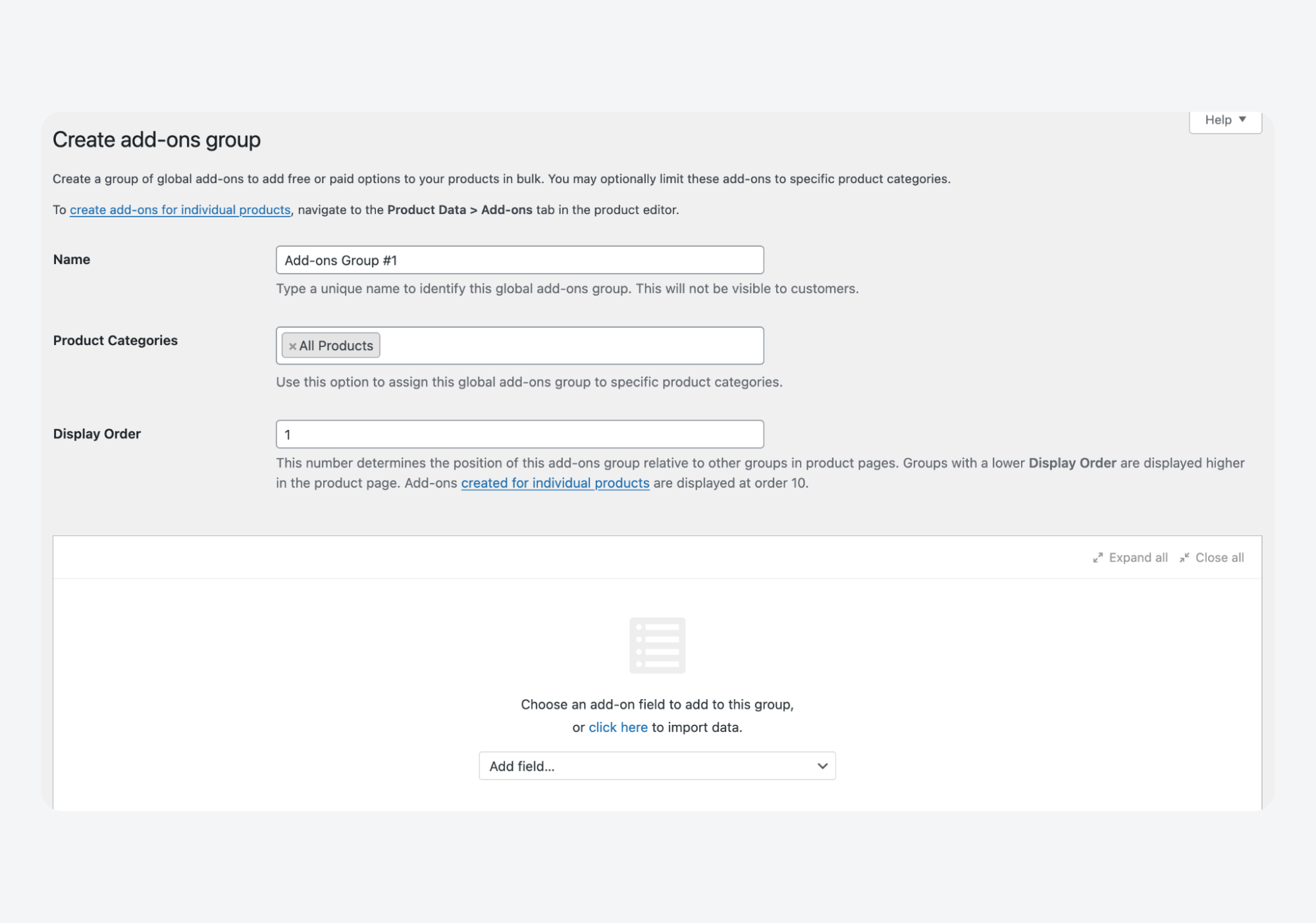
Pricing rules are built into the field configuration: fixed fees, percentage-based adjustments, quantity-dependent pricing, and conditional logic that shows or hides options based on other selections. Validation runs before the item enters the cart, catching invalid submissions early rather than surfacing them as order errors.
Once submitted, customer data flows automatically through cart, checkout, order storage, admin screens, and email notifications. No additional hooks at any stage.
Global rules let you apply the same fields across multiple products or entire categories, eliminating repetitive configuration for options like gift wrapping or rush processing.
ACF and add-ons coexist without conflict. ACF manages backend product data. Add-ons manage customer-facing inputs that affect pricing and orders. Each stays in its own lane.
Variation-specific data and advanced scenarios
Variable products make both data paths harder. ACF and add-on plugins each handle variations, but with different levels of native support. Set realistic expectations before you build.
Backend variation metadata and dynamic frontend display
ACF can store metadata on individual variations. You set a field group’s location rule to Post Type is equal to Product and enable it at the variation level. Each variation then gets its own set of fields in the admin.
The limitation is on the frontend.
When a customer selects a different variation from the dropdown, WooCommerce swaps price and stock data via AJAX. ACF values are not part of that swap. The page doesn’t know to update your custom fields when the selection changes.
Making this work requires custom JavaScript. You need to listen for the found_variation event, fetch the correct ACF values for the selected variation, and inject them into the page.
Some page builders and specialized WooCommerce add-ons handle this natively. Out of the box, however, ACF has no variation-switching behavior.
Variation-aware customer options and conditional logic
Path B handles this more elegantly. Many product add-on plugins support variation-based conditions as a built-in feature. You can show a field only when a specific variation is selected, change available options per variation, or apply different pricing rules depending on the customer’s choice.
This conditional logic runs on the frontend without custom JavaScript. The plugin listens for variation changes and updates visible fields automatically. It’s the same transactional pipeline described in Path B, extended with variation awareness.
If your customer-facing inputs depend on which variation is selected, an add-on plugin will save significant development time compared to building that interaction layer manually with ACF and custom scripts.
Keeping custom product data maintainable and future-proof
Getting custom fields working is one step. Keeping them stable through updates, migrations, and team changes is another. A few structural decisions early on prevent most long-term problems.
Performance considerations and common pitfalls
Avoid loading heavy ACF fields in shop loops. Repeater and Flexible Content fields trigger multiple database queries per product. On an archive page rendering 20 or more products, that multiplies fast. Reserve complex field types for single product pages where only one product loads at a time.
Keep the product editor manageable. Scope field groups tightly using location rules so editors only see fields relevant to the product type they’re working on. Use ACF’s tab and group layout fields to organize sections within the editor. An overwhelming edit screen leads to data entry mistakes.
Store all customizations in a child theme or a site-specific plugin. Template overrides, hook callbacks, and field group PHP exports all belong in version-controlled code, not the functions.php of a parent theme that will be overwritten on the next update. A dedicated plugin is often better because it decouples your custom logic from any particular theme.
HPOS compatibility, updates, and support boundaries
ACF PRO is compatible with WooCommerce’s High-Performance Order Storage. Product meta continues to work as expected with HPOS enabled. However, any custom code that writes order-related data must use WooCommerce’s CRUD APIs. Direct calls to update_post_meta on orders will break under HPOS because orders are no longer stored as posts.
WooCommerce support does not cover custom code or ACF configurations. If something breaks in your field setup or display logic, that’s outside their scope. You’ll need to debug it yourself or work with a developer.
ACF is actively maintained by WP Engine, so you can expect updates and security patches to ship regularly.
Choosing the right path and stabilizing your data flow
The confusion around WooCommerce custom product data comes from treating two separate jobs as one. Once you split them, the decisions are straightforward.
Use ACF for backend product data. Specs, certifications, technical details, compliance information. Fields that your team manages in the admin and deliberately outputs on the frontend. ACF gives you the structure, editor experience, and field types to do this reliably.
Use a product add-ons plugin for customer-facing inputs. Anything the buyer fills in, anything that changes the price, anything that needs to travel automatically through cart, checkout, and order emails. That’s a transactional job, and it belongs in a tool built for WooCommerce’s transactional layer.
The two paths coexist without conflict. ACF handles product information. Add-ons handle product customization. Run both on the same store, and each operates at full strength in its own domain.
Download ACF and start building structured product data that works the way WooCommerce expects.




For plugin support, please contact our support team directly, as comments aren't actively monitored.