
Key points:
- Headless WordPress separates content management (the “body”) from the presentation layer (the “head”), using an API to bridge the two (the “neck”).
- Performance gains are significant but conditional; they depend on choosing the right rendering strategy (like SSG or ISR) rather than the architecture alone.
- Decoupling breaks any plugin that relies on the WordPress theme layer (page builders, many forms), shifting that functionality to custom frontend development.
- Moving to a headless stack typically increases build costs and maintenance complexity, requiring a team with expertise in both PHP and JavaScript.
- Headless is ideal for high-traffic, multi-platform projects, but can be viewed as over-engineering for standard marketing or brochure websites.
You might have noticed that the term “headless WordPress” keeps showing up in client pitches, job listings, and conference keynotes. But most explanations fall into one of two camps: Endless hype from vendors who just want you on their platform, or dense architectural deep-dives that assume you spoke your first words in the GraphQL language.
Neither is particularly useful when you’re trying to make an actual decision for a real project.
To make the process a bit less painful, we’ll cover some important questions:
- What headless WordPress®1 architecture looks like in practice.
- How the REST API and GraphQL connect your frontend to your content.
- Which plugins survive the transition (and which don’t).
- And the rendering strategies that determine whether you actually get the performance gains everyone promises.
It’s written for developers and technical leads evaluating headless for a current project, and for the decision-makers who want to actually understand what they’re approving.
What is headless WordPress?
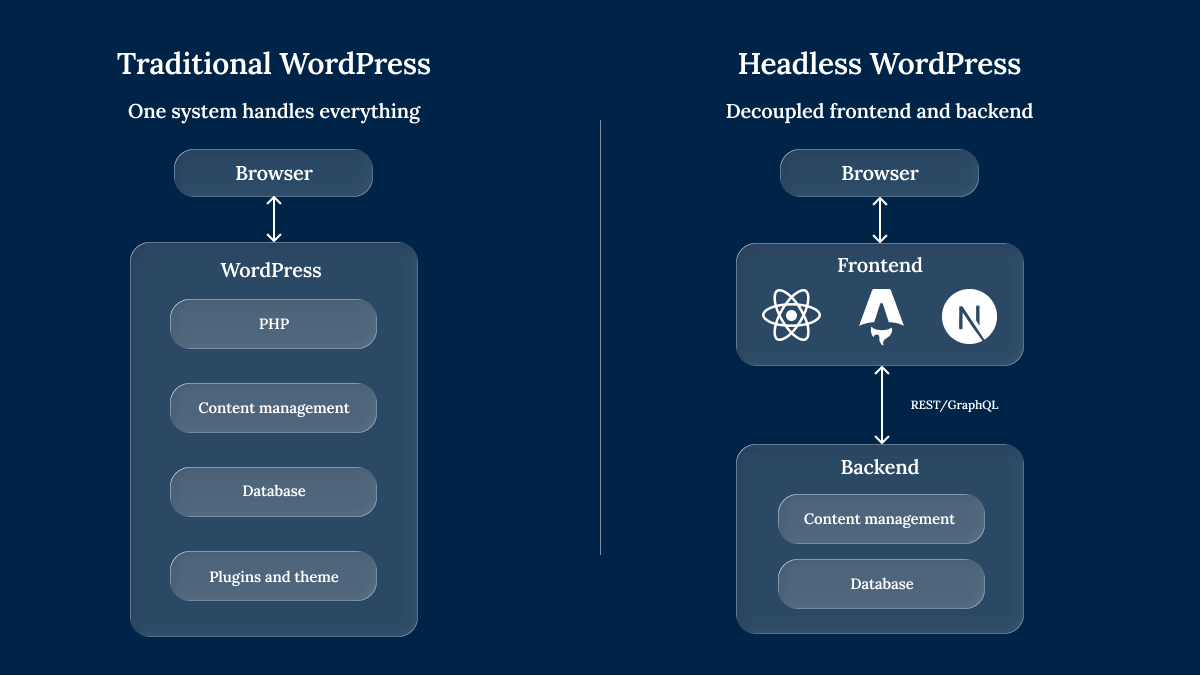
In a traditional WordPress® setup, everything happens in one place.
- A visitor’s browser sends a request.
- PHP processes it through the template hierarchy.
- Queries the database.
- Merges the content with your active theme.
- Returns a fully rendered HTML page.
The backend and frontend are a single, tightly coupled system, and headless WordPress® breaks that coupling.
The backend – wp-admin, your content, user roles, media library – stays exactly where it is. WordPress® still does what it’s always done well: Manage content. But instead of rendering pages through a theme, it exposes that content as structured JSON through an API.
A separate frontend application, built in whatever JavaScript framework suits the project, fetches that JSON and handles all the rendering independently.
You might think of it this way:
- The body: WordPress® manages content, users, and media.
- The neck: The REST API or GraphQL delivers structured data.
- The head: A frontend framework (React, Next.js, Astro) renders the pages visitors actually see.
For editors, nothing changes on the day-to-day. The dashboard, field groups, and media library are all still there, still familiar. The shift is entirely in how that content travels from wp-admin to someone’s browser.
What’s the difference between decoupled and headless?
You’ll see these two terms used interchangeably across most articles on this topic. They’re closely related, but there’s a useful distinction worth understanding.
- Fully headless: WordPress® plays no role in rendering the public-facing site. Content is delivered exclusively via API to a completely separate frontend application.
- Decoupled: WordPress® and the frontend are separated to some degree, but WordPress® might still render parts of the site while also exposing APIs for other applications – a mobile app, an interactive component, or a digital kiosk.
💡 The short version: All headless sites are decoupled, but not all decoupled sites are fully headless.
Understanding the difference matters because many teams assume that headless is the only way to incorporate API-driven content delivery. In reality, a hybrid model – where WordPress® handles most publishing while selectively exposing APIs for specific use cases – often delivers what teams need without the full operational overhead.
ACF’s REST API integration docs show how field groups map directly to named JSON properties, giving frontends clean, reliable data to consume.
Supercharge Your Website With Premium Features Using ACF PRO
Speed up your workflow and unlock features to better develop websites using ACF Blocks and Options Pages, with the Flexible Content, Repeater, Clone, Gallery Fields & More.
How the REST API and GraphQL connect your frontend to WordPress
Once you’ve separated the frontend from WordPress®, the two need a way to talk to each other. That’s where the API layer comes in, and you have two main options.
The REST API: built in and ready to go
WordPress® ships with a REST API out of the box. It exposes endpoints for posts, pages, media, and more – no plugins required. Custom post types and taxonomies can also be exposed, though they need to be registered with REST support explicitly.
The trade-off is in how data comes back. REST endpoints return fixed data shapes, which means you’ll often get more fields than you need (over-fetching) while still missing related data like author details or taxonomy terms (under-fetching). That leads to multiple round-trip requests to assemble a single page’s worth of content.
WPGraphQL: ask for exactly what you need
WPGraphQL is a free plugin that adds a GraphQL endpoint to WordPress®, letting your frontend request the exact fields it needs in a single query. No extra data downloaded or extra round-trips needed.
This can improve performance. In WPGraphQL’s own benchmarks, a 100-post query returned 335 KB over 7.91 seconds via REST, compared to just 6.4 KB in 67 ms via GraphQL.
💡 Which should you choose? REST is the simpler starting point for smaller projects or teams that haven’t worked with GraphQL before. WPGraphQL becomes the stronger choice once you’re dealing with complex content relationships, nested data, or high-volume queries where payload size and request count matter.
Where ACF fits into the API layer
This is where Advanced Custom Fields (ACF®) enters the headless workflow. ACF fields appear in REST responses under a dedicated acf JSON namespace, enabled with a single toggle per field group in the Group Settings panel.
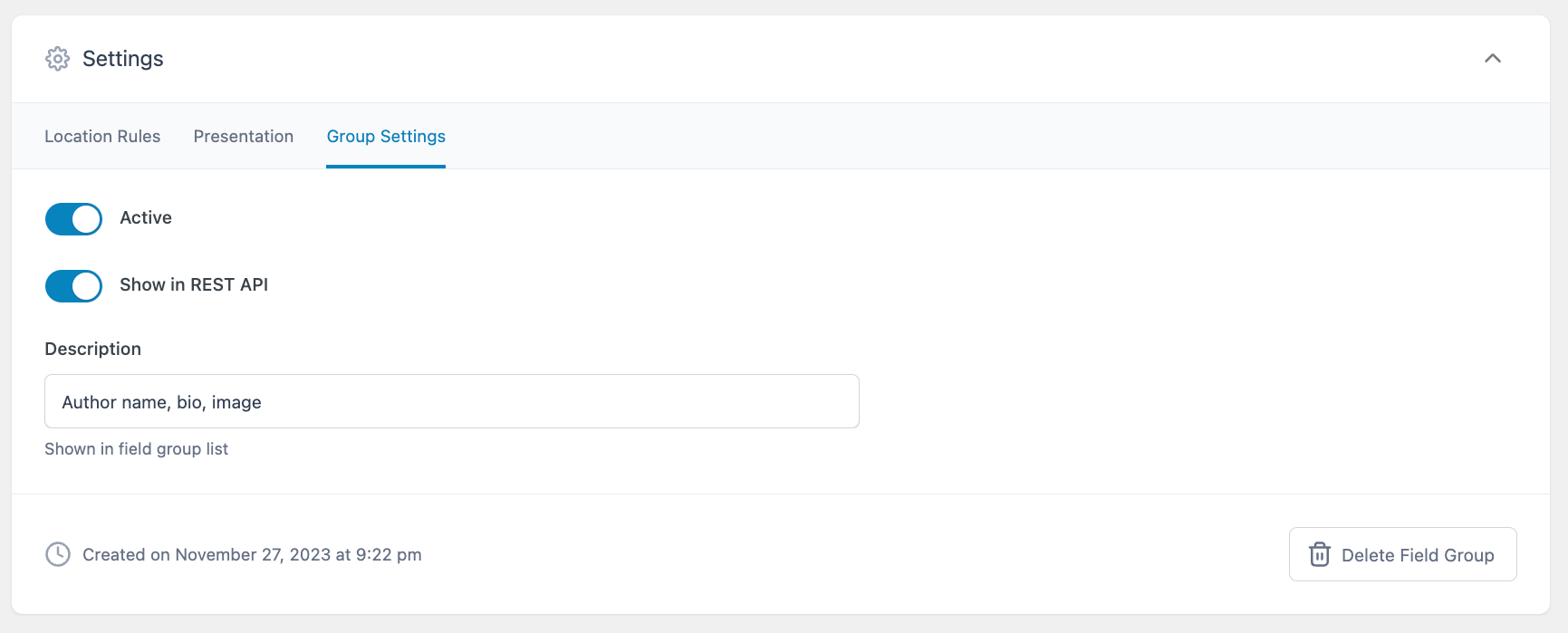
Developers can scope responses further using _fields with nested properties like acf.headline and acf.author_bio, which typically avoids any need for custom register_rest_field() code.
For GraphQL-based stacks, a common setup looks like this:
- WPGraphQL as the data layer.
- ACF for structured content modeling.
- WPGraphQL for ACF to expose those fields in the GraphQL schema.
- WPGraphQL Yoast SEO addon for SEO metadata in queries.
Rendering strategies that determine your site’s performance
Going headless doesn’t automatically make your site faster. That claim only holds under specific conditions, and the rendering strategy you choose is one of the biggest factors.
Static site generation (SSG)
Every page is pre-built at build time into static HTML files, then served directly from a CDN. This is where headless performance gains are most real – excellent page loads and strong Core Web Vitals scores.
There is a catch, however: Every content change requires a rebuild. For a 50-page marketing site, that’s trivial. For a site with thousands of pages, rebuilds can take a lot longer, and even if your editorial team publishes frequently, that delay adds up fast.
Server-side rendering (SSR)
HTML is generated on the server fresh for each request. This works well for frequently updated content and keeps things SEO-friendly since search engines receive fully rendered pages.
But SSR adds server load, and if your API calls aren’t properly cached, SSR can actually perform worse than a traditional WordPress® site running Varnish or NGINX caching. More moving parts don’t always mean more speed.
Incremental static regeneration (ISR)
ISR, popularized by Next.js, tries to give you the best of both worlds. Pages are pre-generated statically, but when content updates, individual pages regenerate in the background – no full rebuild needed.
It works through either time-based revalidation (regenerate every n seconds) or on-demand revalidation (trigger a rebuild when a specific post updates). For most headless WordPress® projects, ISR is the sweet spot between SSG speed and content freshness.
The framework landscape
So, what are your options? Here’s a quick rundown
- Next.js has become the default choice for headless WordPress® projects because it supports SSR, SSG, and ISR in a single framework.
- Astro is gaining traction for content-heavy sites since it ships minimal JavaScript by default.
- Gatsby was an early favorite but has declined significantly after Netlify’s acquisition and the sunsetting of Gatsby Cloud.
That said, the framework matters less than the rendering strategy behind it.
A poorly configured Next.js site using client-side rendering will underperform a traditional WordPress® site with basic page caching. The architecture isn’t magic – the decisions you make within it are what determine the outcome.
The modern best practice is hybrid rendering: Use static generation and caching where possible, ISR or revalidation for CMS content, and SSR only where request-time data is truly needed.
What you gain and what you lose by going headless
One question comes up almost every time headless WordPress® enters the conversation: Is it free?
WordPress® itself is free. WPGraphQL is free. Most frontend frameworks are free. But hosting two separate environments, building a custom frontend, and maintaining the whole setup over time – that costs real money and real developer hours. Whether headless is “free” depends entirely on whether you’re asking about the software or the project.
The real benefits
Every advantage of headless WordPress® comes with a “when” attached to it. Here’s what you gain – and what needs to be true for each benefit to materialize.
Performance that earns its reputation
SSG pre-rendering plus CDN delivery can produce excellent page loads and a strong starting point for Core Web Vitals scores. But as covered in the rendering strategies section above, this is conditional. The “headless is faster” claim only holds when the rendering strategy is right. Uncached SSR with live API calls on every request won’t outperform a well-optimized traditional WordPress® stack.
Omnichannel publishing from a single content store
This is where headless architecture creates genuinely new capability, not just a faster version of something you could already do. One WordPress® backend can feed a website, a mobile app, digital signage, email systems, and any other channel from a single content store. Content creators enter data once in wp-admin, and it’s available everywhere via API.
A more nuanced security picture
Security can improve because the public-facing site is no longer rendered through WordPress® themes. But wp-admin access, login routes, XML-RPC, and API endpoints still need explicit hardening. The overall system also introduces new attack surfaces: API endpoints, build pipelines, and frontend dependencies all need their own security attention.
Developer freedom on the frontend
No PHP constraint on the presentation layer. Teams choose their own framework, component libraries, and deployment tools. Developers already working in React or Vue don’t need to context-switch into WordPress® theme PHP.
The honest caveat: Every one of these benefits requires the technical capacity to build and maintain the headless setup. For a five-page brochure site, traditional WordPress® with page caching delivers comparable speed without the overhead.
The real costs
As great a system as it can be, the drawbacks of headless WordPress® are specific, structural, and worth understanding before you commit.
Your plugin ecosystem splits into two
Not every WordPress® plugin survives the transition to headless, but thankfully, there’s a clear dividing line.
Backend plugins that manage data within WordPress® and expose it via API continue working normally. ACF, Yoast SEO, and WooCommerce all fall into this category, though WooCommerce deserves an asterisk. Powering a headless storefront is possible, but cart logic, checkout flows, session handling, and extension compatibility require significantly more engineering than a standard WooCommerce theme.
Frontend plugins (anything that injects code into the rendered page) break or become irrelevant entirely:
- Page builders (Elementor, Divi).
- Caching plugins (WP Rocket).
- Most contact form plugins.
- Live chat widgets.
- Anything hooking into
wp_head()orwp_footer().
Themes, the customizer, and visual design systems? Gone. The functionality they provided now lives in your custom frontend, and rebuilding it is your team’s responsibility.
Supercharge Your Website With Premium Features Using ACF PRO
Speed up your workflow and unlock features to better develop websites using ACF Blocks and Options Pages, with the Flexible Content, Repeater, Clone, Gallery Fields & More.
Editors lose more than they expect
Content creators still work in wp-admin, but the experience changes in ways that catch teams off guard. Real-time page preview disappears because the preview system renders through the theme layer, which no longer exists. The theme customizer is gone. Drag-and-drop visual editing is gone. Making frontend changes without a developer? Also gone.
Tools like Faust.js attempt to restore preview functionality, but implementing reliable content previews across a decoupled stack remains non-trivial.
Two of everything
Going headless means maintaining two hosting environments, two deployment pipelines, two security update cycles, and a team comfortable in both JavaScript and PHP. Managed platforms like WP Engine’s headless platform host both environments under one roof, which reduces this overhead – but doesn’t eliminate it.
The price tag nobody quotes upfront
Codeable cites $25,000 to $100,000 in build costs for headless WordPress® projects. That’s before ongoing expenses such as two hosting bills, API contract maintenance, and the reinstrumentation of analytics, A/B testing, and experimentation tools across a custom frontend.
| Cost category | Traditional WordPress® | Headless WordPress® |
|---|---|---|
| Hosting environments | One | Two (WordPress® + Node.js) |
| Frontend development | Theme customization | Full custom build |
| Preview/editing tools | Built in | Custom implementation |
| Ongoing maintenance | Single stack | Dual stack (PHP + JS) |
| Typical build cost | $5,000–$30,000 | $25,000–$100,000 |
There is a “maintenance nightmare” narrative that circulates in developer communities, and that’s not entirely wrong – it’s just incomplete. It’s a nightmare for the wrong team. If your organization lacks dedicated frontend engineers and DevOps support, the operational burden compounds over time. But for teams with the right skillset, it’s a manageable architectural trade-off, not a cautionary tale.
FAQs about headless WordPress
Can I use WooCommerce with a headless WordPress setup?
Yes, WooCommerce runs as a backend plugin and exposes product, order, and customer data via API. But cart logic, checkout flows, session handling, and extension compatibility require custom frontend engineering – it’s significantly more work than a standard WooCommerce theme.
Will I lose access to the WordPress visual editor?
You keep the block editor in wp-admin for content creation. What you lose is the visual connection between what you edit and what visitors see, since the theme layer no longer renders the frontend.
Do I need a special hosting setup for headless WordPress?
Yes. You need hosting for the WordPress® backend and separate hosting for the Node.js (or equivalent) frontend. Managed platforms like WP Engine’s headless platform combine both under one service.
Is headless WordPress the same as using a headless CMS like Contentful or Strapi?
No. Dedicated headless CMSs are built API-first with no frontend layer at all. Headless WordPress® repurposes a full CMS by disabling its theme rendering. The trade-off: WordPress® offers a mature content editing experience and a massive plugin ecosystem, but carries more architectural overhead than a purpose-built headless CMS.


For plugin support, please contact our support team directly, as comments aren't actively monitored.