
Key points:
- Headless WordPress® uses WordPress® as the content management system and Next.js as the frontend that renders the website.
- Most projects choose between the WordPress® REST API and WPGraphQL, with WPGraphQL generally offering more flexibility for complex content structures.
- ISR (Incremental Static Regeneration) is usually the best rendering strategy for content-driven sites because it combines static performance with near real-time content updates.
- The biggest trade-off of a headless architecture is added complexity, including separate deployments, hosting environments, preview workflows, cache layers, and security considerations.
- A successful headless project starts with a well-structured content model. ACF makes it easy to create and expose structured content, while ACF PRO adds advanced field types like Repeater, Flexible Content, and Options Pages that many Next.js frontends depend on.
Next.js and WordPress®1 work together by using WordPress® as a content management system and Next.js as the frontend that renders the website. WordPress® stores and delivers content through the REST API or WPGraphQL, while Next.js handles routing, design, performance, and user experience.
Moving to a headless setup introduces new decisions around APIs, rendering, previews, caching, and hosting, but don’t worry, because this article has you covered.
You’ll learn how Next.js and WordPress® communicate, when to use REST API or WPGraphQL, how SSG, SSR, and ISR work, where Advanced Custom Fields (ACF®) fits into the data layer, and how to deploy a production-ready stack.
How Next.js and WordPress communicate in a headless setup
In a headless architecture, WordPress® remains the content management system, while Next.js becomes the application that visitors interact with.
For editors, very little changes. They still log in to WordPress, create posts and pages, upload media, manage categories and tags, configure users, and update custom fields. The familiar editorial workflow remains intact because WordPress® is still the source of truth for content.
The difference is that WordPress® no longer renders the public website. Instead, Next.js handles the frontend experience. Routing, page layouts, component rendering, performance optimization, and user interactions all move into the Next.js application. When a visitor loads a page, they’re seeing HTML generated by Next.js rather than a traditional WordPress® theme.
The connection between the two happens through an API. Next.js requests content from WordPress® and then uses that data to build pages. Most projects choose between two approaches:
- WordPress® REST API – typically the simplest option for blogs, marketing sites, and straightforward content structures.
- WPGraphQL – often the better choice when working with complex relationships, custom post types, nested content, or highly customized frontends.
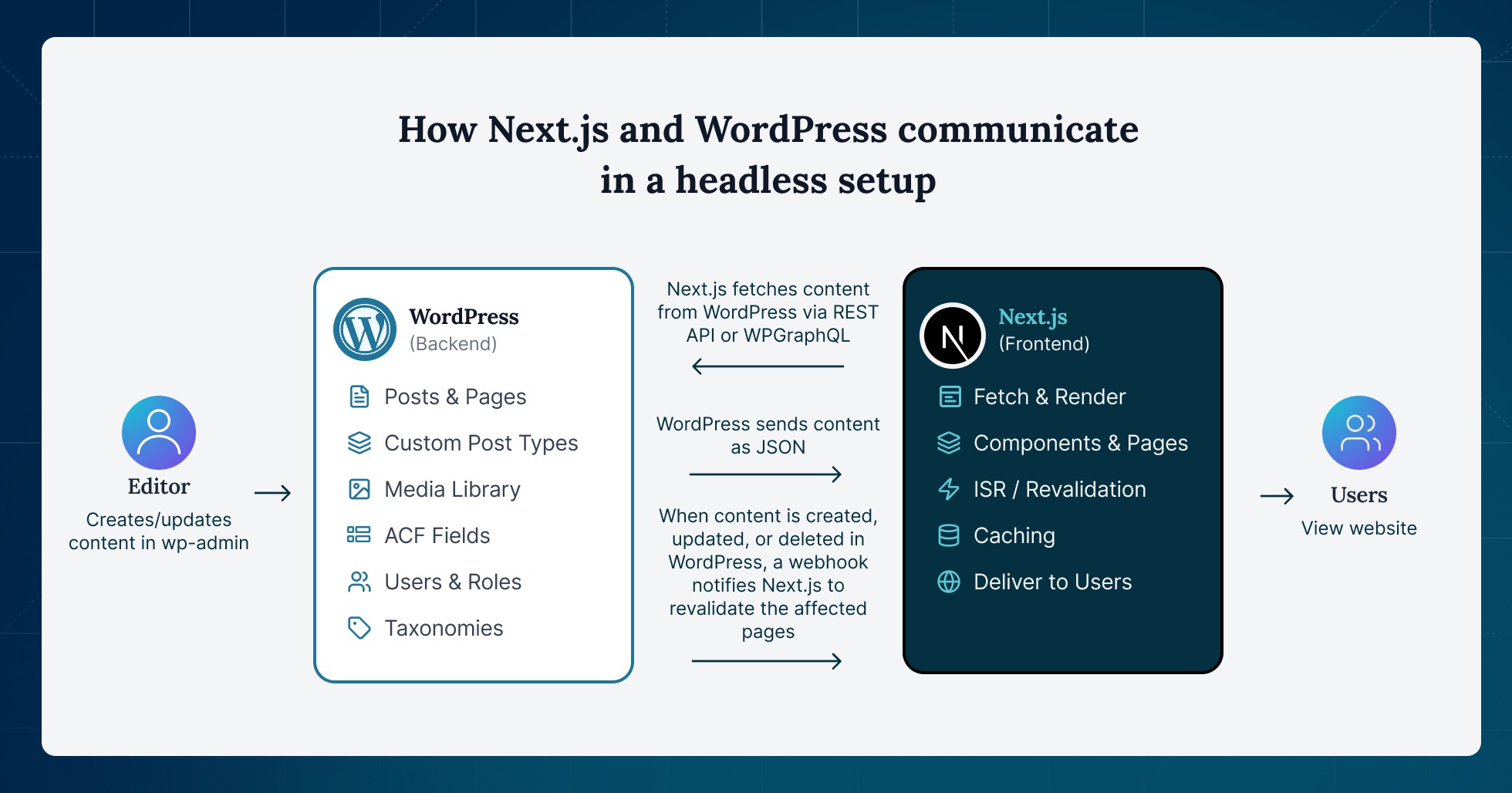
For teams using ACF, ACF field groups can be exposed in REST API responses by enabling Show in REST API in the field group’s settings. The fields then appear under a dedicated acf object in the JSON response, eliminating the need for custom register_rest_field() code and making structured content immediately available to Next.js components.
Other than fetching content, you still need:
- Caching to reduce API requests.
- Webhooks to notify Next.js when content changes.
- Preview functionality to enable editors to review content before it goes live.
- Media handling to ensure images and other assets are delivered efficiently.
- Generate and render SEO metadata through the Next.js frontend.
- Manage redirects outside the WordPress® theme layer.
- Rebuild and maintain XML sitemaps via the frontend application.
Supercharge Your Website With Premium Features Using ACF PRO
Speed up your workflow and unlock features to better develop websites using ACF Blocks and Options Pages, with the Flexible Content, Repeater, Clone, Gallery Fields & More.
The main benefits of decoupling WordPress
Teams usually move to a headless WordPress® architecture for one or more of four reasons:
- More control over the user experience: Decoupling lets WordPress® remain the editorial system while Next.js becomes a dedicated frontend application. Instead of working within the constraints of a PHP theme, frontend teams can build with React, TypeScript, component libraries, design systems, and modern deployment workflows.
- WordPress® becomes a reusable content platform: In a headless architecture, WordPress® becomes a content source rather than just a website backend. Content can power multiple frontends while editors continue using familiar publishing workflows. Guild’s headless rebuild by Athletics is a good example. The project consolidated three platforms into a single WordPress-powered content system with a Next.js frontend, simplifying content management and editorial operations.
- Better frontend performance: Traditional WordPress® sites often generate pages dynamically on every request. Next.js can instead serve many pages as pre-rendered HTML, reducing the amount of work required to deliver content. This can improve page speed, reduce server load, and make traffic spikes easier to handle.
- SEO remains strong in a headless architecture: A Next.js frontend can be just as SEO-friendly as a traditional WordPress® site. Pages still need to render crawlable HTML, metadata must be generated correctly, and URLs should map cleanly between WordPress® and the frontend. Sitemaps, redirects, canonical tags, and structured data also need to be rebuilt outside the WordPress® theme layer, but when implemented correctly, search engines can crawl and index the site normally.
Next.js rendering strategies: SSG, SSR, and ISR
One of Next.js’ biggest advantages is that it supports multiple rendering strategies in the same application. Choosing the right approach affects performance, scalability, infrastructure costs, and how quickly content updates appear after publication.
SSG (Static Site Generation)
SSG works best for content that rarely changes, such as evergreen landing pages, documentation, resource centers, case studies, and older blog posts. Next.js generates these pages ahead of time, caches the HTML, and serves it directly to visitors without asking WordPress® to participate in every request.
The benefit is speed. Because the page already exists before a visitor arrives, the frontend can often respond faster and with less server overhead.
The trade-off is freshness. If an editor updates content in WordPress, the change may not appear until the next build or cache refresh. That makes pure SSG a poor fit for teams publishing frequently unless they also configure some form of revalidation.
SSR (Server-Side Rendering)
SSR generates pages at request time. It works well for authenticated experiences, personalized content, search results, or pages that change too often to cache safely.
For most WordPress® editorial content, SSR should be used selectively. While it guarantees fresh data, it also makes the live site more dependent on WordPress® API latency, server performance, and runtime caching. Every request requires additional work compared to serving a pre-generated page.
ISR (Incremental Static Regeneration)
ISR is usually the best middle ground for WordPress® and Next.js. It allows the site to serve static pages while refreshing content automatically after a defined interval or when WordPress® content changes.
Two common ISR patterns exist:
- Time-based ISR refreshes cached pages after a set period, such as every hour.
- On-demand ISR lets WordPress® trigger revalidation whenever a post is published, updated, deleted, or moved between statuses.
In practice, the workflow looks like this:
- An editor updates content in WordPress.
- WordPress® sends a webhook to a secure Next.js route.
- The route validates a shared secret.
- Next.js revalidates the affected path or cache tag.
- The next visitor receives the regenerated version.
This allows a single content update to refresh without rebuilding thousands of pages:
- Use path-based revalidation when WordPress® can identify the exact URL that changed.
- Use tag-based revalidation when one update affects multiple locations, such as a post page, blog index, category archive, author archive, RSS feed, sitemap, or related-post module.
A production-ready ISR workflow requires more than a publish hook. Teams should map WordPress® content types to frontend routes, secure webhooks, log failures, add retry behavior, and handle slug changes, deleted posts, scheduled publishing, unpublished drafts, and taxonomy updates. As a rule, revalidate the changed page and every page that surfaces it.
For most headless WordPress® projects, the modern best practice is hybrid rendering: use static generation and caching where possible, ISR for CMS content, and SSR only where request-time data is truly needed.
The biggest challenges of headless WordPress with Next.js
Headless WordPress® offers significant flexibility, but it also introduces trade-offs that teams should understand before committing to the architecture.
The WordPress theme layer disappears
Once Next.js becomes the frontend, WordPress® stops being the system that renders the public website. Anything that relied on the theme layer must be rebuilt, replaced, or exposed through an API.
Plugins that manage backend data generally continue to work. However, frontend-focused plugins often become problematic. Page builders, caching plugins, contact forms, live chat injections, and functionality that depends on wp_head() or wp_footer() may break entirely or become irrelevant because the frontend no longer runs through a WordPress® theme.
Editorial previews become more complex
Editors still work in wp-admin, the Block Editor, the Media Library, and ACF field groups. The challenge is that they lose the direct connection between editing content and seeing the final page.
Traditional WordPress® previews assume the theme will render unpublished content. In a headless setup, the frontend lives in Next.js, so preview functionality must be rebuilt using preview routes, authentication, and API access to draft content.
Operating the stack requires more coordination
A traditional WordPress® site is usually one application. A headless site is often two.
That means:
- Two deployment pipelines.
- Two hosting environments.
- Two cache layers.
- Two monitoring systems.
- More coordination during outages and releases.
The architecture can be more powerful, but it is also more operationally demanding.
Security shifts rather than disappears
Removing the public WordPress® theme can reduce part of the attack surface, but new areas require attention. APIs, preview endpoints, webhooks, frontend dependencies, access tokens, deployment secrets, and build pipelines all need proper security controls.
With mature security practices, this can be a net benefit. Without them, the additional complexity can create new risks.
Content freshness becomes a technical concern
Static generation introduces a challenge that traditional WordPress® sites rarely face: content updates are not always immediate.
Without revalidation, changes published in WordPress® may not appear until the next build. This is why ISR and webhook-driven revalidation are so important. They allow specific pages to refresh when content changes, avoiding the need to rebuild the entire frontend while still keeping content reasonably fresh.
Starter templates and frameworks worth knowing about
A starter template can accelerate development, but it does not eliminate the need to design your content model properly. Before choosing one, verify that it supports the features your project actually needs, including the App Router, REST API, or WPGraphQL, previews, ISR or on-demand revalidation, TypeScript, sitemap generation, SEO metadata, custom post types, custom fields, and active maintenance.
Some popular options include:
- next-wp – a strong starting point for simpler REST API-based projects. It provides a modern Next.js foundation without adding unnecessary WordPress-specific abstractions.
- gregrickaby/nextjs-WordPress – a more production-oriented reference for WPGraphQL-based builds. It includes support for custom post types, custom fields, previews, revalidation, search, menus, sitemaps, and SEO features that many real-world projects need.
- Faust.js – best viewed as a WordPress-focused toolkit rather than a starter template. It is particularly useful when a project needs WordPress-specific functionality such as previews, authentication, template hierarchy support, and tighter integration with the Block Editor experience.
The most important takeaway is that starters solve setup problems, not content architecture problems. Whether you’re using REST API, WPGraphQL, or Faust.js, the long-term success of a headless project still depends on how well content is structured inside WordPress.
Hosting and deploying both halves of the stack
A headless WordPress® and Next.js architecture usually creates two deployable applications: the WordPress® backend and the Next.js frontend. How you host those applications affects everything from deployment workflows to support overhead.
The most common approach is to host WordPress® on a managed PHP platform and deploy Next.js separately on a frontend platform such as Vercel or Netlify.
In this model, Next.js typically stores the WordPress® API URL in environment variables and fetches content through the REST API or WPGraphQL. Public content can often be retrieved without authentication, while drafts, previews, private content, and content mutations require a secure authentication layer.
For ISR workflows, WordPress® can trigger Next.js revalidation through webhooks. On Vercel and Netlify App Router deployments, this is commonly handled through Route Handlers. On WP Engine’s Headless Platform, on-demand ISR support currently relies on the Pages Router and API route model through @wpengine/atlas-next, with some App Router limitations.
Operationally, a split architecture often means managing:
- Separate hosting vendors and billing.
- Separate deployment workflows.
- Separate dashboards and monitoring tools.
- Independent dependency and security updates.
- Domain and TLS configuration across multiple platforms.
WP Engine’s Headless Platform takes a different approach by hosting both WordPress® and the Node.js frontend within a single platform.
The platform includes support for Faust.js and WPGraphQL workflows, starter Blueprints, production and staging environments, PR preview environments, automatic builds, and rollback capabilities. It also supports on-demand ISR, though teams still need to configure webhooks and revalidation endpoints.
Neither approach is universally superior. A split architecture typically provides more flexibility, access to Vercel-native Next.js features, and greater control over deployment workflows and infrastructure choices.
A consolidated platform can reduce vendor sprawl, simplify support, and remove some operational complexity, but it also increases dependence on a single vendor’s tooling, deployment model, cache behavior, feature support, and pricing.
Smaller teams often benefit from consolidation because it reduces moving parts. Larger teams or teams with specialized frontend requirements often prefer a split setup.
Whichever model you choose, treat WordPress® and Next.js as one product. Environments, releases, previews, cache invalidation, monitoring, and incident response should be planned and managed together.
Model your content first with ACF, then build the frontend
By this point, you’ve made three key architectural decisions:
- Which API to use (REST or WPGraphQL).
- Which rendering strategy fits your content (SSG, SSR, or ISR).
- Whether to use a split or consolidated hosting model.
The next decision is about how your content is structured in WordPress. Clean API responses start with clean content models. Map your posts, pages, custom post types, and the fields each one requires before building frontend components. The structure you create in WordPress® ultimately becomes the data shape your Next.js application consumes.
This is where ACF shines. ACF makes it easy to model structured content, while ACF PRO adds powerful field types such as Repeater, Flexible Content, and Options Pages that many headless projects rely on.
Explore ACF’s field group resources to create a foundation that scales with your Next.js application.


For plugin support, please contact our support team directly, as comments aren't actively monitored.