
Key points:
- A WordPress® directory website is fundamentally a structured data system built around listings, taxonomies, and custom fields – not just a design template or plugin.
- Dedicated directory plugins are the fastest way to launch because they bundle submissions, filtering, maps, and monetization into one prebuilt system.
- All-in-one directory themes prioritize launch speed and polished design, but they create heavy dependency between the theme, data layer, and functionality.
- Search, filtering, maps, and scalability become the most technically demanding parts of a directory build, especially as listing volume grows.
- ACF gives developers full control over the directory data model, making it a strong fit for custom, scalable, and highly specialized directory websites.
A WordPress®1 directory website is a site that stores and displays structured listing data so visitors can browse, search, filter, and compare entries. The listings themselves can represent businesses, properties, jobs, restaurants, events, or any other repeatable content type.
Building a WordPress® directory website is not difficult. Choosing the right architecture before you start is the real challenge.
There are several ways to build a WordPress® directory website, each with different trade-offs around flexibility, control, scalability, and long-term maintainability. This guide explains what a directory website actually needs under the hood, compares the three main build approaches with real pricing and trade-offs, and walks through how to structure a custom directory with Advanced Custom Fields (ACF®).
Supercharge Your Website With Premium Features Using ACF PRO
Speed up your workflow and unlock features to better develop websites using ACF Blocks and Options Pages, with the Flexible Content, Repeater, Clone, Gallery Fields & More.
What a WordPress directory website actually needs
A directory website is not defined by its design or by the plugin it uses. At the WordPress® data layer, nearly every directory shares the same three structural components:
- A custom post type that acts as the listing container.
- Taxonomies that classify the listings.
- Custom fields that store the listing details themselves.
For example, a restaurant directory might use a “Restaurant” post type, taxonomies for cuisine and location, and custom fields for opening hours, phone number, reservation link, and price range. A real estate directory follows the same pattern, just with different fields like square footage, bedrooms, and neighborhood. A job board swaps those for salary range, employment type, and experience level. The architecture stays the same each time.
The difference between directory tools is what defines and manages this structure. Dedicated directory plugins register the post types, taxonomies, and fields automatically when activated. On the other hand, a custom build with ACF allows you to define those layers manually instead. But both approaches still rely on the same underlying WordPress® content model.
Three ways to build a WordPress directory website
Every directory builder faces the same fork: use a purpose-built plugin, pick a theme with directory features baked in, or define the data layer yourself with custom post types and fields.
Each path handles the architecture from the previous section differently, and the right choice depends on the builder’s technical skills and how much control they need.
1. Dedicated directory plugins
This is the fastest path to a working directory. Plugins like GeoDirectory, Directorist, HivePress, and Business Directory Plugin each register the full directory data model automatically on activation, then layer in front-end submissions, search/filtering, maps, reviews, and monetization features without requiring custom development.
Pricing varies considerably depending on which features are bundled into the core plugin versus sold as add-ons, especially for maps, paid listings, and advanced search.
Vendor dependency is a trade-off here. The directory becomes tied to the plugin’s data structure, templates, and front-end assumptions. If the plugin is ever removed, core directory functionality often breaks with it.
For non-technical builders, or for projects that need submissions, payments, and geolocation features out of the box, using a dedicated directory plugin can be the most practical starting point.
2. All-in-one directory themes
Some builders skip standalone plugins entirely and use a directory theme that bundles both the design layer and the directory functionality into one package. Marketplaces like ThemeForest list hundreds of premium directory themes, including top sellers like ListingPro at $69, Listify at $69, and Listeo at $79.
The appeal is speed. These themes usually ship with prebuilt demos, listing templates, search pages, maps, reviews, and monetization flows already styled and connected together. A polished directory can be online faster than either the plugin or custom-built paths.
The downside is total vendor dependency, just like dedicated directory plugins. The theme controls both presentation and functionality, so if development slows or compatibility breaks, the entire directory stack is affected.
Using an all-in-one directory theme works best for builders who prioritize launch speed and visual polish over long-term flexibility.
3. Custom post types with ACF
The third option is building the directory structure yourself with ACF. Since version 6.1 (the current release is 6.8), ACF’s admin UI has handled custom post type registration, taxonomy registration, and field groups from a single interface.
ACF PRO pricing starts at $49/year for one site, scaling to $249/year for unlimited sites.
This approach gives developers full control over the content model, templates, and front-end architecture – especially valuable for niche directories with unusual filtering, listing logic, or custom field requirements. The directory data stays separate from the design layer, which makes the build far more portable and customizable long term.
Keep in mind that this path requires developer skills. ACF does not include front-end submissions, payment processing, geolocation, proximity search, or monetization features out of the box. It provides the structured data layer, while the developer builds or integrates everything else manually.
Supercharge Your Website With Premium Features Using ACF PRO
Speed up your workflow and unlock features to better develop websites using ACF Blocks and Options Pages, with the Flexible Content, Repeater, Clone, Gallery Fields & More.
How to structure a directory with ACF
For developers who decide ACF is the right architecture, here’s an overview of the implementation.
1. Register your listing post type and taxonomies
The first step is registering a Listing custom post type and its related taxonomies inside ACF. Most directories use at least two taxonomies: one for what the listing is (Category) and one for where it exists (Location). Some directories also add Tags for amenities, features, or attributes.
ACF’s post type and taxonomy UI makes this setup manageable from a single admin interface, including connecting taxonomies directly to the Listing post type.
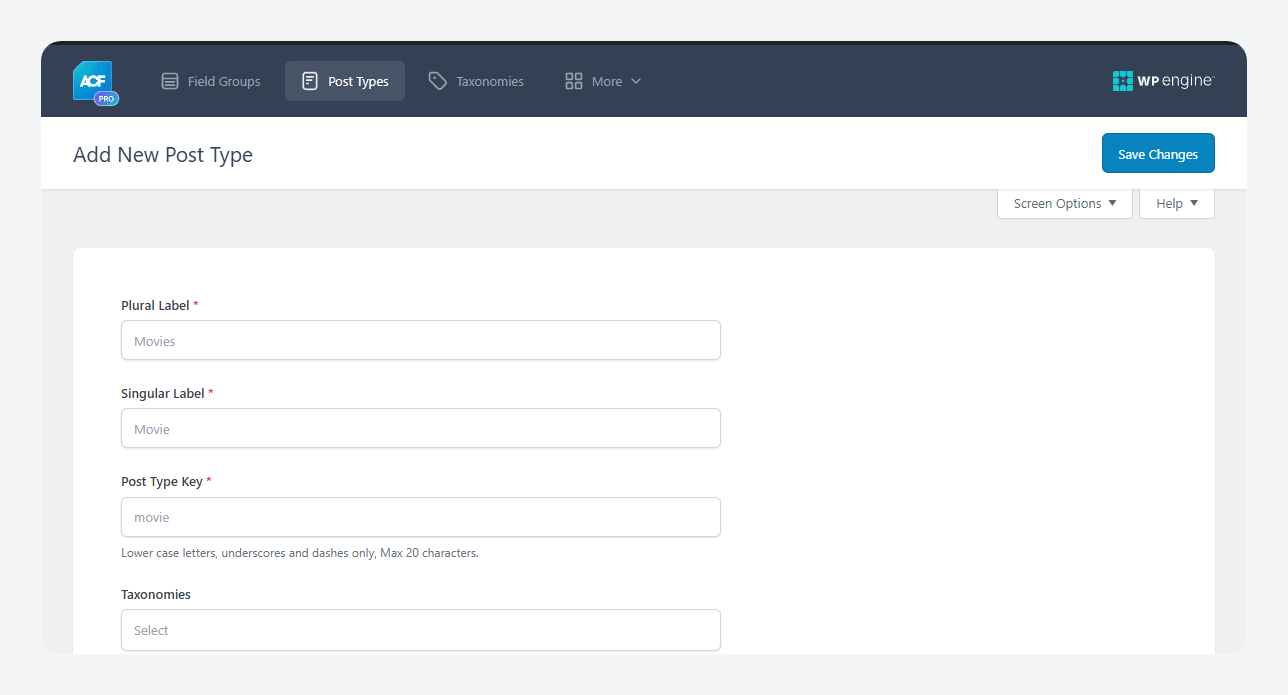
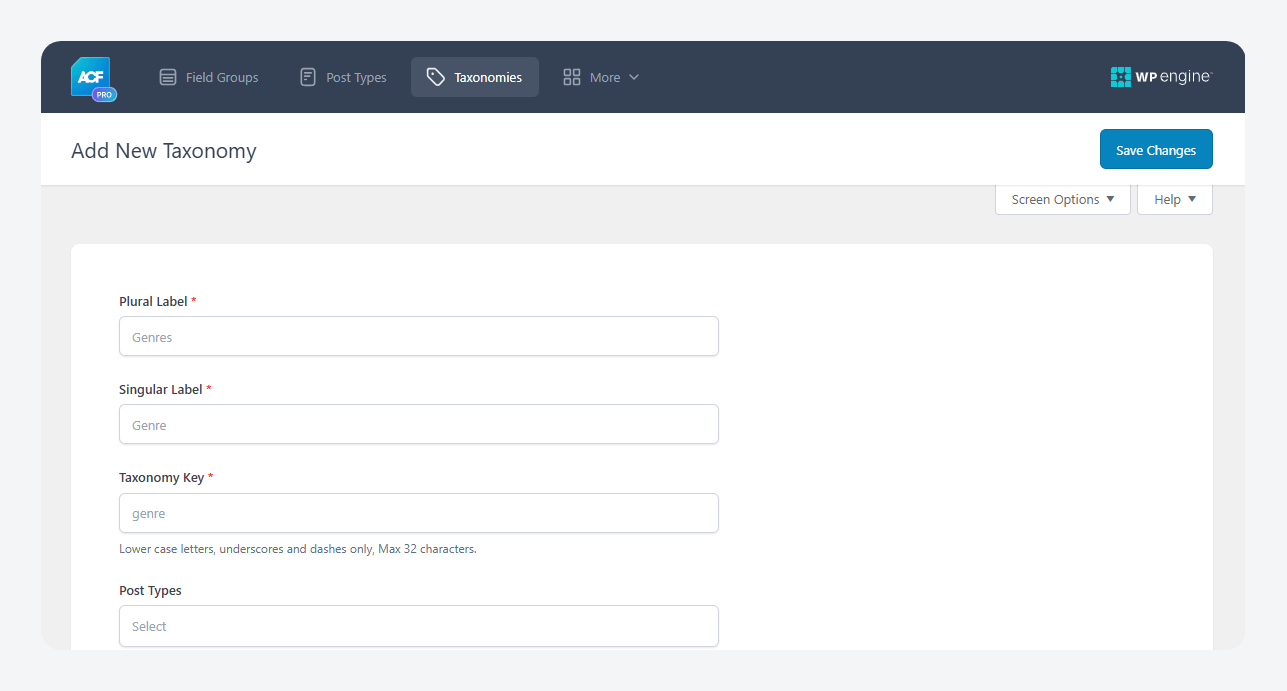
This structure also creates a major SEO advantage. Every public taxonomy-term combination automatically generates an indexable archive page. A directory with fifty cities and twenty categories can theoretically create 1000 searchable landing pages before individual listings are even considered. That structural archive system is one reason directories scale search visibility faster than flat-content sites.
For production workflows, ACF can export post type and taxonomy definitions into native WordPress® PHP registration code, while Local JSON stores the content model as version-controlled JSON files that can move cleanly across development, staging, and production environments.
2. Design field groups for your listing type
With the post type and taxonomies registered, the next step is designing the field groups that define what each listing actually contains.
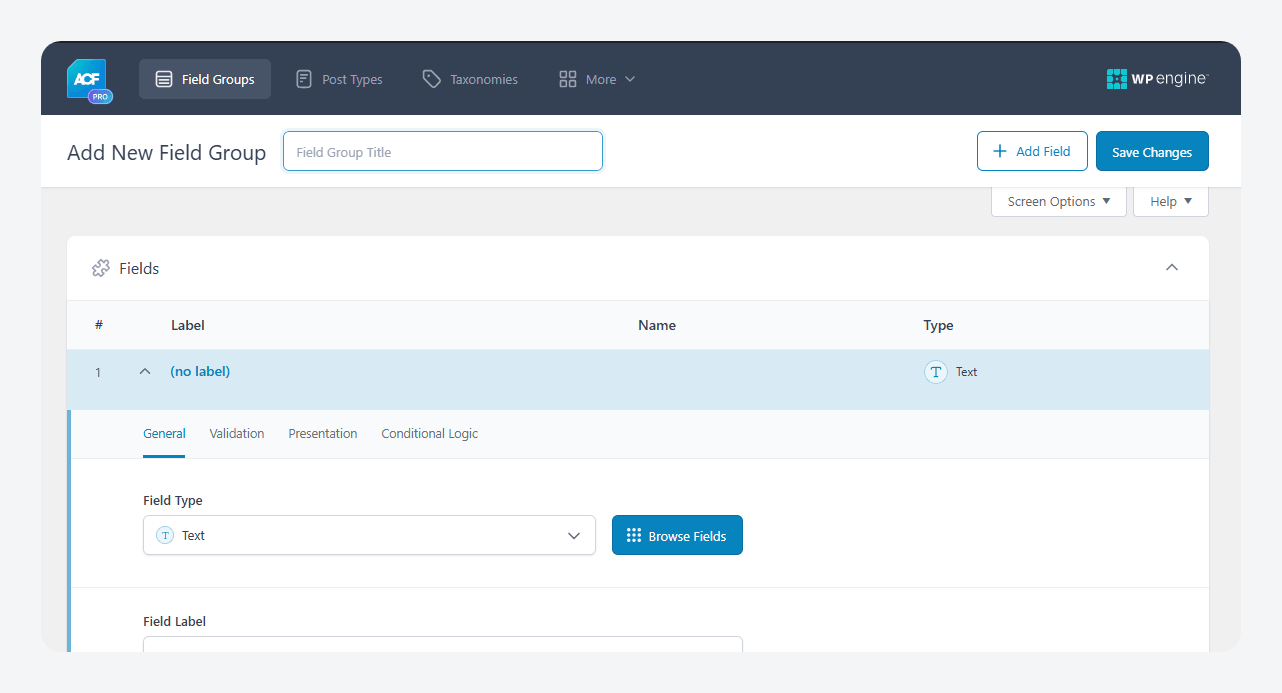
This stage matters more than many builders expect, because the field structure directly determines what visitors can search and filter by later. Poor field planning early on usually creates painful restructuring work once the directory grows.
The exact fields depend entirely on the niche. For example:
- A restaurant directory might use a Select field for cuisine type, a Radio Button field for price range, a Repeater field for opening hours, a Gallery field for menu photos, and a URL field for reservations.
- A real estate directory needs fields like price, square footage, bedrooms, and lot size.
- A job board uses salary range, employment type, and application deadlines instead.
💡 Check out this business listing tutorial using ACF Blocks and the Query Loop Block.
An important balance to plan carefully for is that requiring too many fields discourages submissions from business owners, while requiring too few weakens the directory’s usefulness for visitors. The field structure has to support both usability and listing quality at the same time.
3. Set up search, filtering, and maps
Search and filtering are where directory complexity starts becoming visible at the technical level. By default, WordPress® search does not index custom field values from ACF, so directories usually need additional tooling like:
- FacetWP for dynamic faceted navigation.
- Search & Filter Pro for form-based archive filtering,
- ACF: Better Search for extending WordPress® search into custom field data.
Maps introduce another architectural decision. Google Maps becomes paid at scale because billing applies after the free tier, while OpenStreetMap is free but requires more manual setup. ACF’s Google Maps field stores latitude and longitude coordinates per listing, but advanced features like radius search, proximity filtering, and marker clustering still require extra plugins or custom development.
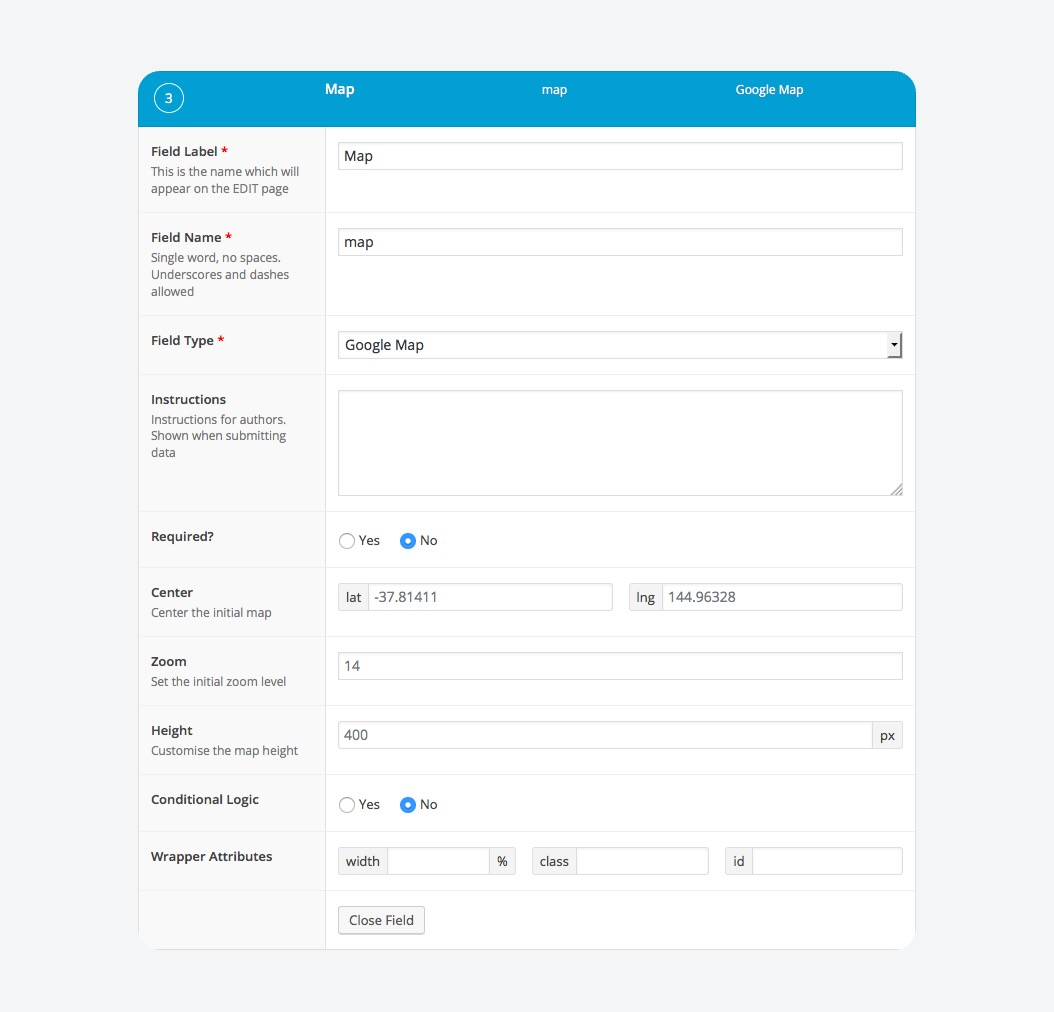
The database limitations also become visible here. Multi-field filtering repeatedly queries the wp_postmeta table, which works well enough for smaller directories but slows as datasets grow. Plugins like FacetWP improve performance by indexing data separately, while larger projects sometimes move field data into custom database tables entirely. This is one area where dedicated directory plugins – especially GeoDirectory – still hold a genuine advantage for location-heavy directories.
Populating your directory before launch
Whether the directory was built with a plugin or with ACF, the next challenge is the same: solving the cold start problem. A directory with zero listings gives visitors no reason to use the site, which means no traffic arrives, which means businesses have little incentive to submit listings themselves.
The solution is seeding the directory before launch. Most successful operators manually add at least fifty to one hundred high-quality listings first, import publicly available niche data through CSV when possible, and combine that with direct outreach to businesses. LaunchPedia, for example, launched with 216 pre-populated listings and reportedly built the directory in under two days with roughly $25 in plugin costs.
Once the directory contains enough content to feel useful, submission workflows become the next decision point. Dedicated directory plugins usually include front-end submission forms natively. The ACF route requires extra tooling like Frontend Admin for ACF or a custom-built submission system.
Monetization timing also matters more than many new operators expect. Most successful directories build traffic and listing volume before introducing paid tiers. Common monetization models include featured listings, memberships, booking commissions, lead generation, display ads, and paid submissions, but charging too early often suppresses growth faster than it generates revenue.
Get started with ACF: The right way to build a WordPress® directory website ultimately depends on how much control the project needs over its data model. For developers who need portability, version-controlled content models, custom filtering logic, and freedom from vendor lock-in, ACF provides the structured foundation to build exactly the directory the project requires.
Ready to build your directory your way? Start with ACF today.
Supercharge Your Website With Premium Features Using ACF PRO
Speed up your workflow and unlock features to better develop websites using ACF Blocks and Options Pages, with the Flexible Content, Repeater, Clone, Gallery Fields & More.
FAQs about WordPress directory sites
What security risks come with accepting user-submitted listings?
Directories have a larger attack surface than standard WordPress® sites because they accept user-generated content. The biggest risks are malicious file uploads, spam submissions, and unsafe user input inside custom fields. The core protections are restricting allowed file types, scanning uploads, sanitizing all submitted field data, and rate-limiting forms to reduce automated spam and abuse.
Will a directory plugin work with my existing WordPress theme?
Compatibility depends on the plugin. For instance:
- GeoDirectory markets itself as compatible with most themes but still relies on standard HTML5 theme structures.
- HivePress works best with its own ecosystem of themes.
- ACF avoids most compatibility issues entirely because it handles structured data, not front-end presentation. The developer controls the templates separately.


For plugin support, please contact our support team directly, as comments aren't actively monitored.