
Description
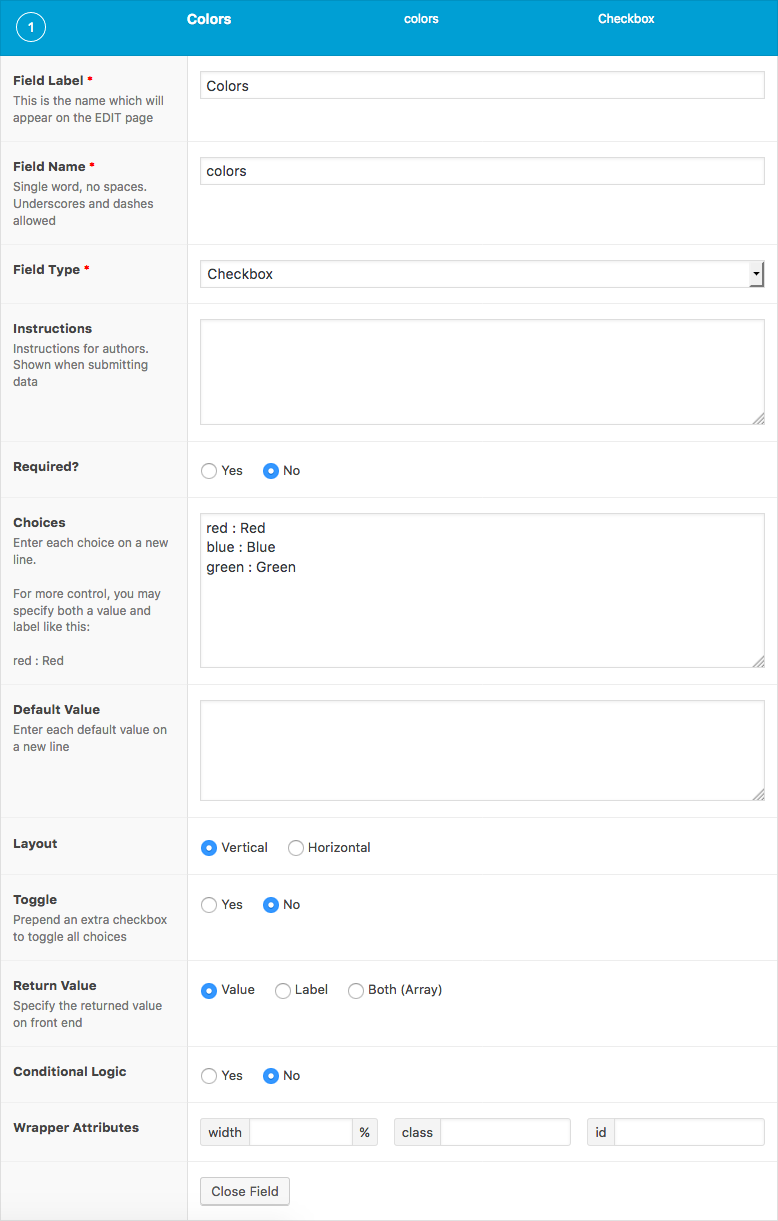
The Checkbox field creates a list of check-able inputs.
Screenshots

Changelog
- Added
Return Formatsetting in version 5.4.0. - Added
Toggle Allsetting in version 5.2.7.
Settings
Choices
The choices displayed when selecting a value. Enter each choice on a new line (eg.Red). For more control over the value and label, you may use a colon to specify both (eg.red : Red).Default Value
The default values selected when first editing the field’s value. Enter only values, not labels.Layout
The layout orientation of checkbox inputs. Select from “Vertical” or “Horizontal”.Toggle
Prepends an extra checkbox to toggle on/off all inputs.Return Format
Specifies the value format returned by ACF functions. Select from “Value”, “Label” or “Both”.Allow Custom
Appends a button that allows custom values to be added when editing the field’s value.Save Custom
Allows custom values to be saved back into the field’s choices. See Notes for more information.
Template usage
The checkbox field returns an array of selected choices.
Display value
This example demonstrates how to display the selected values in a comma-delimited list.
<p>Colors: <?php the_field('colors'); ?></p>
Display values in a list
This example demonstrates how to display the selected values in an unordered list.
<?php
$colors = get_field('colors');
if( $colors ): ?>
<ul>
    <?php foreach( $colors as $color ): ?>
        <li><?php echo $color; ?></li>
    <?php endforeach; ?>
</ul>
<?php endif; ?>
Display labels in a list
This example demonstrates how to display the selected labels in an unordered list when Return Format is set to Value.
<?php

// Load field settings and values.
$field = get_field_object('colors');
$colors = $field['value'];

// Display labels.
if( $colors ): ?>
<ul>
    <?php foreach( $colors as $color ): ?>
        <li><?php echo $field['choices'][ $color ]; ?></li>
    <?php endforeach; ?>
</ul>
<?php endif; ?>
This example demonstrates how to display the selected labels in an unordered list when Return Format is set to Both.
<?php
$colors = get_field('colors');
if( $colors ): ?>
<ul>
    <?php foreach( $colors as $color ): ?>
        <li><span class="color-<?php echo $color['value']; ?>"><?php echo $color['label']; ?></span></li>
    <?php endforeach; ?>
</ul>
<?php endif; ?>
Conditional logic
This example demonstrates how to check if the choice “red” was selected in the field’s value.
$colors = get_field('colors');
if( $colors && in_array('red', $colors) ) {
    // Do something.
}
Query posts
This example demonstrates how to query posts that contain a checkbox field named “colors” with the value “red” selected. Because the checkbox field saves its value as a serialized array, it is important to use the meta_query “LIKE” comparison.
$posts = get_posts(array(
    'meta_query' => array(
        array(
            'key'     => 'colors',
            'value'   => '"red"',
            'compare' => 'LIKE'
        )
    )
));

if( $posts ) {
    // Do something.
}
Notes
Save custom
If using the local JSON feature, any custom values saved to the field’s choices will not appear on page reload. This is because the JSON file will not be updated and will override any field settings found in the database.
Supercharge Your Website With Premium Features Using ACF PRO
Speed up your workflow and unlock features to better develop websites using ACF Blocks and Options Pages, with the Flexible Content, Repeater, Clone, Gallery Fields & More.
Related
- Choice: Radio Button
- Choice: Button Group
- Choice: Select
- Choice: True / False
- Field Types: Taxonomy
